Business Analytics Dashboards That Drive Decisions
Most dashboards look busy and change nothing. This guide shows how to pick the right metrics, design charts that answer one question each, build on connected data, and turn a business analytics dashboard into something that actually moves decisions.

A business analytics dashboard is a single live screen that gathers the few numbers that matter from across your business — sales, support, marketing, finance — and shows them as trends and comparisons so you can decide what to do next. Done well, it replaces scattered reports with one view that drives action, not just admiration.
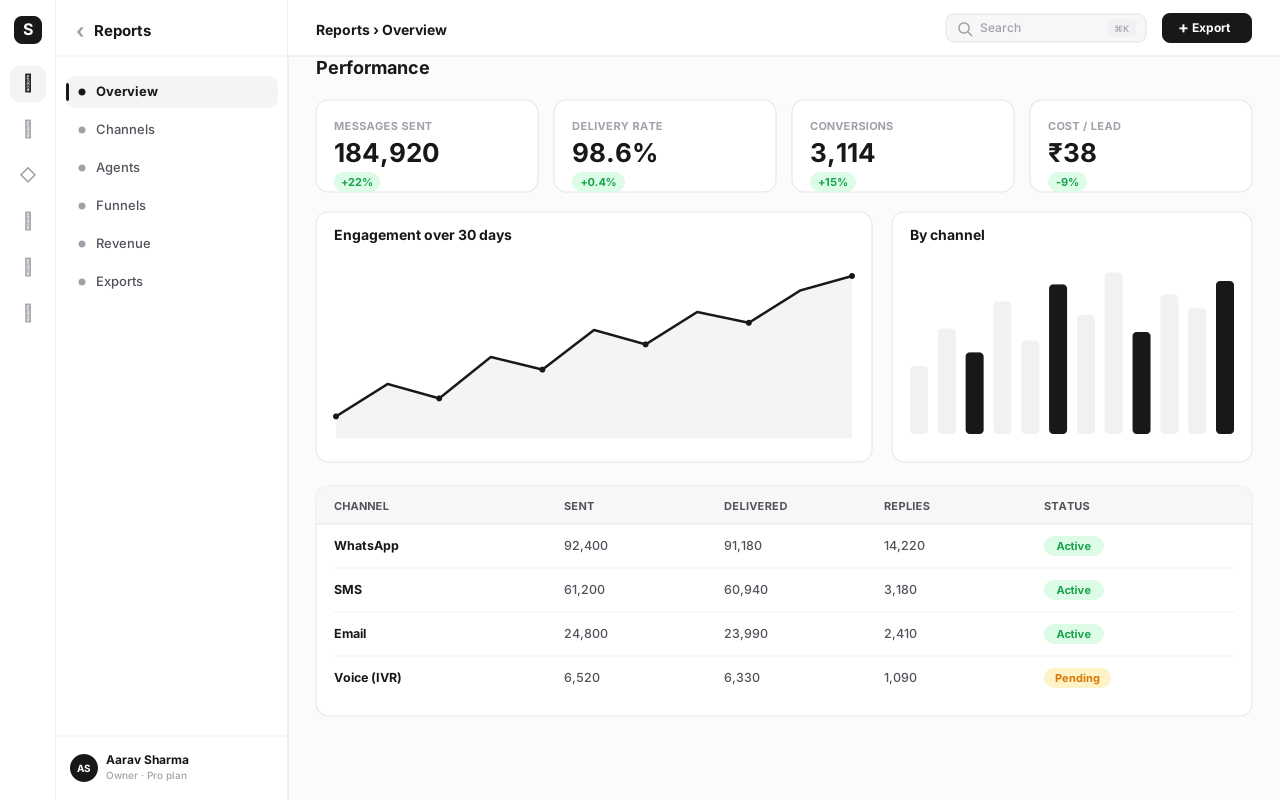
Most dashboards fail at exactly that. They look busy, refresh on a schedule, and change nothing — a wall of gauges nobody acts on. This guide is about the difference: how to choose the right metrics instead of vanity numbers, design charts that each answer one question, build on data connected across your whole business, and turn a dashboard into a decision tool. The examples use SabNode built-in analytics, but the principles apply to any tool.
What a business analytics dashboard actually is#
At its simplest, a dashboard is a curated answer to a recurring question. A founder asks every morning, "are we on track this month?" A support lead asks, "is our queue under control?" A marketing manager asks, "which campaigns are paying back?" A business analytics dashboard is the screen that answers one of those questions at a glance, with live data, so the person doesn't have to assemble it by hand each time.
That word curated is doing the heavy lifting. A dashboard is not a report dump, not a spreadsheet export, and not "every chart we could build." It is a deliberately small set of numbers, chosen because they inform a decision, arranged so the most important signal hits the eye first. The discipline is subtraction: what can you leave off without losing the answer?
This is also where business intelligence (BI) comes in. BI is the broader practice of collecting data from across your systems, modelling it into consistent metrics, and presenting it for analysis. A dashboard is the visible tip of that work — the part people actually look at. SabNode has a built-in analytics layer that sits across your modules and turns raw activity into dashboards, funnels and cohorts.
Why scattered reports fail#
Before dashboards, most small businesses live in a world of scattered reports. Sales lives in a spreadsheet the founder updates on Sundays. Support numbers come from the helpdesk's own report. Campaign results sit in the ad platform. The call team has its own wallboard. Finance is a separate sheet entirely. Each is accurate in isolation, and together they are nearly useless.
The failure has three causes. First, no single source of truth: when sales counts a "lead" one way and marketing counts it another, the two reports disagree and a meeting gets wasted arguing about whose number is right. Second, stale by the time you read it: a report assembled by hand on Sunday is already two days old on Tuesday, so decisions trail reality. Third, no connection between numbers: the campaign report and the revenue sheet never touch, so you can't actually see whether the spend produced sales. You end up with five true-but-disconnected stories and no way to act on any of them with confidence.
A dashboard is only as good as the data feeding it. If your tools don't talk to each other, you'll spend your life exporting CSVs and reconciling numbers by hand. That's the core argument for running on one connected platform: when conversations, pipeline, revenue and calls already share a system, the dashboard builds itself from data that's consistent by default.
Leading versus lagging indicators#
The single most useful idea in business analytics is the distinction between lagging and leading indicators, because it decides whether your dashboard can change anything.
A lagging indicator measures an outcome that has already happened. Last month's revenue, this quarter's churn rate, the number of deals closed in May — all final, all unchangeable. Lagging indicators are honest scorekeepers. They tell you where you ended up, which is essential for knowing whether you're succeeding. But by the time you read them, the game is over; you can't go back and play the month differently.
A leading indicator measures activity now that predicts a future outcome. Demos booked this week, trials started, average first-response time in support, number of qualified leads entering the pipeline. These are still in your hands. If demos booked is sliding, you can do something today — before it shows up as a weak revenue month four weeks from now.
The practical rule: a dashboard built only on lagging indicators is a rear-view mirror. You'll always know what happened and never be able to change it in time. The fix is to pair them.
| Outcome you care about (lagging) | Leading indicator that predicts it | What it lets you do early |
|---|---|---|
| Monthly revenue | Qualified demos booked this week | Spot a thin pipeline before it becomes a weak month |
| Customer churn | Support tickets per account, login frequency | Reach out to at-risk accounts before they leave |
| Sales conversion rate | Speed of first follow-up after a lead arrives | Fix slow follow-up while the lead is still warm |
| Campaign ROI | Cost per qualified lead, early reply rate | Pause a weak campaign before the budget is gone |
| Annual retention | Onboarding completion in first 14 days | Rescue new customers who stalled during setup |
For an Indian SMB, this is the difference between learning in early July that June revenue missed by 2 lakh, and seeing in the second week of June that demos booked had halved — with three weeks left to react. The leading indicator is where the dashboard earns its keep.
Choosing the right metrics, not vanity metrics#
If leading-versus-lagging is the most useful idea, choosing the right metrics is the hardest discipline. Every dashboard drifts toward clutter because adding a number feels safe and removing one feels risky. Resist it.
The North Star and its supporting cast#
Start with a single North Star metric: the one number that best captures the value your business delivers to customers. It should be something that, if it grows, almost everything else is going well. For a subscription tool it might be weekly active accounts; for a services firm, completed projects per month; for a D2C brand, repeat purchase revenue. The North Star sits at the top of the dashboard, biggest, because it is the question behind all the others.
Beneath it sit three to six supporting KPIs — the inputs that drive the North Star. If your North Star is monthly recurring revenue, the supporting cast might be new MRR, expansion MRR, churned MRR, qualified leads and trial-to-paid conversion. Each one is a lever a team can pull. Together they explain why the North Star is moving, which is what turns a number into a plan.
Vanity metrics, and the test that kills them#
A vanity metric is a number that looks impressive and changes no decision. Total page views, cumulative sign-ups (a count that can only go up), raw follower counts, "total emails sent." They feel like progress and they make slides look healthy, but they don't connect to an action. The dashboard fills with them because they're easy to measure and pleasant to report.
There's a one-line test that clears them out: if this number moved sharply tomorrow, would anyone do something differently? Total page views doubled — would you change anything? Probably not. Trial-to-paid conversion dropped from 22% to 14% — absolutely, you'd investigate the onboarding flow today. Keep the second kind. Replace cumulative counts with rates and recent windows: not "total sign-ups," but "sign-ups this week versus last."
| Vanity metric | Why it misleads | Actionable metric to use instead |
|---|---|---|
| Total page views | Traffic without intent; can't tell you what to fix | Conversion rate by traffic source |
| Cumulative sign-ups | Only goes up; hides whether growth is slowing | New sign-ups this week vs last (rate of change) |
| Total revenue (all time) | A historical total no one can act on | Net new MRR and churn this month |
| Emails / messages sent | Effort, not result | Reply rate and qualified leads generated |
| Total followers | An audience that may never buy | Followers who became paying customers |
For every metric you're tempted to add, name the decision it informs and the person who'd make it. If you can't, leave it off. A dashboard with seven numbers that each drive a decision beats one with thirty that drive none. The goal isn't completeness — it's clarity that produces action.
Dashboard design principles#
A dashboard can have all the right metrics and still fail because it's badly designed — the eye lands on the wrong thing, the chart type hides the pattern, or no one can tell whether a number is good or bad. Four principles fix most of it.
1. Design for one audience and one question#
A dashboard built for everyone serves no one. The founder, the support lead and the marketing manager need different screens because they're answering different questions and can act on different things. Before you place a single chart, write down who this is for and what decision it supports. A founder's executive dashboard is a handful of outcomes — revenue, cash, growth, churn. A support lead's dashboard is queue depth, first-response time and CSAT. Same data, different curation. If two audiences are fighting over one dashboard, you need two dashboards.
2. Establish a visual hierarchy#
People read a screen in a predictable order — top-left first, then across and down. Use that. Put the most important number top-left, large, with its trend and a comparison to target. Supporting KPIs come next as a row of smaller tiles. Detailed breakdowns — tables, segmented charts — sit lower, for the person who wants to dig in after the headline lands. When everything is the same size, nothing is important, and the viewer has to hunt for the signal every time.
3. One question per chart#
This is the principle that most improves a cluttered dashboard. Each chart should answer exactly one question. "How is revenue trending this year?" is one chart. "Which products sell best?" is another. The moment a chart tries to answer two questions — trend and breakdown and comparison — it becomes a puzzle nobody solves at a glance. If you find yourself explaining a chart out loud, it's doing too much; split it.
4. Pick the right chart type#
The chart type is a choice about which pattern you want the eye to catch. Get it wrong and the truth is technically present but invisible.
| You want to show… | Use this chart | Avoid |
|---|---|---|
| A trend over time | Line chart | Pie chart (hides direction) |
| Comparison between categories | Bar chart | Many overlapping lines |
| A single number versus a target | Big number with delta / gauge | A full chart for one value |
| Parts of a whole (few categories) | Stacked bar or simple donut | A pie with ten slices |
| Drop-off through stages | Funnel chart | A plain table of counts |
| Behaviour over a group's lifetime | Cohort heatmap | One averaged retention number |
A few habits keep charts honest: start bar-chart axes at zero so differences aren't exaggerated, label units (₹, %, count) so no one guesses, and use colour for meaning — red for a breached target, not just because it's pretty. Restraint reads as trustworthy.
Building on connected data#
Here is where being on one platform changes everything. A dashboard is only as honest as the data behind it, and the hardest part of analytics in most businesses isn't drawing charts — it's getting clean, consistent, joined-up data in the first place.
When your CRM, your WhatsApp inbox, your call centre, your payments and your campaigns each live in a separate tool, every dashboard starts with an export-and-reconcile chore. You pull a CSV from each, line up the date ranges, hope the "lead" definitions match, and stitch it together in a spreadsheet — by which point it's stale and fragile. Worse, you can't easily ask cross-module questions, the ones that actually matter: did this WhatsApp campaign produce calls that became deals that turned into paid invoices?
Because analytics sits inside SabNode, the data is already in one place and already joined. A single dashboard can pull from:
- Conversations — WhatsApp and chat volume, response times, resolution rates.
- Pipeline — leads, stages, deal value and velocity from the CRM.
- Revenue — invoices, payments and recurring revenue from SabPay.
- Calls — connect rates, talk time and outcomes from SabCall.
- Campaigns — sends, replies, cost and the leads each one generated.
That connection is what makes the genuinely useful metrics possible. You can put cost per acquired customer on a dashboard because the campaign spend and the closed revenue are in the same system. You can trace a single lead from a WhatsApp reply, through three sales calls, to a paid invoice — and see that whole journey as one funnel. None of that requires an integration to build or a nightly sync that breaks at 2am. The join is free because it's one platform.
Funnels, cohorts and revenue analytics#
Three analysis types do most of the heavy lifting once your data is connected.
A funnel tracks how many people make it through each stage of a journey and where they drop off. A sales funnel might run lead → qualified → demo → proposal → won. The value is in the biggest leak: if 200 leads become 120 qualified but only 18 reach a demo, the demo-booking step is where you're bleeding, and that's where a fix pays back most. A funnel chart makes that drop-off obvious in a way a table of counts never does.
A cohort analysis groups customers by when they started and follows each group over time. Take everyone who signed up in March and watch what share is still active in month one, two, three. Then compare March's cohort to April's and May's. This answers the retention question honestly — a single "85% retention" number hides whether your newest customers are healthier or sicker than your oldest. If each new cohort retains better than the last, your product and onboarding are improving; if they're getting worse, you have a problem that an averaged number would have masked for months.
Revenue analytics is the layer that ties money to everything else: MRR and its movement (new, expansion, contraction, churn), revenue by product or plan, average revenue per account, and the path from spend to return. For an Indian SMB this is the dashboard the founder actually runs the business on — is recurring revenue growing in rupees, which plan is carrying it, and is acquisition spend producing customers worth more than they cost?
Build a dashboard, step by step#
You can build a useful dashboard in an afternoon if you start from the question rather than the data. Here's the order that works, using SabNode but applicable anywhere.
- Name the audience and the decision. Write one sentence: "This dashboard helps [who] decide [what], reviewed [how often]." Everything else flows from this. If you can't write the sentence, you're not ready to build.
- Pick the North Star metric. Choose the single number that best captures value delivered. This is the anchor — it goes top-left, largest, with a trend and a target.
- Choose three to six supporting KPIs. Select the inputs that drive the North Star, mixing leading and lagging indicators. Run each through the test: would a sharp move change someone's behaviour? If not, drop it.
- Connect your data sources. Point the dashboard at the relevant SabNode modules — pipeline, conversations, revenue, calls, campaigns. Because they share a platform, definitions already match, so a "lead" means the same thing everywhere.
- Choose a chart type per metric. Trend → line, comparison → bar, single value → big number with delta, drop-off → funnel, group behaviour → cohort grid. One question per chart, no exceptions.
- Set targets and thresholds. Give each headline number a goal so it reads as good or bad at a glance — green when on track, red when a target is breached. A number without a target is just trivia.
- Lay out the hierarchy. North Star top-left, supporting KPIs in a row beneath, detailed funnels, cohorts and tables lower down for those who want to dig in.
- Add a funnel and a cohort. Build at least one funnel for your core conversion journey and one cohort grid for retention. These two views catch problems that headline numbers hide.
- Schedule exports and set alerts. Send a weekly snapshot to stakeholders automatically (PDF or a link), and configure alerts so people are told when a metric crosses a threshold — churn over 5%, queue wait over two minutes — instead of having to check.
- Review it in a meeting, then prune. Walk the dashboard in your weekly review. Any chart that didn't lead to a decision in a month gets cut. The best dashboards get smaller over time, not bigger.
The instinct on day one is to add every chart you can build. Don't. Launch with a North Star, four supporting KPIs and one funnel. Once people are actually using it in the weekly review, you'll discover the two or three views genuinely missing — and you'll add those instead of thirty you guessed at. A small dashboard people read beats a comprehensive one they ignore.
Scheduled exports and alerts#
A dashboard that requires someone to remember to open it will be forgotten exactly when it matters. Two features fix that, and both turn a passive screen into an active one.
Scheduled exports push the dashboard to people on a rhythm. A Monday-morning PDF to the leadership group, a Friday campaign summary to marketing, a daily revenue snapshot to the founder's inbox. The point isn't the file — it's that the numbers arrive without anyone fetching them, so the dashboard stays part of the routine even on busy weeks. It also creates a paper trail: a stakeholder who only skims email still absorbs the trend over time.
Alerts are the bigger shift, because they invert the model. Instead of people watching the dashboard for problems, the dashboard watches itself and tells people when something needs attention. You set a threshold — abandonment rate above 8%, churn above 5%, daily revenue below a floor, support backlog over fifty tickets — and when it's crossed, the right person gets a notification immediately, on WhatsApp, email or in-app. This is what closes the loop between seeing a problem and acting on it. A leading indicator with an alert is the most powerful object on a dashboard: it warns you while you can still change the outcome.
| Mechanism | How it works | Best for |
|---|---|---|
| Scheduled export | Dashboard snapshot sent on a fixed rhythm (PDF or link) | Keeping stakeholders informed without them logging in |
| Threshold alert | Notification fires the moment a metric crosses a set limit | Catching problems early — churn, queue, revenue floor |
| Anomaly alert | Notification when a number deviates sharply from its normal range | Spotting the unexpected you didn't think to set a threshold for |
Making dashboards drive decisions, not just look pretty#
This is the whole point, and it's where most dashboards quietly die. A beautiful screen that nobody acts on is a screensaver. The gap between a pretty dashboard and a useful one is process, not pixels.
Three habits close it. Tie every chart to a decision and an owner. Walk through the dashboard and, for each element, answer: what decision does this inform, and who makes it? Anything without an answer is decoration — remove it. This single audit shrinks most dashboards by half and sharpens what remains.
Set targets so numbers carry a verdict. A revenue figure of ₹14 lakh means nothing on its own. Against a target of ₹18 lakh it means "behind, act now"; against ₹12 lakh it means "ahead, keep going." Targets are what let a glance produce a decision instead of a shrug. Colour the number red or green against its goal so the verdict is instant.
Review it on a rhythm, and make each number lead somewhere. Put the dashboard at the centre of a recurring meeting — weekly for operations, monthly for strategy. Go number by number. Each one either confirms you're on track (good, move on) or flags a gap, and a gap must produce a decision or an action item with an owner and a date. A dashboard reviewed this way becomes the agenda; a dashboard merely admired becomes wallpaper.
Common mistakes to avoid#
Most dashboard failures aren't tooling problems — they're decisions made during setup. These are the ones that recur.
- Building for everyone. A dashboard that serves the founder, support and marketing at once serves none of them. Build separate dashboards per audience and decision.
- Vanity metrics front and centre. Total views, cumulative sign-ups and "messages sent" feel like progress and inform nothing. Replace them with rates and recent-window comparisons.
- Only lagging indicators. If every number is a finished outcome, the dashboard can only tell you the game is lost. Add leading indicators you can still influence.
- No targets. Numbers without goals can't be judged. Set a target for every headline metric so a glance produces a verdict.
- One chart trying to answer three questions. Overloaded charts become puzzles. Split each into single-question views.
- Wrong chart type. A pie chart for a trend, ten slices in a donut, a truncated bar axis that exaggerates a gap — the data's there but the pattern is hidden. Match the chart to the question.
- Reconciling data by hand. Exporting CSVs from five tools and stitching them in a spreadsheet produces stale, fragile dashboards. Build on connected data so the join is free and consistent.
- No alerts. A dashboard that relies on someone remembering to check it will be checked least when it matters most. Set threshold alerts so problems find you.
- Never pruning. Dashboards rot by accretion — every month someone adds a chart, none get removed. Cut anything that hasn't driven a decision.
- Admiring instead of reviewing. The most common failure of all: a polished dashboard nobody acts on. Put it in a recurring meeting where each number leads to a decision.
Bringing it together#
A business analytics dashboard is not a gallery of charts — it's a decision tool. The version that earns its place picks one North Star and a handful of supporting KPIs, pairs leading indicators with lagging ones, gives each chart a single question and the right chart type, and sets targets so every number carries a verdict. It's built on data that's already connected, so funnels, cohorts and revenue views come together without a single CSV export. And it's wired with scheduled exports and alerts so the numbers prompt action instead of waiting to be noticed.
The thread running through all of it is connection. The hardest part of analytics has always been getting clean, consistent, joined-up data — and that problem dissolves when conversations, pipeline, revenue, calls and campaigns already live in one platform. The dashboard stops being a reconciliation project and becomes what it was always meant to be: the screen you look at to decide what to do next.
SabNode is built for exactly this. Its analytics sit across your modules — CRM, WhatsApp, payments, calls and campaigns — and turns that connected activity into focused dashboards, funnels, cohorts and alerts, in rupees, for an Indian business that needs to decide, not just admire.
Turn your scattered reports into one decision-driving dashboard
Build dashboards on data that's already connected across your CRM, conversations, calls and payments — with funnels, cohorts and alerts that prompt action. Explore the full module on the products page or compare plans on pricing.
Frequently asked questions
What is a business analytics dashboard?
A business analytics dashboard is a single screen that pulls live data from across your business — sales, support, marketing, finance — and presents the few numbers that matter as charts, trends and comparisons. Instead of opening five separate reports, you see one view that answers questions like 'are we on track this month?' and 'where is the pipeline leaking?' A good dashboard is built for a specific audience and a specific decision, not as a generic data dump.
What is the difference between leading and lagging indicators?
A lagging indicator measures an outcome that has already happened — last month's revenue, this quarter's churn. It tells you the score but you can't change it. A leading indicator measures activity that predicts a future outcome — demos booked, trial sign-ups, first-response time. You can still influence it. A useful dashboard pairs both: lagging metrics confirm where you ended up, leading metrics tell you what to do next.
What metrics should I put on a dashboard?
Start with one North Star metric that captures the value your business delivers, then add three to six supporting KPIs that drive it. Avoid vanity metrics like total page views or raw follower counts that look impressive but don't connect to a decision. Every metric on the dashboard should pass a simple test: if this number moved, would someone do something differently? If not, cut it.
How many charts should a dashboard have?
Fewer than you think. A focused dashboard usually has between five and nine elements, each answering exactly one question. When a single screen tries to show everything, the important signals get buried and people stop trusting it. If you have more questions than that, split the content into separate dashboards by audience or theme rather than cramming them onto one page.
What is a cohort analysis and why does it matter?
A cohort analysis groups customers by when they started — for example, everyone who signed up in March — and tracks how that group behaves over time. It reveals whether customers stick around or drift away, and whether newer cohorts are healthier than older ones. This is far more honest than a single retention number, because it separates the experience of long-time customers from people who joined last week.
How do I make a dashboard actually drive decisions?
Tie every chart to a question and an owner, set targets so a number reads as good or bad at a glance, and add alerts so people are told when something crosses a threshold instead of having to check. Review the dashboard in a regular meeting where each number leads to a decision or an action. A dashboard that nobody acts on is decoration, however polished it looks.