Call Center Software Without the Call Center
Cloud call center software gives a small team enterprise-grade routing, dialers, recording and live wallboards — with no PBX, no on-prem hardware and no minimum seat count. Here's exactly how it works and how to set it up.
Call center software is an application that lets a team handle high volumes of inbound and outbound phone calls through one shared system — routing each call to the right agent, recording and monitoring conversations, and reporting on performance. Modern versions run entirely in the cloud, so a small team gets enterprise-grade calling with no PBX, no hardware and no minimum seat count.
For most small and mid-size businesses, the phrase "call center" still conjures a room full of cubicles, a wall of blinking phone lines and an IT contract you can't escape. That picture is two decades out of date. This guide explains what modern call center software actually does, how the parts fit together, and how to stand up a working team — from your own laptops — using SabCall, SabNode's cloud calling module. Think of it as a call center without the call center.
What modern call center software is (and isn't)#
A call center, at its simplest, is a team that handles a lot of phone calls. Call center software is the system that makes that possible at scale: instead of a dozen people each picking up a separate desk phone, every call flows through one application that decides where it goes, keeps it in a queue when needed, records it, and logs what happened.
The old way of building this was on-premise. You bought a PBX (a private branch exchange — essentially a phone-routing server) and racked it in a cupboard, ran physical lines, plugged in desk phones, and paid an integrator to wire it all together. It worked, but it was expensive, slow to change, and tied your agents to one building.
Modern call center software is cloud-based, sometimes called CCaaS (Contact Center as a Service). The routing engine, recording, dialers and analytics all run on the provider's infrastructure. Your agents log in through a browser-based softphone or a mobile app and take calls over the internet with a headset. There's nothing to rack, nothing to maintain, and you can add or remove agents in minutes.
The practical differences are stark.
| Capability | On-premise PBX | Cloud call center software |
|---|---|---|
| Upfront cost | High — hardware, licences, installation | Low — subscription per agent or per minute |
| Setup time | Weeks of provisioning and wiring | An afternoon — log in and configure |
| Agent location | Tied to the office and its lines | Anywhere with internet — office, home, other cities |
| Scaling up or down | Buy more hardware, re-wire | Add or remove seats in the dashboard |
| Maintenance | In-house IT or a paid contractor | Handled by the provider |
| New features | Upgrade projects | Shipped continuously, on by default |
It's worth being clear about what call center software is not. It isn't just a phone line with a fancier number. The value is in the layer above the call: the routing logic, the dialers, the recording-and-coaching tools, and the reporting that turns a pile of calls into something you can manage. A plain VoIP line gives you dial tone; call center software gives you a system.
Call center software is one layer of a broader cloud calling system. The calling system gives you numbers, a softphone and basic call handling; the call center layer adds team-scale routing, dialers, monitoring and analytics on top. If you're starting from zero, read the cloud calling guide first, then come back here.
Inbound, outbound and blended#
Call centers are usually described by the direction of their calls, and the software is tuned differently for each. Understanding which kind you're running shapes almost every later decision.
Inbound#
An inbound call center receives calls from customers. Think support lines, helpdesks, order desks, appointment booking, and "press 1 for sales" hotlines. The whole game here is getting each caller to the right person fast and not making them wait. The features that matter most are the IVR menu, the ACD and its queues, callback options so people don't have to hold, and clear service-level reporting so you know how many callers you're keeping waiting.
Outbound#
An outbound call center makes calls out. The classic uses are sales (calling leads), collections (chasing payments), surveys, and proactive support ("your order shipped"). The enemy here is idle time — an agent who spends half their shift listening to ringing phones and answering machines is expensive. So outbound centers lean on dialers that automate the dialing and only connect agents to live humans, plus list management and disposition codes to track outcomes.
Blended#
A blended call center does both, and lets agents flip between modes based on demand. When the inbound queue is quiet, the system feeds agents outbound calls to make; when inbound volume spikes, agents are pulled back to answer. Blending keeps a small team productive without overstaffing for the busiest hour — which is exactly why it suits SMBs, where the same five people often handle support in the morning and sales follow-ups in the afternoon.
| Type | Primary goal | Key features it leans on | Typical use |
|---|---|---|---|
| Inbound | Answer fast, route correctly | IVR, ACD, queues, callback, SLA reports | Support, helpdesk, order line |
| Outbound | Maximise live talk time | Auto/power/predictive dialer, lists, dispositions | Sales, collections, surveys |
| Blended | Keep agents busy across demand | Both, plus mode-switching and unified queues | Small teams doing sales + support |
The features that matter — and what each one does#
This is where call center software earns its name. Below are the building blocks, grouped by what they do, with plain-English explanations of why each one exists.
Routing: ACD, queues and skills#
The ACD (Automatic Call Distribution) is the brain of any inbound center. When a call comes in, the ACD decides where it goes based on rules you define. Common strategies include round-robin (share calls evenly), longest-idle (give the next call to whoever's been free longest), and skills-based routing — sending a billing question to agents tagged with billing skills, or a Tamil-speaking caller to a Tamil-speaking agent.
When every relevant agent is busy, the call enters a queue: the caller hears music or a message and an estimated wait, and the ACD connects them to the first agent who frees up. You can layer priority on top, so a VIP customer or a caller who's already waited too long jumps ahead. Done well, this is invisible to the caller and feels like good service.
The IVR#
The IVR (Interactive Voice Response) is the automated menu — "press 1 for sales, 2 for support." Its real job is to gather a little context up front and route the call before it reaches a human, so the right queue gets it. A good IVR is short, has a path to a person at every step, and remembers the caller where it can. Building one is a topic in itself; see our IVR setup guide for the full walkthrough.
Dialers (for outbound)#
On the outbound side, dialers do the dialing for agents and shield them from dead air. There are three common modes, increasing in aggression.
| Dialer mode | How it works | Best for |
|---|---|---|
| Auto / preview dialer | Agent sees the next contact, then triggers the call with one click | High-value calls where context and pacing matter |
| Power dialer | System dials the next number automatically when an agent finishes | Steady-volume calling with a clean list |
| Predictive dialer | System dials several numbers ahead of agent availability, predicting who'll be free, and connects only answered calls | Large lists where talk time is the priority |
Predictive dialing squeezes out the most idle time but must be tuned carefully — dial too aggressively and you create "abandoned" calls where a customer answers and no agent is free, which is both a bad experience and, in many regimes, a compliance problem.
Recording, monitoring and coaching#
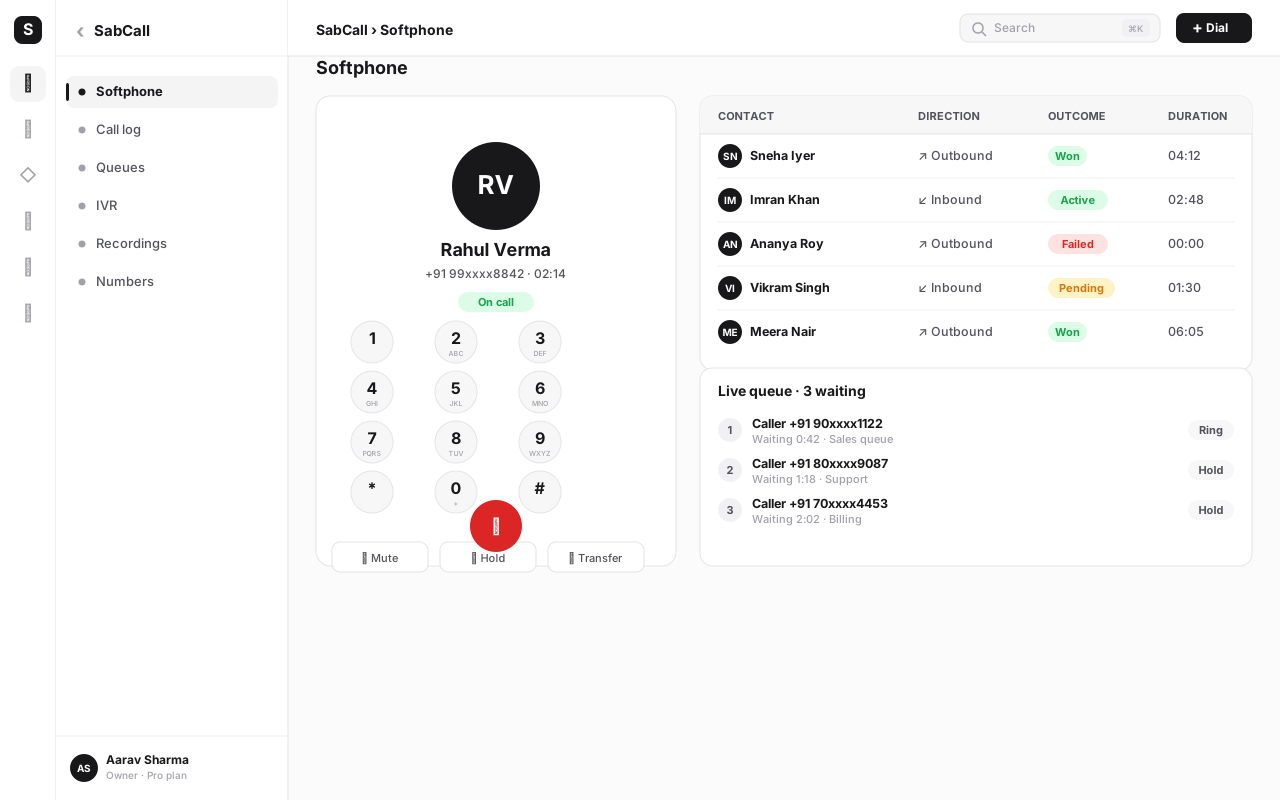
Call recording captures conversations for quality, training and compliance. Layered on top are the live monitoring tools that let a supervisor support agents in real time:
- Listen (monitor) — a supervisor hears a live call silently.
- Whisper — the supervisor speaks only to the agent, unheard by the customer, to coach mid-call.
- Barge — the supervisor joins the call so all three parties can speak, to rescue a tricky situation.
Together these turn the floor from a black box into something you can actually coach. New agents ramp faster when a senior teammate can whisper a fix instead of waiting for a post-call review.
Wallboards and analytics#
A wallboard is the live dashboard the floor watches: calls waiting, longest wait, agents available versus on a call, today's service level. It creates shared awareness — everyone can see when the queue is backing up and pitch in. Behind it sit historical analytics: trends over days and weeks that tell you whether Tuesdays need more staff or whether a new script improved resolution.
CRM integration: screen-pop and click-to-call#
This is the feature that quietly changes the whole experience. Screen-pop means that when a call connects, the caller's CRM record opens automatically on the agent's screen — name, history, open tickets, last order — so the agent greets a known person, not a stranger. Click-to-call is the reverse: an agent dials a contact with one click from the CRM, no re-typing numbers.
Crucially, every call — its time, duration, recording link and outcome — is written back to the contact's timeline automatically. Because SabCall and SabCRM sit in the same platform, this happens with no integration to build and no sync to break. The call is just part of the customer's story.
Callback and voicemail#
Nobody enjoys holding. A callback option lets a caller keep their place in the queue and hang up — the system calls them back when an agent is free. Voicemail captures after-hours or overflow messages and drops them into a queue (or transcribes them) so nothing is lost. Both reduce abandonment and protect the customer experience when you're short-staffed.
Agent and supervisor roles#
Call center software separates agents (who take and make calls) from supervisors (who monitor, coach and report) with role-based permissions. Agents get a focused softphone and their own stats; supervisors get the wallboard, monitoring tools, queue controls and the full analytics suite. Clean roles keep the floor simple and the data governed.
Setting up a small team — no on-prem hardware#
Here's the part that surprises people: you can stand up a working call center in an afternoon, from laptops, with nothing to install. The rollout below assumes you're using SabCall, but the shape is the same for any cloud platform.
- Create your workspace and pick numbers. Sign up, create a SabCall project, and provision the phone number(s) your customers will dial. Choose local Indian numbers for trust, or a toll-free for a national support line.
- Add your agents and supervisors. Invite each team member by email and assign a role — agent or supervisor. Tag agents with skills (billing, sales, Hindi, Tamil) so skills-based routing has something to work with.
- Build your IVR. Map the menu callers hear. Keep it shallow: one or two levels, an escape to a human at every step, and clear options. Point each option at the right queue.
- Create queues and set the ACD strategy. Make a queue per team or skill (Support, Sales, Billing). Choose a distribution strategy, set the maximum wait before a callback is offered, and add hold music and position announcements.
- Set business hours and after-hours handling. Define when you're open. Route out-of-hours calls to voicemail or a callback request so nothing is dropped.
- Turn on recording and consent. Enable call recording and configure the consent announcement callers hear (more on this below). Decide retention and who can access recordings.
- Connect the CRM. Link contacts so screen-pop and click-to-call work. Confirm a test call writes back to the contact timeline.
- For outbound: load lists and set the dialer. Import your call list, set dispositions (the outcome codes agents pick after each call), and choose a dialer mode — start with preview or power, move to predictive only once you understand your answer rates.
- Configure the wallboard and reports. Put the live wallboard on a shared screen, set your service-level target (a common starting point is 80 percent of calls answered within 20 seconds), and schedule a daily summary.
- Run a pilot day, then iterate. Go live with a small group, listen to a handful of calls, check the wallboard during your busiest hour, and adjust IVR wording, queue thresholds and staffing from what you see.
Resist the urge to model your perfect call center on day one. Launch with one number, one or two queues and recording on. Once real calls are flowing, the data tells you where to add skills, tune the IVR and adjust staffing. A simple setup that's live beats a sophisticated one that's still being designed.
The metrics that actually run a floor#
You can't manage what you don't measure, and call centers generate a lot of measurable activity. These are the numbers worth watching, and what each one is really telling you.
| Metric | What it measures | Why it matters |
|---|---|---|
| Average Handle Time (AHT) | Mean time per call, including talk and wrap-up | Capacity planning and efficiency — but don't chase it so hard that quality drops |
| First Call Resolution (FCR) | Share of issues solved in one call | The strongest single driver of customer satisfaction and lower repeat volume |
| Abandonment rate | Callers who hang up before reaching an agent | A direct sign of understaffing or bad routing — every abandon is a lost chance |
| Service level | Percent of calls answered within a target time | Your promise to customers, made measurable (e.g. 80% in 20 seconds) |
| CSAT | Customer-rated satisfaction, often a post-call survey | The outcome that matters; correlate it with FCR and agents to find what works |
| Connect rate (outbound) | Calls reaching a live person | Reveals list quality and dialer tuning for outbound teams |
A word of caution: metrics interact. Push AHT down too hard and agents rush, FCR falls, and customers call back — which raises volume and hurts service level. The art is reading them together. FCR and CSAT are the outcomes; AHT, service level and abandonment are the levers.
Working from home and across cities#
Because cloud call center software runs over the internet, where your agents sit stops mattering. An agent in Pune, a supervisor in Bengaluru and a part-timer in Jaipur all log into the same system, see the same queues, and appear on the same wallboard. This isn't a degraded mode — it's the normal one.
A few things make distributed teams work smoothly. Give agents a wired headset and a stable connection (a basic broadband line is plenty for voice). Keep the wallboard shared — a link everyone can open — so remote agents still feel the rhythm of the floor. And lean harder on monitoring and recording, because you can't lean over and listen in person; whisper-coaching and reviewable recordings replace the over-the-shoulder help of a physical room.
For small Indian businesses, this is often the unlock. You can hire the best person for the role regardless of city, run support across time zones with staggered shifts, and keep going through disruptions that would shut a single office. The call center becomes a capability, not a place.
Compliance you can't skip#
Calling at scale comes with rules, and ignoring them is expensive. Three areas matter for almost every team.
DNC (Do Not Call). For outbound, you must not call numbers registered on Do Not Call / Do Not Disturb lists. Good call center software scrubs your outbound lists against DNC registries before dialing and blocks flagged numbers, so a clean import stays clean.
Recording consent. If you record calls — and you should — callers generally need to be told. The standard practice is a short announcement at the start ("this call may be recorded for quality and training") configured once in your settings. Store recordings securely, set a retention period, and limit who can access them.
Caller ID and pacing. Present a genuine, reachable caller ID — spoofed or unreachable numbers erode trust and can breach rules. For predictive dialing, keep the abandonment rate within acceptable limits so you're not bombarding people with silent calls.
Treat DNC scrubbing, the consent announcement and retention settings as part of your initial setup, not a later clean-up. It's far cheaper to start compliant than to untangle a problem after thousands of calls. Reputable cloud platforms ship these controls as settings — use them on day one.
Is cloud call center software right for you?#
It isn't automatically the answer for everyone. Here's the honest trade-off.
For the overwhelming majority of small and mid-size teams, the cloud option wins clearly: you get capabilities that used to require a six-figure project, with none of the hardware, in a fraction of the time. The classic exceptions — a giant enterprise with bespoke telephony, or a site with genuinely no reliable internet — are rare and getting rarer.
Common mistakes to avoid#
Most call center problems aren't software faults — they're setup and process mistakes. These are the ones we see most often.
- An IVR maze with no exit. Deep menus that trap callers without a path to a human are the fastest way to anger people. Keep it shallow and always offer "0 for an agent."
- No skills-based routing. Sending every call to one big queue wastes your specialists and makes callers repeat themselves. Tag skills and route on them.
- Chasing AHT at the cost of FCR. Rewarding short calls trains agents to rush and hand off, which raises repeat volume. Measure resolution, not just speed.
- Recording without consent or retention rules. Either skipping the consent announcement or hoarding recordings forever creates legal and storage risk. Configure both up front.
- Ignoring the wallboard. A live dashboard nobody watches is decoration. Put it on a shared screen and use it to flex staffing in real time.
- No callback option. Forcing customers to hold during spikes drives abandonment. A queued callback protects experience when you're slammed.
- Treating the CRM as optional. Without screen-pop and write-back, agents fly blind and follow-ups slip. The CRM link is where the leverage lives — wire it on day one.
- Over-aggressive predictive dialing. Tuning the dialer purely for talk time creates abandoned and silent calls, harming both customers and compliance. Start conservative.
Bringing it together#
Modern call center software has quietly inverted the old equation. The capabilities that once defined a "real" call center — automatic distribution, IVR menus, dialers, recording, supervisor monitoring, live wallboards and deep analytics — are now available to a three-person team logging in from their laptops, with no PBX and no installation. That's the headline: a call center is no longer a place you build, but a capability you switch on.
The winning setup for most businesses is a cloud platform where calling lives next to the CRM, so every conversation lands on the customer's timeline automatically. Start narrow — one number, a couple of queues, recording on — measure FCR, abandonment and service level, respect DNC and consent from the first call, and let the data guide where you add skills and staff. That's how a small team punches well above its weight on the phone.
SabCall is built exactly this way: a full inbound, outbound and blended call center with ACD, IVR, dialers, recording, monitoring and analytics, sitting inside the same SabNode platform as your CRM, WhatsApp and payments — so the call is never an island.
Run a call center without the call center
Stand up ACD routing, IVR, dialers, recording and live analytics in an afternoon — from your own laptops, with no hardware. See the full feature set on the products page or compare plans on pricing.
Frequently asked questions
What is call center software?
Call center software is an application that lets a team handle large volumes of phone calls — both incoming and outgoing — through one system instead of separate desk phones. Modern call center software runs in the cloud, so it provides call routing (ACD), an IVR menu, dialers, call recording, live monitoring and analytics over the internet, with agents using a browser or app rather than physical hardware.
What is the difference between inbound, outbound and blended call centers?
An inbound call center receives calls from customers — support, helpdesk, order lines — and focuses on routing each call to the right agent quickly. An outbound call center makes calls out, usually for sales, collections or surveys, and leans on dialers to maximise talk time. A blended call center does both, letting agents switch between answering inbound calls and making outbound ones based on demand, which keeps everyone busy during quiet patches.
Do I need hardware to run a call center?
No. Cloud call center software removes the need for an on-premise PBX, telephony cards or desk phones. Agents log in through a browser-based softphone or a mobile app and take calls over the internet using a headset. You can run a fully working call center from laptops in a single afternoon, and agents can work from home or different cities with the same setup.
What is ACD in a call center?
ACD stands for Automatic Call Distribution. It is the engine that decides which agent or queue an incoming call goes to, based on rules you set — round-robin, longest-idle agent, skills-based routing, priority for VIP callers, or time-of-day logic. Good ACD keeps wait times low, distributes work fairly, and holds callers in a queue with position and music when every agent is busy.
What metrics should a call center track?
The core metrics are Average Handle Time (AHT), First Call Resolution (FCR), call abandonment rate, service level (the share of calls answered within a target time, like 80 percent in 20 seconds), and customer satisfaction (CSAT). For outbound teams, add connect rate, talk time per agent and conversion rate. Track these on a live wallboard for the floor and in historical reports for trends.
Is cloud call center software suitable for a small team in India?
Yes. Cloud call center software is often a better fit for small Indian teams than legacy systems because there is no upfront hardware cost, you pay per agent or per minute, and you can start with two or three seats and grow. It also handles India-specific needs like DNC scrubbing, recording-consent announcements and local number provisioning, which matter for compliance from day one.