CRM Software: The Complete Guide for Growing Teams
What a CRM actually is, the contact-lead-company-deal data model, pipelines, automation, reports and forecasting — plus a step-by-step setup. With the all-in-one advantage: the CRM sits with your channels, so nothing has to sync.
CRM software is the system of record for everyone your business sells to and serves. It stores every contact, lead, company and deal in one place, and keeps the full history of every interaction — calls, messages, emails, payments — on a single timeline. Instead of scattered spreadsheets and inboxes, your whole team works from one shared, accurate view of each customer.
That definition sounds simple, but the implications are large. A CRM is the difference between a business that remembers its customers and one that constantly re-learns them. This guide explains what a CRM is and what it's actually for, walks through the data model that every CRM is built on, and covers pipelines, custom objects, automation, reporting and forecasting in plain language. We'll use SabCRM — SabNode's CRM, with SabBigin for pipeline-first sales — as the worked example, and we'll keep coming back to one advantage that changes everything: because the CRM sits on the same platform as your channels, there's nothing to sync.
What a CRM is — and what it's actually for#
A CRM (Customer Relationship Management system) is software whose job is to hold the truth about your customers. Not the marketing emails, not the website analytics — the relationship: who they are, what they've bought or asked about, who on your team has spoken to them, what was said, and what happens next.
It's easiest to understand a CRM by the four questions it answers for any business that's growing past a handful of customers:
- Who are our customers and prospects? Names, companies, phone numbers, email addresses, and the context that turns a row in a database into a person you can sell to.
- What's the status of each opportunity? Which deals are open, what they're worth, what stage they're at, and which are about to close or slip.
- What have we already done? The complete history — every call, message, email, meeting, quote and payment — so nobody asks "did we already follow up?"
- What should happen next, and who owns it? The tasks, reminders and next steps that keep momentum from dying between conversations.
A CRM is not a marketing tool, and it's not an accounting tool, although it touches both. Its purpose is to make a relationship legible to a whole team, so the business behaves like one organism rather than a set of individuals each holding pieces of the customer in their own head and inbox. When a salesperson is on holiday, the deal doesn't stall. When a customer calls back, whoever answers already knows the story.
If a customer you spoke to last month called your business today and reached a different colleague, would that colleague instantly see the full history and pick up where you left off? If yes, you have a working CRM. If no, you have files — and a CRM is the fix.
The CRM data model: contacts, leads, companies and deals#
Every CRM, no matter how it's branded, is built on the same small set of objects. Understand these four and you understand how any CRM thinks. SabCRM uses exactly this model, and it's worth knowing precisely how the pieces relate.
| Object | What it represents | Example |
|---|---|---|
| Contact | A person you deal with | "Priya Nair, Procurement Manager" |
| Company (Account) | The organisation a contact belongs to | "Greenleaf Foods Pvt Ltd" |
| Lead | A prospect you haven't qualified yet | "Someone who filled a form, not yet verified" |
| Deal (Opportunity) | A specific revenue opportunity | "Greenleaf — annual supply contract, ₹6,00,000" |
Here's how they connect in practice. A company is the account — the business you're selling to. One company has many contacts (the buyer, the finance person, the decision-maker). A deal is a single opportunity to earn revenue; it's attached to a company and usually to a primary contact, and it moves through pipeline stages until it's won or lost. One company can have several deals at once — a renewal, an upsell, a new project.
The lead is the object people get confused about, so let's be exact. A lead is a potential customer who hasn't been qualified yet — a name and a phone number from a form, an ad, a trade show or an inbound WhatsApp message. You don't yet know if they're real, relevant or ready. When you qualify a lead — confirm it's a genuine opportunity — you convert it: the CRM turns it into a contact (and a company, if it's a business) and creates a deal. Some teams keep leads and contacts as separate stages of the same person's journey; others, especially in pipeline-first sales, treat the qualified deal as the centre of gravity. SabNode supports both: SabCRM gives you the full lead-to-account model, while SabBigin offers a leaner, deal-first pipeline for sales teams who live in their board. Our lead management guide goes deep on capturing and qualifying leads specifically.
The reason this model matters is that everything else in a CRM hangs off it. Activities attach to contacts. Deals roll up to companies. Reports group by stage, owner and source. Get the data model right and the rest of the CRM becomes obvious.
The single customer timeline (the part that changes everything)#
If the data model is the skeleton of a CRM, the timeline is its nervous system. Open any contact in a good CRM and you should see, in one chronological feed, every interaction that's ever happened with that person: calls (with duration and recording), WhatsApp threads, emails, SMS, meetings, notes, deal-stage changes, quotes sent, documents signed, payments received.
This is the single most valuable thing a CRM does, and it's where the difference between a bolt-on CRM and an all-in-one CRM becomes stark.
In a typical stack, your CRM is one tool and your channels are others. Your calling lives in a telephony app, WhatsApp in a separate provider, email in a marketing service, payments in a gateway. To get those onto the CRM timeline, you have to integrate — buy connectors, configure syncs, hope nothing breaks. In reality, half the interactions never make it onto the record. A rep makes a call from their mobile; it's invisible. A WhatsApp reply goes out from a shared phone; it's gone. The timeline has holes, and a timeline with holes is a story you can't trust.
SabCRM is built the other way around. Because the CRM and the channels are the same platform, the logging is automatic and complete:
| Interaction | SabNode module | How it reaches the timeline |
|---|---|---|
| Phone call | SabCall | Auto-logged with duration, outcome and recording |
| WhatsApp message | WaChat | Full thread synced to the contact in real time |
| SMS / OTP | SabSMS | Every message logged against the contact |
| SabMail | Sent and received mail threaded to the record | |
| Payment | SabPay | Payment links and receipts reconciled to the deal |
| Signed document | SabSign | Signature status written back to the timeline |
There is no integration to configure and no sync to break, because there's nothing between the channel and the record. The call happens in the platform; the WhatsApp message arrives in the platform; the payment is taken in the platform. The timeline is complete by default.
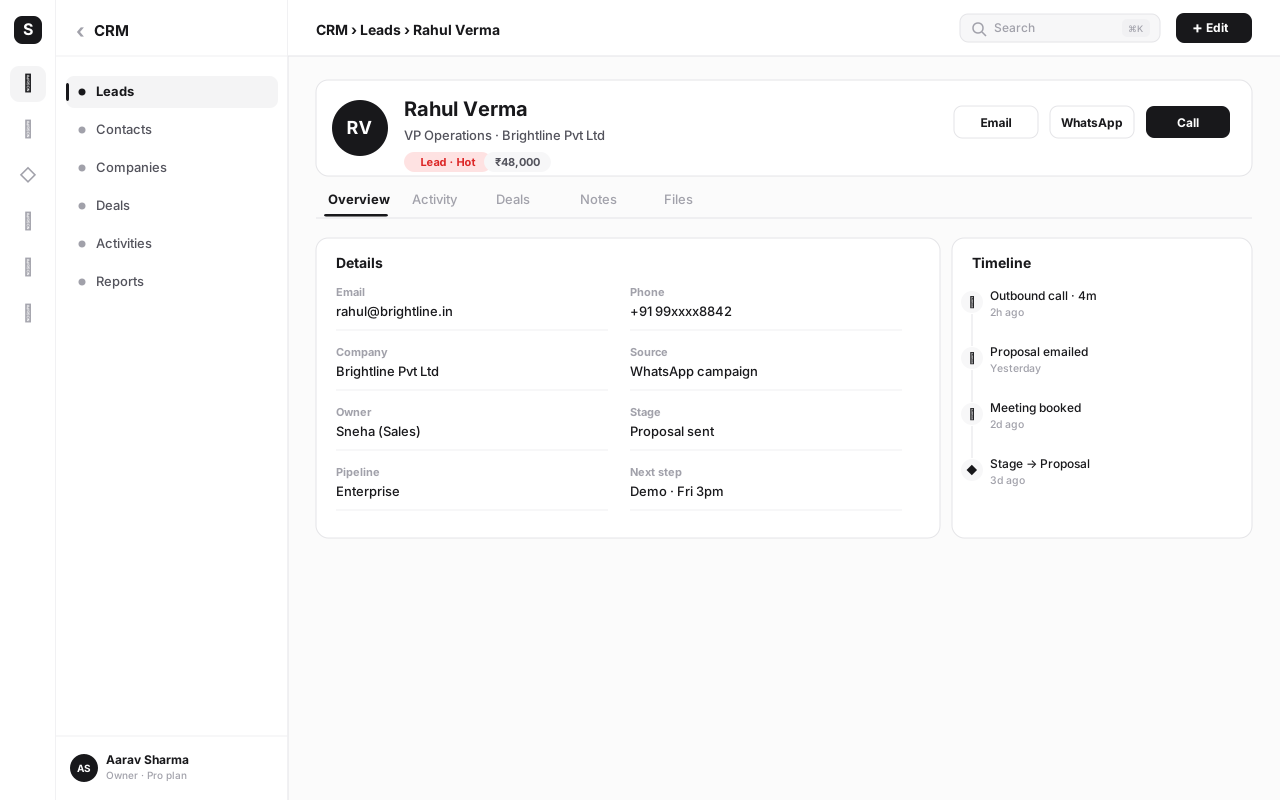
This is why the all-in-one model isn't just a packaging convenience. A standalone CRM's timeline is only as complete as your discipline in logging things by hand. An all-in-one CRM's timeline is complete because logging is the act of using the channel. That difference compounds every single day.
Pipelines and stages: making your sales process visible#
A pipeline is the visual sequence of stages a deal passes through on its way from first contact to closed business. It's the part of a CRM that turns selling from a hopeful activity into a managed process you can see, measure and improve.
A pipeline is usually shown as a Kanban board: columns are stages, cards are deals, and you drag a deal from one column to the next as it progresses. A typical B2B pipeline looks like this:
| Stage | What it means | Typical exit criteria |
|---|---|---|
| New | A fresh opportunity, not yet worked | First contact attempted |
| Qualified | Confirmed real need, budget and fit | Discovery call completed |
| Proposal | Quote or proposal sent | Customer reviewing terms |
| Negotiation | Working through price and terms | Verbal agreement reached |
| Won | Deal closed and signed | Revenue booked |
| Lost | Opportunity didn't close | Reason captured for learning |
The power of a pipeline is that it makes where revenue is stuck obvious at a glance. If twelve deals are piled up in Proposal and nothing's moving to Negotiation, you have a follow-up problem or a pricing problem — and now you can see it. Each stage carries a probability, so open deals weighted by their stage give you a forecast (more on that below).
Most businesses need more than one pipeline. A sales pipeline isn't the same shape as an onboarding or a support-escalation pipeline. SabCRM lets you build multiple pipelines, each with its own stages, so the board always matches the real process. For a complete treatment of designing stages, measuring conversion and keeping deals moving, see our sales pipeline management guide.
A common mistake is creating ten micro-stages because they feel precise. They don't help — they create busywork and ambiguity ("is this Proposal-Sent or Proposal-Reviewing?"). Five to seven stages, each with a clear exit criterion, is almost always right. A stage should mean something changed in the deal, not just that time passed.
Custom objects and fields: shaping the CRM to your business#
Out of the box, a CRM knows about contacts, companies, leads and deals. But your business has its own nouns — and a serious CRM lets you model them.
Custom fields add the specific attributes you track. A clinic adds "Last appointment date" and "Treatment plan" to contacts. A real-estate team adds "Budget", "Preferred locality" and "Possession timeline" to deals. A SaaS company adds "Plan tier" and "Renewal date" to companies. Fields come in types — text, number, currency, date, dropdown, multi-select, checkbox, linked record — and choosing the right type matters, because it controls how you can filter, sort and report on the data later.
Custom objects go further: they let you model entire entities the standard four don't cover. A logistics business might add a "Shipments" object linked to deals. A coaching institute might add "Courses" and "Batches". A field-service company might add "Assets" and "Service Visits". Each custom object gets its own fields, its own views, its own permissions — and crucially, it links to the standard objects so a contact's record can show their shipments, courses or service history right alongside their calls and messages.
This is what separates a CRM you adapt to your business from one your business has to adapt to. The data model should bend to how you work.
It's tempting to design fifty custom fields and six custom objects before you've logged a single deal. Resist it. Start with the standard objects plus the handful of fields you genuinely use to make decisions. Add custom structure when a real reporting or workflow need shows up — not in anticipation of one. An over-engineered CRM is one nobody fills in, and an empty CRM is worse than a spreadsheet.
Sales automation and workflow rules#
Once your data lives in a CRM, the system can start doing work for you. Sales automation is a set of rules — "when X happens, do Y" — that handle the repetitive, easy-to-forget parts of selling. Done well, it's the difference between a team that follows up religiously and one that follows up when it remembers.
The bread-and-butter automations every growing team should turn on:
- Lead assignment. A new lead is routed automatically to the right rep — by territory, by product, by round-robin, or by load. No lead sits unowned.
- Stage-based follow-ups. When a deal enters "Proposal", create a task to follow up in two days. When it's been in "Negotiation" for a week with no activity, flag it.
- Task and reminder creation. After a call is logged, automatically create a "next step" task so nothing depends on memory.
- Field updates. When a deal is marked Won, set the close date, update the company's status to "Customer", and trigger onboarding.
- Notifications. Ping a manager when a high-value deal stalls, or a rep when a customer they own replies.
On a standalone CRM, automation ends at the edge of the CRM — it can create a task, but it can't send the WhatsApp message or place the call, because those live in other tools. On SabNode, automation crosses that edge. SabFlow, the platform's no-code workflow builder, can react to a CRM event and then act on a channel: a deal hits "Proposal" and SabFlow sends the quote over WhatsApp via WaChat, schedules a call task in SabCall, and emails a follow-up through SabMail — all in one workflow, all logged back to the contact's timeline.
That's the all-in-one advantage applied to automation: the rules don't just rearrange data inside the CRM, they reach out to the customer through the channels that are right there on the same platform. Our workflow automation guide covers building these flows end to end.
Activities, tasks and reminders#
A CRM is only as alive as the activities logged against it. Activities are the verbs of customer relationships — calls, meetings, emails, messages, notes — and tasks and reminders are the future-tense versions: the things you've promised to do.
The discipline that separates teams who win deals from teams who lose them is simple: every conversation creates a next step, and every next step has an owner and a due date. A good CRM makes this nearly frictionless. When you finish a call in SabCall, you log the outcome and set a follow-up in the same breath. The task appears on your day's list and on the contact's timeline. If you don't act, a reminder nudges you. If you're away, your manager can see the open task and reassign it.
The payoff is twofold. First, nothing slips — the "I forgot to call them back" failure mode disappears. Second, the activity history becomes a goldmine for coaching and forecasting: you can see how many touches it takes to close, which reps are active, and which deals have gone quiet. A deal with no activity in two weeks is a deal you're probably losing, and a CRM surfaces that automatically.
Reports, dashboards and forecasting#
Data you can't read is just storage. The reporting layer of a CRM turns your contacts, deals and activities into the numbers that run a sales operation.
Reports answer specific questions: How many deals did we close last quarter? What's our average deal size by source? Which rep has the highest win rate? What's our lead-to-customer conversion? A good CRM lets you build these by filtering and grouping your own data, then save them to re-run any time.
Dashboards put the handful of metrics you watch daily onto one screen — open pipeline value, deals closing this month, activities logged this week, conversion by stage. The right dashboard is a flight instrument: a glance tells you whether the operation is healthy.
Forecasting is the report that matters most to anyone responsible for revenue. It projects how much you'll close in a period based on your open pipeline. The simplest method is weighted pipeline: multiply each open deal's value by its stage probability and sum them.
| Deal | Value | Stage probability | Weighted value |
|---|---|---|---|
| Greenleaf supply contract | ₹6,00,000 | 60% (Proposal) | ₹3,60,000 |
| Sunrise renewal | ₹2,50,000 | 80% (Negotiation) | ₹2,00,000 |
| Metro upsell | ₹1,20,000 | 30% (Qualified) | ₹36,000 |
In this example, ₹9,70,000 of open pipeline forecasts to ₹5,96,000 of expected revenue. As deals advance, their probability rises and the forecast firms up. The value of doing this in the CRM rather than a spreadsheet is that it updates itself — every time someone drags a deal to the next stage, the forecast moves. For a deeper company-wide view across modules, SabNode also offers cross-module dashboards that roll CRM data together with channel and revenue data.
Quotes and invoices#
For many businesses the deal doesn't end at "yes" — it ends at paid. A CRM that stops at the handshake leaves you toggling to a separate billing tool, re-keying the deal details, and losing the link between what you sold and what you got paid for.
SabCRM keeps the money on the record. From a deal you can generate a quote with the right line items, send it for approval, and — once accepted — turn it into an invoice. Because SabPay is on the same platform, the invoice can carry a payment link that the customer settles by UPI or card, and the payment reconciles straight back to the deal. The timeline then reads as one continuous story: enquiry, calls, proposal, signed document (via SabSign), invoice, payment. No gap between "closed-won" in the CRM and "received" in your accounts, because they're the same event seen from two angles.
This closes the loop that makes a CRM a true system of record: it doesn't just track relationships, it tracks the revenue those relationships produce.
Roles and permissions#
The moment more than one person uses a CRM, you need to control who can see and do what. Roles and permissions are how a CRM stays trustworthy and compliant as your team grows.
The essentials a CRM should give you:
- Record visibility. A rep sees their own accounts; a manager sees the team's; an admin sees everything. Sensitive deals can be restricted further.
- Field-level control. Some fields (margin, cost, internal notes) shouldn't be visible to everyone. Permissions can hide or lock individual fields.
- Action permissions. Who can delete records, export data, change pipelines, or edit automation? These powers belong to a few, not everyone.
- Audit trail. Who changed what, and when. Essential when something looks wrong and for compliance.
SabNode treats this as a first-class concern because it's built as a multi-tenant, RBAC-guarded SaaS: roles cascade across the platform, so a permission set governs not just the CRM but the channels and payments tied to it. That matters — there's little point locking down a deal in the CRM if anyone can read the WhatsApp thread attached to it. One permission model across the whole timeline keeps the boundary intact.
When a spreadsheet stops being enough#
Almost every business starts customer tracking in a spreadsheet, and for a while that's completely fine. A spreadsheet is free, familiar and flexible. The honest question isn't "is a spreadsheet bad?" — it's "have I hit the wall yet?" Here's how to tell.
The four signals that the spreadsheet has stopped being enough:
- More than one person needs to update it at once. The moment two people own customers, a shared sheet starts diverging and overwriting.
- History matters. You need to know what was said on the last call, not just that there was one. Spreadsheets have no timeline.
- Follow-ups are slipping. If "I forgot to call them back" is happening, you need reminders and automation, not a column of dates you have to remember to read.
- You can't trust the data. When the sheet is half-empty because logging is manual and tedious, every report built on it is fiction.
If you recognise two or more of these, you've hit the wall. The cost of fragmentation has arrived, and a CRM will pay for itself in recovered deals within weeks.
How to set up your CRM: a step-by-step guide#
A CRM rollout fails when teams try to do everything at once. The reliable approach is to stand up the core, get people using it, and add sophistication only as real needs appear. Here's the sequence we recommend for SabCRM — most of it is an afternoon's work.
-
Create your workspace and invite your team. Set up your CRM, add your users, and assign roles up front so visibility and permissions are right from the start. Don't skip roles — retrofitting them is painful.
-
Import your contacts and companies. Bring in your existing data from spreadsheets or your old tool. Map columns to fields carefully, de-duplicate as you go, and resist importing junk — a clean start is worth the extra hour.
-
Define your pipeline and stages. Lay out the stages your deals actually move through (aim for five to seven), with a clear exit criterion for each. If you run distinct processes — sales, onboarding, renewals — create a pipeline for each.
-
Add the custom fields you genuinely use. Only the attributes you make decisions on: budget, source, renewal date, whatever drives your follow-ups and reports. You can always add more later; you rarely remove them cleanly.
-
Connect your channels. This is the step that makes SabCRM more than a database. Link WaChat, SabCall, SabSMS and SabMail so every call, message and email logs to the contact automatically. On SabNode there's no integration to configure — the channels are already on the platform.
-
Turn on your first automations. Start small: auto-assign new leads, and create a follow-up task when a deal enters Proposal. Two good rules beat twenty half-baked ones. Expand once the team trusts them.
-
Build one dashboard and one forecast. Put your daily metrics on a single screen — open pipeline, deals closing this month, activities this week — and set up a weighted forecast so revenue is visible from day one.
-
Agree the team's logging discipline. Decide the one rule everyone follows: every customer interaction is logged, and every interaction creates a next step. With channels auto-logging on SabNode, this is mostly automatic — but the "next step" habit is the human part that makes a CRM compound.
Do these eight steps and you have a working CRM that your team will actually use — not a shelf-ware database that fills up with stale rows. Start lean, build the habit, and let the structure grow with the business.
Common mistakes when adopting a CRM#
Most CRM projects don't fail because of the software. They fail because of a handful of predictable mistakes. Knowing them in advance is half the cure.
-
Over-configuring before anyone uses it. Fifty fields and six custom objects on day one creates an intimidating, half-empty system nobody fills in. Start with the standard model plus a few fields; earn complexity.
-
Treating the CRM as a manager's reporting tool. If reps see the CRM as something they feed for the boss rather than something that helps them sell, they'll do the minimum. The CRM has to save the rep time — auto-logging, reminders, one-click calling — or it dies of neglect.
-
Letting the data rot. A CRM with stale, duplicate, half-empty records is worse than no CRM, because people trust it and make bad calls on bad data. The auto-logging an all-in-one platform provides is the single best defence against rot.
-
Bolting channels on instead of building them in. A CRM whose calls and messages live in separate tools will always have a holey timeline, because manual logging never holds. The fix isn't more discipline — it's a platform where the channel and the record are the same thing.
-
Too many pipeline stages. Over-granular stages create ambiguity and busywork without improving insight. Five to seven meaningful stages beats a dozen micro-steps every time.
-
No follow-up rule. The most expensive mistake of all. A CRM that captures everything but doesn't ensure a next step still loses deals to silence. Make "every interaction creates an owned, dated next step" a non-negotiable.
Avoid these six and you're ahead of most teams who buy a CRM and wonder why nothing changed. The tool is necessary; the habits are what make it work.
Choosing a CRM#
When you compare CRMs, it's easy to be swayed by feature checklists. Ignore the length of the list and score each option on the jobs your team does most. A practical buyer's checklist:
- Is the data model flexible enough? Custom fields and custom objects so the CRM bends to your business, not the reverse.
- Is the timeline complete by default? Will calls, WhatsApp, email and payments land on the record automatically, or only if someone integrates and remembers? This is the question that separates a real CRM from a contacts list.
- Does automation cross to the channels? Can a workflow not just create a task but actually send the message and place the call? On a standalone CRM, no. On an all-in-one platform, yes.
- Are roles and permissions serious? Field-level control, record visibility, audit trail — the things you need the day your team grows.
- Is it built for where you operate? For India that means DLT-compliant SMS, WhatsApp Business API onboarding, UPI payments and rupee billing — built in, not bolted on.
This is where SabCRM's place in an all-in-one platform is decisive. A standalone CRM can match many features, but it can't make the timeline complete without integrations, and it can't make automation reach the customer through channels it doesn't own. SabCRM doesn't integrate with your WhatsApp, calling, SMS, email and payments — it lives with them. There's no sync because there's no gap. That's not a feature you can add to a standalone CRM later; it's an architecture you either have or you don't.
Put every customer on one timeline
See how SabCRM keeps every contact, deal and conversation in one place — with calls, WhatsApp, email and payments logged automatically, no integrations to maintain. Explore the full platform on our products page or compare plans on pricing.
Conclusion#
A CRM is, at heart, a simple promise: your business will remember its customers — who they are, what's been said, what they're worth, and what happens next — and the whole team will share that memory. The data model (contacts, companies, leads, deals) gives the memory structure. The timeline gives it depth. Pipelines, automation, reports and forecasting turn the memory into a managed, improvable sales operation.
The mistake to avoid is thinking the CRM is the database. The CRM is the behaviour change: every interaction logged, every interaction creating a next step, every team member working from one truth. The fastest way to make that behaviour stick is to remove the friction — and the biggest source of friction in a traditional CRM is the gap between the system of record and the channels where the conversations actually happen.
That's the case for a CRM that sits inside an all-in-one platform. When the CRM lives with your calling, WhatsApp, email, SMS and payments, the timeline fills itself, automation can reach the customer, and there's nothing to sync. You spend your energy on the relationship, not on the plumbing. If you've outgrown the spreadsheet and you're ready for a customer memory your whole team can trust, start free and build it on one platform from day one — or see how that model compares to a bundled suite in SabNode vs Zoho One.
Frequently asked questions
What is CRM software?
CRM software (Customer Relationship Management) is the system of record for everyone your business sells to and serves. It stores every contact, lead, company and deal, and keeps the full history of interactions — calls, messages, emails, payments — on a single timeline. The point is that your whole team works from one shared, accurate view of each customer instead of scattered spreadsheets and inboxes.
What is the difference between a contact, a lead, a company and a deal in a CRM?
A contact is a person. A company (or account) is the organisation they belong to. A lead is a potential customer you haven't qualified yet — often an unconfirmed contact. A deal (or opportunity) is a specific revenue opportunity you're working to close, attached to a contact and company and moving through pipeline stages. Together they form the core CRM data model.
Do I need a CRM if I use spreadsheets?
A spreadsheet works until two things happen: more than one person needs to update it at once, and you need a history of what was said and done. Spreadsheets have no timeline, no reminders, no permissions and no automation, and they go stale the moment a call or message isn't logged by hand. When follow-ups slip and you can't trust the data, it's time for a CRM.
What is a sales pipeline in a CRM?
A pipeline is the visual sequence of stages a deal moves through from first contact to closed — for example New, Qualified, Proposal, Negotiation, Won and Lost. Each stage represents a step in your sales process. A pipeline view (usually a Kanban board) shows you exactly where every deal sits and where revenue is stuck, so nothing falls through the cracks.
What is sales automation in a CRM?
Sales automation uses rules to handle repetitive work for you: assigning new leads to the right rep, sending a follow-up message when a deal enters a stage, creating tasks and reminders, and updating fields automatically. In SabNode, those workflows can also fire across channels — send a WhatsApp, place a call task, email a quote — because the CRM lives on the same platform as the channels.
What makes SabCRM different from a standalone CRM?
Most CRMs have to integrate with separate tools for WhatsApp, calling, SMS, email and payments — which means syncing, connectors and gaps. SabCRM sits on the same platform as those channels, so every call, message, email and payment is logged to the contact automatically, with no integration to maintain. One platform, one customer timeline, no sync.