Workflow Automation for Business, Without Code
Stop copy-pasting between apps. Workflow automation turns an event — a new lead, a payment, a WhatsApp message — into a chain of actions that runs itself. Here's exactly how to build your first one, with no code, using SabFlow.
Workflow automation is software that runs a chain of business tasks for you automatically. You set a trigger — an event like a new lead, a payment, or an incoming WhatsApp message — then connect the actions that should follow. Once built, the workflow runs itself every time the trigger fires, with no code and no copy-paste.
This guide is the complete, practical walkthrough: what workflow automation actually is, how triggers and actions fit together, how to branch on rules, where AI fits, and how to test, monitor and govern automations once they're live. We'll build a real example step by step using SabFlow, SabNode's no-code automation module, with examples drawn from Indian SMBs — a Jaipur boutique, a Pune coaching institute, a Mumbai clinic.
What workflow automation actually is#
Every business runs on repetitive, rule-based work. A lead comes in, so someone copies it into a spreadsheet, looks up the company, pings the sales team on WhatsApp, and adds a reminder to follow up. None of those steps require judgement — they're the same every time. That's exactly the kind of work a computer should do.
Workflow automation captures that sequence once and then runs it for you. Instead of a person performing five steps, you describe the steps to the software, and from then on it performs them itself — instantly, consistently, and around the clock. The work doesn't sit in someone's mental queue waiting for them to get to it; it happens the moment the trigger fires.
The crucial shift is that you stop thinking in tasks ("I need to add this lead to the CRM") and start thinking in flows ("whenever a lead arrives, this whole sequence should happen"). You design the flow once, and it scales infinitely — handling one lead a day or a thousand with no extra effort.
A no-code automation platform makes this accessible to anyone, not just developers. You work on a visual canvas: each step is a node you drag into place, and you connect nodes with lines to show the order things run. Filling in a node is a matter of choosing options and typing values into a form. There's no programming language to learn — the logic is the diagram.
The point isn't only speed. A workflow that runs the instant a lead arrives means no lead waits in a queue, no follow-up is forgotten, and every customer gets the same experience whether they message you at 11am or 11pm. Consistency and zero dropped tasks matter as much as the time saved.
Triggers vs actions: the two halves of every workflow#
Every workflow, no matter how complex, is built from two kinds of building block. Get these two clear and the rest follows naturally.
A trigger is the event that starts the workflow. It answers the question "when should this run?" A trigger is always the first node, and a workflow has exactly one. When the event happens, the workflow wakes up and begins.
An action is something the workflow does. It answers "what should happen?" Actions come after the trigger, and a workflow can have as many as you need, chained one after another. Each action can use data produced by the steps before it.
Here are the common trigger and action types you'll reach for, with everyday SMB examples:
| Type | Example trigger or action | SMB use |
|---|---|---|
| Trigger — app event | New lead created in SabCRM | Start a follow-up sequence the moment a lead lands |
| Trigger — message received | New WhatsApp message in WaChat | Auto-classify and route customer enquiries |
| Trigger — payment | Payment received in SabPay | Send a receipt and provision access on payment |
| Trigger — webhook | External system calls your URL | Catch events from your website or any third-party app |
| Trigger — schedule | Every weekday at 9:00 AM IST | Send a daily sales summary or chase stale leads |
| Action — send message | Send a WhatsApp / SMS / email | Confirm a booking, share a quote, nudge a customer |
| Action — update record | Create or update a CRM contact | Keep the customer record current automatically |
| Action — call an app | Add a row, create a ticket, post to Slack | Connect to the 400+ external tools you already use |
| Action — internal task | Assign an owner, place a call via SabCall | Hand work to the right person with full context |
Between the trigger and the actions sit a third family of nodes — logic nodes like conditions, routers, loops and AI — that shape how the actions run. We'll get to those. But fundamentally, every automation is the answer to two questions: when? and then what?
The expression engine: how data flows between steps#
The thing that turns a list of steps into a real workflow is data moving from one node to the next. When your trigger fires on a new lead, it carries the lead's data — name, phone, source, budget — and every later step can reach back and use those values.
SabFlow does this with an expression engine. Anywhere you can type a value, you can instead reference data from an earlier step. So the "Send WhatsApp" action's message can read "Hi {lead's first name}, thanks for your enquiry about {lead's interest}" and SabFlow fills in the real values at run time. You can reference the trigger's output, any previous node's output, and built-in helpers for dates, text and numbers.
This is what makes a workflow feel intelligent rather than canned. The same automation greets every customer by name, quotes the product they actually asked about, and stamps the right date — because each run pulls live data through the expression engine instead of using fixed text.
In a no-code builder you usually pick the field you want from a dropdown of available data, and the platform writes the expression for you. The expression engine is there when you need to transform a value — uppercase a name, format a date, do arithmetic — but for everyday referencing, it's point and click.
A worked example: new lead to follow-up sequence#
Abstract definitions only go so far. Let's design a complete, realistic automation and watch the pieces connect. The scenario: Sharma Coaching, a Pune institute, runs WhatsApp and Instagram ads. Every enquiry should be captured, enriched, routed to the right counsellor, and put on a polite follow-up sequence — without anyone watching the inbox.
Here's the flow we'll build, step by step:
1. Trigger — a new lead arrives. The workflow starts when a new lead is created in SabCRM, regardless of whether it came from a WhatsApp ad, a website form, or a manual entry. The trigger carries the lead's name, phone, course interest and source.
2. Action — enrich the record. The next node looks up extra context: which campaign the lead came from, and whether this phone number already exists as a past enquiry. If it's a returning lead, that's worth knowing before anyone calls. Enrichment can call an internal lookup or an external data app.
3. Action — notify the team. A "Send WhatsApp" node messages the counselling team's internal group: "New lead: Priya, interested in NEET 2027 batch, from Instagram. Returning enquiry." Now a human knows within seconds, with full context, no inbox-watching required.
4. Action — start the follow-up sequence. The workflow sends the lead a warm first message immediately, then waits — a delay node pauses the flow for, say, one day — and sends a second nudge if the lead hasn't replied or booked. A third message follows two days later. The sequence runs itself; the counsellor only steps in when the lead engages.
Notice what didn't happen. Nobody copied the lead into a spreadsheet. Nobody manually messaged the team. Nobody set a reminder to follow up — and crucially, nobody forgot to. The entire sequence, from capture to third nudge, runs without a person touching it. The counsellor's job shrinks to the part that actually needs a human: talking to interested leads.
This single pattern — trigger, enrich, notify, sequence — covers an enormous share of SMB automation. Swap "new lead" for "abandoned cart", "missed call", or "new ticket" and the same shape applies.
Branching: making one workflow handle many scenarios#
The follow-up example treats every lead the same. Real businesses don't. A lead asking about your premium batch deserves a different response than a price-shopper; a high-value order needs manager approval while a small one doesn't. This is where branching comes in.
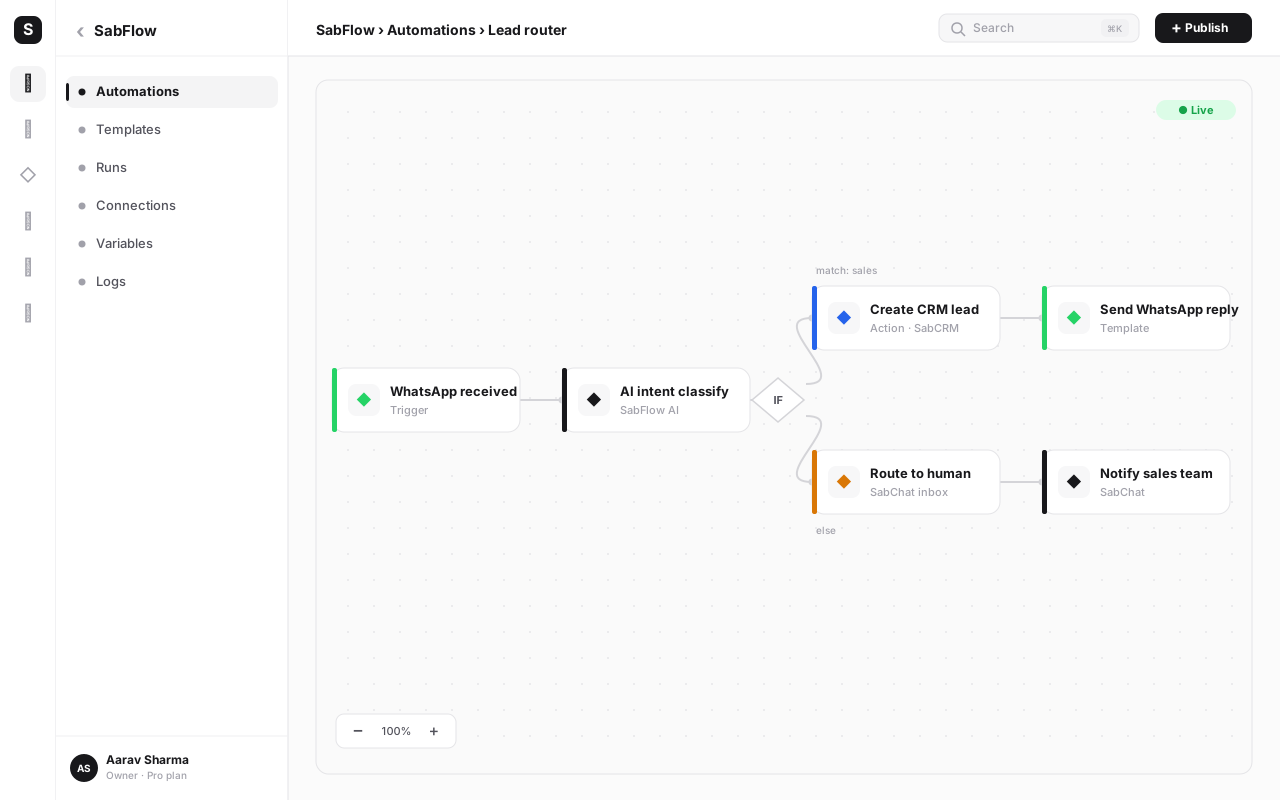
A condition (IF) node splits the flow in two: a true path and a false path. You set a rule — "is the lead's budget above one lakh?" — and the workflow takes one branch or the other based on the live data. A router node generalises this to many branches: one node, several labelled paths, each with its own rule, so a single workflow can fan out into as many cases as you need.
Let's extend Sharma Coaching's automation with a router right after enrichment:
| Branch (rule) | What the workflow does | Why |
|---|---|---|
| Course = NEET / JEE long-term | Assign to senior counsellor, place a SabCall callback within 10 minutes | High-value, high-intent — speed wins these |
| Course = crash course or foundation | Add to the standard WhatsApp follow-up sequence | Volume leads — nurture efficiently, no human needed yet |
| Source = referral | Tag as referral, send a personalised thank-you, notify the referrer's counsellor | Referrals convert best — treat them specially |
| No course specified | Send a "which course?" qualifying question, hold in a pending state | Qualify before spending human effort |
One workflow, four behaviours. Without branching you'd build four separate automations and try to keep them in sync. With a router, the logic lives in one place and is easy to read top to bottom. This is the difference between automation that's brittle and automation that scales with your business.
A practical tip: keep branch rules mutually clear so every lead lands in exactly one path, and always include a default or "everything else" branch. A lead that matches no rule should still go somewhere — never silently fall off the end of the flow.
Connecting internal modules vs external apps#
Workflows become genuinely powerful when they can reach across everything you use. SabFlow distinguishes two kinds of connection, and great automations mix both freely.
Internal modules are the other SabNode products, and they're connected natively — no API keys, no setup. A workflow can read a CRM record, send a WhatsApp from WaChat, place a call through SabCall, fire an SMS through SabSMS, generate a payment link with SabPay, or trigger an e-signature. Because these share the same data model, a lead's WhatsApp chat, call recording and payment all land on one timeline automatically.
External apps are the 400+ third-party tools SabFlow integrates with — spreadsheets, accounting software, project tools, ad platforms, support desks and more — plus a generic webhook for anything not on the list. A workflow can pull a row from a sheet, create a ticket in your help desk, post to a team channel, or push data to your accounting tool, then continue with internal actions in the same flow.
Here's how the two compare in practice:
| Aspect | Internal SabNode modules | External apps |
|---|---|---|
| Setup | None — connected by default | Connect once with an account or API key |
| Examples | WaChat, SabCRM, SabCall, SabSMS, SabPay, SabSign | Sheets, accounting, ad platforms, support desks, 400+ more |
| Data sharing | Same model — writes to one customer timeline | Data passes through the workflow; you map fields |
| Best for | Customer conversations, sales, payments, calls | Bridging to tools you already run elsewhere |
| Fallback | Native nodes | Generic webhook / HTTP node for the long tail |
A Mumbai dental clinic, for example, might run one workflow that reads a new appointment from its booking app (external), creates the patient as a CRM contact (internal), sends a WhatsApp confirmation (internal), and adds the visit to a Google Sheet the front desk lives in (external) — all in a single flow, with the patient record assembled automatically.
AI inside automations#
Classic automation moves and transforms data using fixed rules. AI nodes add something rules can't do: understanding unstructured input. A free-text WhatsApp message, a long email thread, a messy enquiry form — AI can read these and turn them into structured decisions your workflow can act on.
The common AI patterns inside a workflow are:
- Classification — read an incoming message and decide its intent: sales enquiry, support request, complaint, or spam. The workflow then branches on that label.
- Extraction — pull structured fields out of free text. From "Hi, I want 3 units of the blue model delivered to Andheri by Friday", extract product, quantity, location and deadline into clean fields.
- Summarisation — condense a long conversation or call transcript into a few lines so a human gets context fast.
- Drafting — generate a first-draft reply, quote, or follow-up message that a human can approve or that the workflow sends directly.
In Sharma Coaching's flow, an AI node early in the workflow could read the raw enquiry and classify it as "NEET, urgent, comparing with a competitor" — then the router uses that classification to decide the path. The AI does the reading-between-the-lines; the rest of the workflow does the doing.
SabFlow goes a step further with AI agents — nodes that don't just produce a single output but can decide which actions to take from a set you allow, looping until a goal is met. An agent could handle an open-ended request like "find this customer's last order and draft a status update", choosing the right lookups itself. Used carefully, agents handle the fuzzy tasks that are hard to express as fixed branches.
AI is excellent at reading and drafting, but for anything irreversible — sending a contract, issuing a refund, deleting data — route the AI's output to a human approval step rather than acting on it automatically. Use AI to prepare the decision, not to execute the risky part unsupervised.
Build your first automation: a step-by-step walkthrough#
Theory is settled; let's build. Here's how to create a working "new lead, instant WhatsApp welcome, and team notification" automation in SabFlow from scratch. You can follow along in your own workspace.
-
Open SabFlow and create a new workflow. Give it a clear, descriptive name like "New lead — welcome + notify". Good names matter once you have a dozen workflows; you'll thank yourself later.
-
Add the trigger. Drag a trigger node onto the canvas and choose "New lead created in SabCRM". This tells the workflow when to run. If your leads arrive by webhook from a website form instead, choose the webhook trigger and copy the URL into your form tool.
-
Test the trigger. Click run-with-test-data and create (or pick) a sample lead. You'll see the trigger's output — name, phone, source — confirming the data the rest of the workflow can use. Always verify the trigger sees real fields before building further.
-
Add a condition. Drop an IF node after the trigger. Set the rule: "phone number is not empty". This protects later steps — you can't WhatsApp a lead with no number. The true path continues; the false path can notify your team to fix the record.
-
Add the WhatsApp welcome. On the true path, add a "Send WhatsApp message" action using WaChat. Write the message and use the expression engine to insert the lead's first name: "Hi {{lead.firstName}}, thanks for reaching out to Sharma Coaching! A counsellor will call you shortly." Pick the field from the dropdown so the platform writes the expression for you.
-
Add the team notification. After the welcome, add a second WhatsApp (or SMS) action that messages your internal team group with the lead's name, course interest and source — so a human picks up with context.
-
Add a follow-up delay (optional but recommended). Add a delay node set to one day, then a second WhatsApp that nudges leads who haven't replied. This is your safety net against forgotten follow-ups.
-
Run the full test. Execute the whole workflow with your sample lead and inspect each node's output in turn. Confirm the message rendered the right name, the team notification fired, and the branch behaved as expected.
-
Activate it. Flip the workflow from draft to live. From now on, every new lead is greeted and routed automatically. Watch the first few real runs in the execution log to be sure.
That's a production automation built in well under an hour, with no code. The same nine-step rhythm — trigger, validate, act, branch, delay, test, activate — is the template for almost everything you'll build next.
Build your first workflow free
Spin up a SabFlow workspace, connect your modules and apps, and turn your most repetitive task into a workflow that runs itself. Free to start — no credit card, no code.
Testing, monitoring and retries#
An automation that fires for every customer needs to be trustworthy. Three habits make the difference between a workflow you rely on and one you have to babysit.
Test with real-shaped data before going live. Don't activate a workflow you've only imagined working. Run it with sample inputs that look like your actual data — including the awkward cases: a lead with no email, a name with unusual characters, a payment with a partial amount. Inspect every node's output. Most bugs are caught here, not in production.
Monitor the execution log. Once live, the execution log is your control room. It records every run — when it fired, whether it succeeded or failed, and the exact data that flowed through each node. When a customer says "I never got the confirmation", you open the log, find their run, and see precisely what happened at each step. This visibility is what turns automation from a black box into something you can debug.
Configure retries and error handling. External calls fail sometimes — an app's API has a hiccup, a network blips. Without protection, that failure silently drops the run. The fix is two-fold. First, set retries with backoff on steps that touch external systems, so the workflow waits a moment and tries again — often the second attempt succeeds. Second, add an error branch: if a step ultimately fails, route to a fallback that notifies you, logs the data, or retries later, so no event is ever lost without a trace.
| Reliability practice | What it protects against | How to apply it |
|---|---|---|
| Test with sample data | Logic bugs, missing-field crashes | Run before activating; inspect each node's output |
| Execution log monitoring | Silent failures, "did it run?" doubt | Review runs regularly; investigate failed statuses |
| Retries with backoff | Transient API / network failures | Enable on external-call nodes; set sensible limits |
| Error-handling branch | Lost data on hard failures | Route failures to a notify-and-log fallback path |
| Scheduled health check | Workflows that quietly stop firing | A daily run that alerts if expected events drop to zero |
Governance: keeping automations safe as you scale#
One workflow is easy to manage. Fifty is a system, and a system needs governance — otherwise you end up with mystery automations nobody understands and are afraid to touch.
Name and document everything. A clear name ("Invoice paid — receipt + provision access") and a one-line note about what a workflow does and who owns it saves hours later. Future-you, and your teammates, need to know what each flow is for without reverse-engineering it.
Assign an owner per workflow. Every automation should have a named person responsible for it. When it needs changing or it breaks, there's no ambiguity about who acts.
Use roles and permissions. Not everyone should be able to edit live automations that send customer messages or move money. Restrict who can build, who can edit production workflows, and who can only view — SabFlow rides SabNode's role-based access so this maps to your existing team structure.
Version and change carefully. Treat a live workflow like production software. Test changes in a draft or copy, keep a record of versions, and avoid editing a money-moving automation in the middle of a busy day. The ability to roll back a bad change is as important as the change itself.
Review periodically. Workflows accumulate. Schedule a quarterly look at what's running — retire what's obsolete, fix what's drifted, and confirm each still does what its name claims. Automation debt is real, and a short review prevents it.
The ROI of workflow automation#
The case for automation is usually framed as time saved, and that's real — but it undersells the value. There are three distinct returns worth separating.
The first is direct labour saved. Every minute of copy-paste, manual notification and reminder-setting that a workflow absorbs is a minute a person spends on work that actually needs a human. A team that automates lead intake, follow-ups and confirmations often reclaims hours per person per week — time that goes back into selling, building or serving customers.
The second, and bigger, is error and leakage reduction. Manual processes drop things: a follow-up never sent, a lead never entered, a confirmation forgotten. Each dropped item is lost revenue or a frustrated customer. An automation that never forgets closes that leak entirely. For most SMBs, the leads that fall through the cracks cost far more than the hours of admin.
The third is speed-to-response, which directly lifts conversion. The lead greeted in five seconds and called back in ten minutes converts far better than one that waits two hours for someone to notice. Automation isn't just cheaper than manual work — done well, it makes you more money by being faster and more consistent than any human team could be at scale.
To weigh against all this: there's upfront design effort, the discipline to test and monitor, and the governance overhead as you scale. None of it is heavy, and a good no-code platform makes the build fast — but treating automation as "set and forget" is the mistake. The return comes from automations that are well-built, watched and maintained.
Common mistakes to avoid#
- Automating a broken process. If your manual process is messy, automating it just makes the mess happen faster. Clean up and simplify the steps first, then automate the good version.
- Skipping the test run. Activating a workflow you've only built in your head is how you send 200 customers a message with a blank name field. Always run with sample data and inspect each node first.
- No error handling. A workflow with no retry or error branch fails silently the first time an external app hiccups, and you find out from an angry customer. Build the safety net in from day one.
- One giant workflow for everything. Cramming every scenario into a single mega-flow makes it impossible to read or debug. Prefer several focused workflows, or clean branches off a router, over one tangled monster.
- Forgetting the default branch. When you branch, account for the leads or events that match no rule. Without a catch-all, they vanish. Always route "everything else" somewhere deliberate.
- No owner, no documentation. An unnamed, unowned automation becomes a mystery nobody dares touch. Name it, note what it does, and assign a person — before you forget what it was for.
- Over-trusting AI on irreversible steps. Let AI classify, extract and draft freely, but gate anything that sends contracts or moves money behind a human approval. Prepare with AI, confirm with a person.
Conclusion#
Workflow automation is the quiet engine behind well-run businesses. It takes the repetitive, rule-based work that fills your team's day — capturing leads, sending confirmations, chasing follow-ups, moving data between tools — and runs it automatically, instantly, and without ever forgetting. You design the flow once; it works forever.
The mental model is simple: a trigger decides when, actions decide what, branches handle the many cases, AI reads the messy input, and monitoring plus retries keep it trustworthy. With a no-code builder like SabFlow, you can build your first production automation in under an hour, connect it to both your own modules and 400+ external apps, and watch your most tedious task simply stop being your problem.
Start with one painful, repetitive task — the lead follow-up you keep forgetting, the confirmation you send by hand. Build it, test it, ship it. Then build the next. Explore the products, compare the pricing, or read the lead management guide and WhatsApp chatbot automation guide to see where automation pays off first. Coming from Zapier? See how SabFlow compares as a Zapier alternative for Indian teams.
Frequently asked questions
What is workflow automation?
Workflow automation is software that runs a sequence of business tasks for you instead of someone doing them by hand. You define a trigger (an event like a new lead, a payment or an incoming WhatsApp message), then a chain of actions that should follow (enrich the record, notify a team, send a message, update the CRM). Once it's set up, the workflow runs automatically every time the trigger fires, day or night, without anyone clicking anything.
Do I need to know how to code to automate workflows?
No. Modern no-code automation tools like SabFlow use a visual builder — you drag nodes onto a canvas, connect them with lines, and fill in fields with simple forms. Triggers, conditions, actions and even AI steps are configured by pointing and clicking. Coding only becomes optional for advanced cases, where you can drop in a code node or a webhook, but the vast majority of business automations are built entirely without writing a single line.
What is the difference between a trigger and an action?
A trigger is the event that starts a workflow — it answers 'when should this run?' Examples include a new form submission, a new CRM lead, a received payment, or a scheduled time. An action is something the workflow does in response — it answers 'what should happen?' Examples include sending a WhatsApp message, creating a CRM record, calling an external app, or assigning a task. Every workflow is one trigger followed by one or more actions.
Can a workflow make decisions or branch?
Yes. With an IF or router node you can branch a workflow down different paths based on the data. For example, if a lead's budget is above one lakh, route it to your senior sales rep; otherwise add it to a nurture sequence. Routers let you build several branches from a single point, so one workflow can handle many scenarios instead of needing a separate automation for each.
How do I use AI inside an automation?
AI nodes let a workflow call a language model mid-run. Common uses are classifying an incoming message's intent, extracting structured fields from free text, summarising a long conversation, or drafting a reply. The AI node takes input from earlier steps, returns a result, and later steps use that result — for example, branching on the AI's classification or sending its drafted reply. In SabFlow you can also build AI agents that decide which actions to take.
How do I make sure an automation is reliable?
Test before you go live by running the workflow with sample data and inspecting the output of each step. Once live, monitor the execution log, which shows every run, its status and the data that flowed through each node. For steps that can fail — like an external API being down — configure retries with a backoff so the workflow tries again automatically, and add error-handling branches so a single failure doesn't silently lose data. Good governance also means version control and clear ownership of each workflow.