The Best Zapier Alternative for Indian Businesses (2026)
Zapier is a great generic connector — but it doesn't know WhatsApp, DLT SMS or UPI payments natively, and it bills in USD per task. Here's why Indian teams are switching to SabFlow.
Zapier is the category-defining no-code automation tool, with the largest app catalog in the industry and over a decade of polish — that's earned and real. But for an Indian business, three frictions show up fast: it bills in US dollars (exchange-rate exposure on every renewal), it meters usage in "tasks" that scale unpredictably as your automations run more, and it has no first-class understanding of WhatsApp Business API, DLT-compliant SMS or UPI payments, so those typically need generic webhook steps instead of purpose-built nodes. SabFlow, SabNode's automation module, gives Indian teams native nodes for WhatsApp, CRM, SMS, email and payments, rupee billing bundled into one SabNode plan, and one login shared with the rest of the business stack.
Why Indian teams go looking for a Zapier alternative#
Zapier earned its position as the default answer to "how do I connect two apps without code." It has an enormous library of app integrations, a mature and battle-tested editor, and a huge community of shared templates. If your business runs mostly on well-known Western SaaS tools — Google Sheets, Slack, Mailchimp, Salesforce — Zapier connects them all fast, and none of what follows changes that.
The search for an alternative rarely starts as a complaint about Zapier itself. It usually starts with a specific, recurring annoyance: a founder notices the automation bill in the accounting sheet has a rupee amount that quietly moved with the dollar exchange rate again, or an ops lead spends an afternoon writing a webhook payload by hand because there's no dropdown for "send WhatsApp message" the way there is for "send Slack message." Individually, each moment is small. Add them up across a year of renewals and dozens of workflows, and the pattern becomes hard to ignore.
The friction shows up when an Indian business layers its actual channels on top: WhatsApp for customer conversations, SMS with a DLT-registered sender ID for transactional alerts, UPI for collecting payments, and a CRM that needs to update the instant any of those fire. None of that is exotic for an Indian SMB — it's the default stack — but it's also not what Zapier was built around first. Three specific frictions come up again and again when Indian teams evaluate their automation bill and their workflow list side by side.
Currency exposure. Zapier's pricing is quoted and billed in US dollars. Every renewal, an Indian business is paying a dollar amount that moves with the exchange rate, on top of a subscription that was never denominated in rupees to begin with. It's a small tax that compounds silently across a year of renewals.
Task-based pricing that scales with usage, not just features. Zapier counts each completed step in a Zap as a "task," and plans cap a number of tasks per month. That means if a workflow that works fine today simply runs more often next quarter — more leads, more orders, more messages — your bill can climb even though you didn't add a single new automation. Confirm Zapier's current tiers and task limits directly on zapier.com, since pricing pages and caps change over time; the shape of the problem, usage-linked cost growth, is the durable point.
No first-class WhatsApp, DLT SMS or UPI nodes. These three channels are close to universal for Indian businesses, and Zapier doesn't have dedicated, purpose-built nodes for any of them the way it does for, say, Gmail or Trello. Automations that touch WhatsApp Business API, a DLT-compliant SMS sender, or UPI payments typically get built with a generic webhook or HTTP request step instead — which works, but means you're constructing and maintaining raw request payloads by hand rather than filling in a form.
Zapier wasn't built India-first, and that's a fair, unremarkable fact rather than a flaw. Its catalog and maturity are real, hard-won advantages for teams whose stack is mostly global SaaS. The gap only opens up specifically around India's own channels — WhatsApp, DLT SMS, UPI — which a platform built around the Indian business stack handles differently.
SabFlow vs Zapier: the comparison#
Here's how the two stack up on the dimensions that matter most for an Indian business choosing between them. Read the table as a starting point for your own evaluation rather than a final verdict — the right weight to give each row depends entirely on which channels and apps your business actually automates.
| Dimension | Zapier | SabFlow (SabNode) |
|---|---|---|
| Billing currency | USD (confirm current pricing on zapier.com) | INR, bundled into your SabNode plan |
| Pricing model | Task-based — each Zap step run counts against a monthly cap | Automation runs bundled per plan tier, no separate per-task meter |
| Native WhatsApp Business API node | No dedicated node — typically webhook/HTTP | Yes — native trigger and action nodes |
| Native DLT-compliant SMS node | No dedicated node — typically webhook/HTTP | Yes — native SabSMS node with DLT-registered sender IDs |
| Native UPI / payment node | No dedicated node — typically webhook from gateway | Yes — native SabPay node (create link, check status, trigger on payment) |
| Native CRM / calling / e-sign nodes | Via third-party CRM app integrations | Native to SabCRM, SabCall, SabSign — same data model as the rest of SabNode |
| Third-party app catalog | Largest in the industry | Hundreds of pre-built integrations across CRM, e-commerce, payments, marketing and productivity apps, plus generic webhook/HTTP |
| Automation run limits per plan (SabFlow reference) | Task caps vary by plan — confirm on zapier.com | Free: 1,000/mo · Growth ₹2,499/mo: 100,000/mo · Scale ₹9,990/mo: 5,000,000/mo · Enterprise: unlimited |
| Support timezone | Primarily US/global hours | India-based priority support (Growth+), community Slack on Free |
| Learning curve | Low — mature, well-documented editor | Low — n8n-style visual canvas with templates |
| Login / billing surface | Standalone product and bill | One login and one bill shared with CRM, WhatsApp inbox, calling, SMS, email, payments, e-sign |
A worked example: the same automation, two ways#
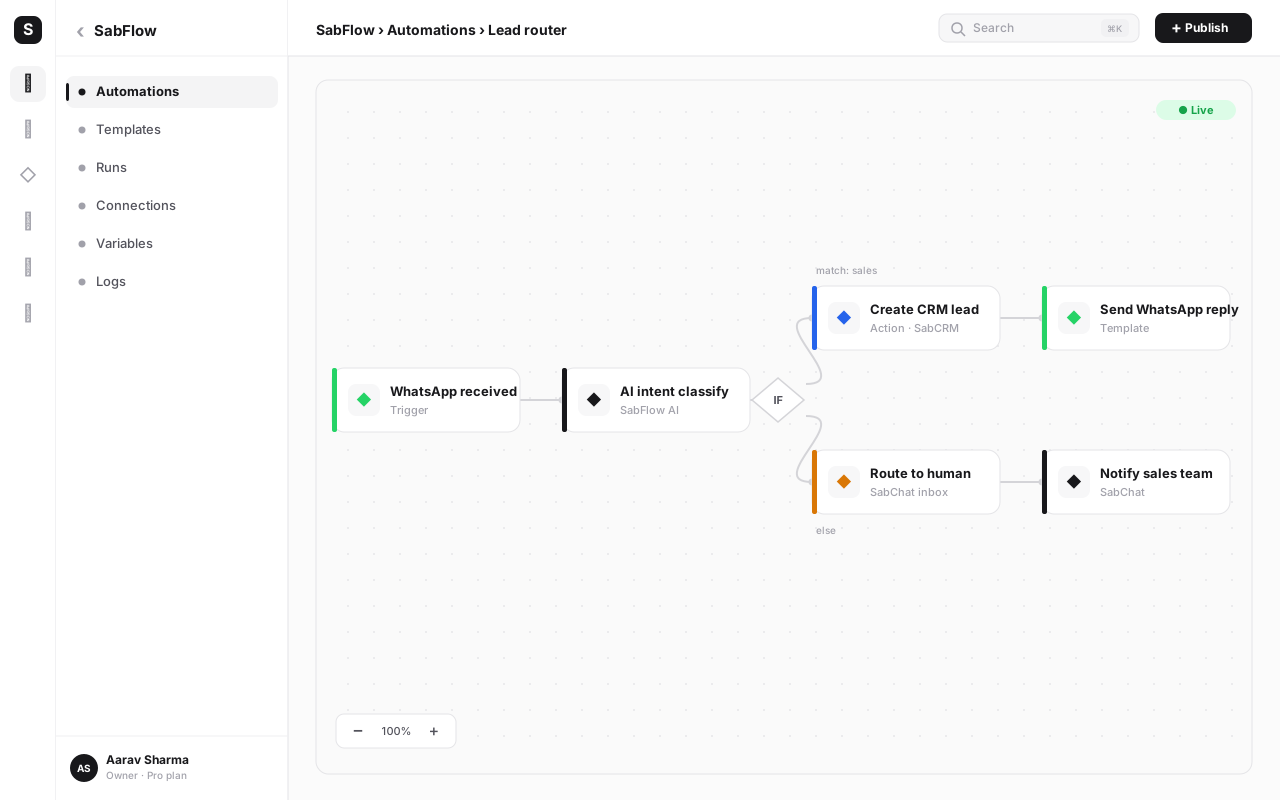
Comparisons get more useful when they stop being abstract. Take a workflow almost every Indian D2C or services business needs: when a customer places a cash-on-delivery order, send them a WhatsApp confirmation, log the order in the CRM, and fire a DLT-compliant SMS reminder the day before delivery. Here's how building that one workflow actually differs on each platform.
On Zapier, the trigger is usually a webhook from your e-commerce or order-management app, since that half is standard SaaS-to-SaaS territory and Zapier handles it well. The trouble starts at the WhatsApp step: there's no dedicated "Send WhatsApp Business API message" action to pick from a list, so you add a webhook/HTTP action instead, paste in your WhatsApp Business API provider's endpoint, and hand-construct the JSON body with the customer's phone number and message template variables. The SMS reminder step repeats the same pattern — another HTTP action, another hand-built payload, this time against your SMS gateway's API, with your DLT-registered sender ID and template ID passed as raw parameters you have to look up and copy correctly. None of it is impossible, but it's the same kind of work a backend developer does when integrating an API directly — you're just doing it inside an automation builder instead of a codebase.
On SabFlow, the same workflow starts with a native order-event trigger (or a webhook, if your order app isn't natively connected), flows into a "Send WhatsApp message" action where you pick the pre-approved template from a dropdown and map the customer's name and order details using the expression engine, then a "Send SMS" action where your DLT-registered sender ID is already attached to your account — you just choose the template and the field mapping, no manual API construction. The CRM update is a third native node, reading and writing to the same customer record the WhatsApp and SMS steps already touched. Building this exact workflow is usually a same-day task on either platform, but the SabFlow version has three native, form-filled nodes where the Zapier version has one native node and two hand-built webhook calls.
Zapier's generic webhook/HTTP action is genuinely powerful and flexible — it can call almost anything. The cost is that for channels without a dedicated node, you become the integration engineer: constructing request bodies, handling authentication headers, and debugging malformed payloads yourself. A native node trades some of that flexibility for a form that already knows the shape of the request.
Where SabFlow genuinely wins#
The clearest wins for SabFlow show up exactly where Indian-specific channels meet everyday automation. A "new WhatsApp enquiry to CRM lead" workflow is a native trigger-to-action chain in SabFlow — pick the WhatsApp trigger, pick the CRM action, map the fields. The same workflow in Zapier usually starts with a webhook step that your WhatsApp Business API provider calls, because there isn't a purpose-built WhatsApp trigger to select from a dropdown.
The same pattern repeats for SMS and payments. Sending a DLT-compliant transactional SMS from within a workflow is a native SabSMS node in SabFlow, with your registered sender ID already configured at the account level — no header pasting into a generic HTTP body. And when a customer pays via UPI, SabFlow's SabPay node can trigger the next step (send a receipt, provision access, update the CRM) directly off the payment event, rather than you standing up a webhook listener yourself.
Billing is the other clear win. Because SabFlow's automation limits are simply a number attached to the SabNode plan you're already paying for in rupees, there's no separate dollar-denominated invoice arriving on its own schedule, and no separate meter to watch as your usage grows month to month. If your workflows run 3x more often next quarter because your business grew, that's covered by your existing plan tier up to its limit — it isn't a second bill.
There's a second, quieter win worth naming: shared data model. Because SabFlow's native nodes read and write to the same customer record that WaChat, SabCRM, SabCall and SabPay already use, a workflow that touches four different channels is still updating one timeline, not stitching together four separate databases through field mappings. On Zapier, each app integration is a separate account with its own data shape, so keeping a customer record consistent across five connected apps means the workflow itself has to do all of the reconciling — mapping the same lead's fields correctly at every hop, every single run. That reconciliation work doesn't disappear on SabFlow, but it shrinks a great deal for anything that stays inside the SabNode modules, since there's only one underlying record to update in the first place.
Support experience follows the same shape. Priority support on SabFlow's paid plans runs on India hours, which matters when a workflow breaks at 11am on a business day and you need an answer before the next batch of orders comes in, not a reply queued for a different timezone's morning.
The gap between SabFlow and Zapier isn't abstract — it's felt the first time you try to build a "new WhatsApp message → create CRM lead → send DLT SMS confirmation" workflow. In SabFlow that's three native nodes. On Zapier, expect to reach for at least one webhook step to bridge WhatsApp or SMS, because there's no dedicated node for either.
Where Zapier still has the edge#
It would be dishonest to pretend SabFlow wins everywhere, so here's the other side plainly. Zapier's app catalog is the largest in the no-code automation industry, built up over more than a decade of integrations with essentially every popular SaaS tool on the market. If your workflows depend on a long tail of niche Western apps — a specific project-management tool, a particular ad platform, an obscure accounting add-on — there's a real chance Zapier already has a polished, native connector for it and SabFlow doesn't yet.
Zapier's editor is also extremely mature. Its multi-step Zap builder, formatter functions, and years of accumulated documentation and community templates mean that almost any automation pattern you can imagine has already been solved by someone, publicly, and is searchable. That maturity is a genuine asset, especially for teams that want to lean on existing recipes rather than build from scratch.
Be specific about where this shows up in practice: performance-marketing teams living inside a particular ad platform's reporting quirks, e-commerce operators on a niche cart or fulfilment tool with a small user base, or agencies juggling a long tail of client-specific SaaS accounts that only exist to serve one customer's stack. For those cases, Zapier has often already built and maintained the exact connector you need, with edge cases ironed out over years of real usage. Rebuilding that same connector reliability inside any newer platform, SabFlow included, takes time the newer platform hasn't had yet. If your workflows genuinely live in that long tail, it's worth checking Zapier's app directory before assuming a switch is a clean win.
How to migrate a Zap to SabFlow#
Migrating is far less daunting than it sounds, because you're not moving data — you're rebuilding logic. Most Zaps map to a SabFlow workflow in well under an hour. Before you start rebuilding, it helps to know roughly what maps to what:
| Zapier concept | Closest SabFlow equivalent |
|---|---|
| Zap | Workflow |
| Trigger step | Trigger node (native app/module trigger, or webhook trigger) |
| Action step (native app integration) | Native node, where one exists (WhatsApp, CRM, SMS, email, calling, payments, e-sign) |
| Action step (Webhooks by Zapier / HTTP) | Webhook / HTTP request node |
| Filter step | IF (condition) node |
| Paths (multi-branch) | Router node with labelled branches |
| Formatter step | Expression engine functions inline on any field |
| Delay step | Delay node |
| Zap history | Execution log |
With the mapping clear, here's the migration process itself.
-
Map the trigger. Open the Zap and note exactly what starts it — a new row, a form submission, a new WhatsApp message, a payment. In SabFlow, find the closest matching trigger: a native node if one exists (WhatsApp, CRM, SabPay), or a webhook trigger if the source app isn't natively connected yet.
-
Rebuild each step, native node first. Go through the Zap's steps one by one. For each, check whether SabFlow has a native node for that app or channel — CRM, WhatsApp, SMS, email, calling, e-sign and payments almost always do. Where there's no native node yet, drop in a webhook or HTTP request node and carry over the same request body and headers your Zap used, or your provider's API documentation.
-
Re-map the data fields. Use SabFlow's expression engine to reference the fields your new trigger produces — click the field from the dropdown rather than typing it, and the platform writes the reference for you. Watch out for field names that differ slightly between Zapier's app integration and SabFlow's native node; a lead's phone number field, for instance, might be named differently.
-
Test with a sandbox run before touching production. Run the new workflow with sample or test data and inspect every node's output in turn — did the WhatsApp message render the right name, did the CRM record get created, did the SMS actually send from your registered sender ID. Fix anything that doesn't match before it ever sees real customer data.
-
Run both platforms in parallel briefly. Rather than an immediate cutover, leave the original Zap active alongside the new SabFlow workflow for a short window — a few days to a week — and compare outcomes on real traffic. This catches edge cases sample data doesn't surface.
-
Cut over and turn off the Zap. Once you've confirmed several real runs succeed identically (or better) on SabFlow, disable the old Zap so both systems don't fire twice. Keep it disabled rather than deleted for a week or two as a safety net.
-
Cancel the Zapier subscription once every Zap is migrated. Work through your Zap list one at a time using this same process. Only cancel once every automation you actually rely on has been rebuilt, tested and cut over — don't cancel to "force" the migration; that's how automations get silently lost.
Migrate your first workflow free
Spin up a SabFlow workspace, rebuild your busiest Zap with native WhatsApp, CRM and payment nodes, and see it run on a rupee-billed plan — free to start, no credit card.
Common mistakes when migrating off Zapier#
- Cancelling Zapier before every Zap is verified. The single most costly mistake. Keep the Zapier subscription active until you've confirmed real production runs succeed on SabFlow for every workflow you depend on — not just the ones you remembered first.
- Skipping the sandbox test run. Rebuilding a workflow and activating it immediately means the first real customer becomes your test case. Always run with sample data and inspect each node's output before going live.
- Assuming field names match exactly. A CRM's "phone" field in one app integration might be "mobile_number" or "contact_number" in another. Re-check every mapped field rather than assuming a like-for-like rename.
- Forgetting to re-register credentials for native nodes. Native WhatsApp, SMS and payment nodes need their own account connections (WhatsApp Business API session, DLT sender ID, SabPay account) configured before the workflow can run — don't assume a node works the moment it's dragged onto the canvas.
- Rebuilding everything as webhooks out of habit. If you're used to Zapier's webhook-heavy pattern for WhatsApp, SMS and payments, it's tempting to rebuild the same way in SabFlow. Check for the native node first — it's usually faster to configure and easier to maintain than a hand-built HTTP call.
- Migrating everything in one big-bang weekend. A large Zap library rebuilt and cut over all at once multiplies the chance of a missed edge case going unnoticed. Migrate workflow by workflow, verify each, then move to the next.
Deciding which one is right for you#
The honest answer depends on where your workflows actually touch. If your automations are almost entirely about connecting well-known global SaaS apps to each other — a form tool to a spreadsheet, a marketing platform to a project tool — and WhatsApp, DLT SMS and UPI aren't part of the picture, Zapier's larger catalog and mature editor are a genuinely strong fit, and there's no need to switch just to switch.
If WhatsApp conversations, SMS confirmations, calling or UPI payments are core to how your business operates — which is true for the overwhelming majority of Indian SMBs — SabFlow's native nodes for those channels, combined with rupee billing bundled into your existing SabNode plan, remove exactly the friction that shows up first: webhook plumbing for channels that should be a dropdown, and a USD bill that moves with the exchange rate. Many teams end up running both for a period, then consolidate onto whichever platform ends up doing more of the actual work.
A useful way to make the call concrete is to actually count your own workflows. Pull up your Zapier dashboard and sort your Zaps by how often each one runs. For the busiest ten, note which ones touch WhatsApp, SMS or a payment gateway versus which ones connect two generic SaaS apps to each other. If the majority of your run volume sits in the first bucket, that's where SabFlow's native nodes and rupee billing will be felt most, since high-frequency workflows are exactly where a per-task meter adds up and where hand-built webhook payloads get exercised — and can break — most often. If the majority sits in the second bucket, the case for switching those specific workflows is weaker, and Zapier may simply keep doing that job well.
Team size and technical depth matter too. A solo founder or small ops team without a developer on staff benefits disproportionately from native nodes, since every webhook step saved is a debugging session they don't have to learn to do themselves. A business with an in-house developer maintaining custom integrations already may feel the webhook-vs-native-node gap less acutely, since they're comfortable writing and maintaining those payloads either way — for them, the currency and pricing-model arguments carry more of the weight than the node-catalog argument does.
You don't have to choose in one sitting. Migrate your highest-volume, most India-specific workflows first — the ones touching WhatsApp, SMS or UPI — since that's where SabFlow's native nodes save the most webhook work. Leave niche, low-volume Zaps connecting rarely used Western apps on Zapier until you're ready, or indefinitely, if SabFlow doesn't yet have that connector.
Conclusion#
Zapier earned its place as the industry's default automation tool honestly, and for a business whose stack is mostly global SaaS apps, it remains a perfectly good choice — nothing here disputes that. What changes the calculus for Indian teams is the specific mismatch between Zapier's generic, webhook-first approach to WhatsApp, DLT SMS and UPI, and the fact that those three channels are close to universal in how Indian businesses actually operate day to day.
SabFlow closes that gap with native nodes for the channels Indian SMBs use constantly, rupee billing folded into a single SabNode plan instead of a separate USD invoice, and automation limits that scale with your plan tier rather than an independent per-task meter. The trade-off is real too: a smaller third-party app catalog and less than Zapier's decade of accumulated templates. Weigh both sides against what your workflows actually touch, and migrate the India-specific ones first.
If you want to see the difference for yourself, read the complete guide to workflow automation for how SabFlow's canvas works end to end, or compare plans on the pricing page before you start free.
Frequently asked questions
Is SabFlow a good Zapier alternative for Indian businesses?
Yes, particularly if WhatsApp, SMS, calling or payments are part of your workflows. SabFlow gives you native nodes for WhatsApp Business API, DLT-compliant SMS, calling and UPI-based payments, bundled into the same rupee-billed SabNode plan as your CRM, inbox and other modules. Zapier remains an excellent choice if your stack is mostly Western SaaS apps and you value the largest possible app catalog — it's a mature, capable product and there's nothing wrong with using it for that job. The right pick depends on which apps and channels your workflows actually touch.
Does Zapier support WhatsApp natively?
Zapier doesn't have a dedicated, first-class WhatsApp Business API node the way it has for, say, Gmail or Slack. Most WhatsApp automations on Zapier go through a generic webhook or HTTP request step that calls your WhatsApp Business API provider directly, which means you're writing and maintaining request payloads yourself. Confirm current app support on zapier.com, since app catalogs change. SabFlow, by contrast, has a purpose-built WhatsApp node — pick a template, fill in a form, done.
How does Zapier pricing compare to SabFlow for an Indian business?
Zapier bills in US dollars using a task-based model, where each completed step in a Zap counts as a task and your plan caps a number of tasks per month. For an INR-paying business, that means exchange-rate exposure on every renewal and a bill that can grow simply because your automations run more often — not because you added features. SabFlow's automation limits are bundled into your existing SabNode plan (for example, up to 100,000 automations a month on the Growth plan at ₹2,499/mo) with no separate per-task meter. Always confirm Zapier's current tiers and task limits on zapier.com before comparing, since pricing pages change over time.
Can I automate UPI payments with Zapier?
Not with a dedicated UPI node. Since UPI is an India-specific payment rail, Zapier automations that touch UPI payments typically rely on a webhook from your payment gateway plus a generic HTTP action to trigger the next step, which works but takes more manual setup and error-handling than a purpose-built integration. SabFlow includes native SabPay actions for creating payment links, checking payment status and triggering next steps the moment a UPI payment lands, without any custom webhook plumbing.
Is it hard to migrate my automations from Zapier to SabFlow?
For most small and mid-size automations, no — a typical Zap can be rebuilt in SabFlow in well under an hour. You map the original trigger to its SabFlow equivalent, rebuild each step (using a native node where SabFlow has one, or a webhook/HTTP node for the long tail of external apps), test with sample data in a sandbox run, and only then cut the live traffic over. Running both platforms in parallel for a week before cancelling Zapier is the safest way to migrate without dropping any automations.
Does SabFlow have as many app integrations as Zapier?
No, and it's fair to say so directly: Zapier's app catalog, built over more than a decade, is larger than SabFlow's. SabFlow connects hundreds of pre-built integrations across CRM, e-commerce, payments, marketing and productivity apps, plus a generic webhook/HTTP node for anything not yet on the list — which covers the overwhelming majority of real SMB workflows. But if your business runs on a long tail of niche Western SaaS tools, Zapier's breadth may still be the better fit for that specific need.
What happens to my data if I stop using Zapier and switch to SabFlow?
Your data in the apps you connect (your CRM, spreadsheet, payment gateway, and so on) isn't stored by Zapier itself — Zapier just moves it between apps — so switching automation tools doesn't put that data at risk. What changes is where the automation logic lives. Rebuild and test your workflows in SabFlow, verify a few real runs succeed, and only then turn off the equivalent Zaps and cancel the Zapier subscription.