How to Build a WhatsApp Chatbot That Books, Sells and Supports
A WhatsApp chatbot that deflects FAQs, qualifies leads, books appointments and collects payments — built without code by combining WaChat with SabFlow. Here's the full design-to-launch playbook.
A WhatsApp chatbot is an automated agent that talks to your customers inside WhatsApp — answering questions, qualifying leads, booking appointments, sharing order status and collecting payments — without a person typing every reply. On SabNode you build one with no code by connecting WaChat (your WhatsApp Business API channel) to SabFlow (a visual automation builder), so each message triggers a flow that branches on what the customer actually says.
This tutorial walks the whole journey: what a chatbot should and shouldn't do, when to use rule-based flows versus AI, how to design a conversation that doesn't trap people, the exact steps to build one in SabFlow, how to wire it into your CRM, catalog, bookings and payments, how to hand off cleanly to a human, and how to test and measure it. We'll use SabNode throughout because it's built to do all of this in one place.
What a WhatsApp chatbot is — and what it should not do#
A WhatsApp chatbot lives on the WhatsApp Business API, not the consumer WhatsApp app or the free Business app. That distinction matters: only the API gives you programmatic message handling, interactive buttons and lists, message templates, and the ability to run automation against incoming messages. A chatbot is simply automation that reads what a customer sends and decides what to send back.
The temptation is to make the bot do everything. Resist it. The bots that customers actually like are narrow and reliable, not broad and flaky. A good WhatsApp chatbot has a small number of jobs it does extremely well and a clear exit to a human for everything else.
| A chatbot should | A chatbot should not |
|---|---|
| Answer the same questions you get asked 50 times a day | Pretend to be a human or hide that it's a bot |
| Qualify a lead with a few quick questions before a human invests time | Trap people in a menu with no way to reach a person |
| Share order status, tracking and delivery updates instantly | Ask for information you already have in the CRM |
| Book appointments and slots around the clock | Loop endlessly when it doesn't understand |
| Take payments and send confirmations | Handle a sensitive complaint or a high-value negotiation alone |
| Hand off to a human with full context when it's stuck | Spam customers outside the 24-hour window without consent |
Every chatbot interaction should leave the customer feeling helped or handed off — never stuck. If a person can't get an answer or reach a human within a couple of turns, the bot is hurting you, not helping. Design the escape hatch before you design the menu.
Rule-based flows vs AI: which to use where#
There are two ways a WhatsApp chatbot can decide what a customer means, and you need both. Understanding the difference is the single most important design decision you'll make.
A rule-based bot follows a fixed script. You present a menu — buttons or a list — and each choice routes to a predetermined branch. It's deterministic, cheap, fast and predictable. The downside: customers have to fit themselves into your structure, and free-text messages like "do you ship to Pune?" fall through.
An AI / NLP bot interprets free text. It reads "where's my parcel, ordered Tuesday" and classifies the intent as order status — no menu required. It feels natural and handles the messy way people actually type. The trade-offs: it's probabilistic (it can be wrong), it costs more per message, and it needs guardrails so it doesn't invent answers.
The right architecture is a hybrid: lead with a structured menu for the common, high-volume paths (where most traffic goes), and use AI intent classification as the catch-all for anything the customer types in free text. When AI confidence is low, fall back to the menu or to a human. This gives you the reliability of rules where it counts and the flexibility of AI where you need it.
Designing the conversation before you build anything#
The biggest mistake teams make is opening the builder first. Design the conversation on paper — or in a doc — before you drag a single node. A WhatsApp conversation is a script with branches, and a good script has five parts.
- Welcome — a short greeting that states who you are, that this is an automated assistant, and what it can do. Set expectations in one or two lines.
- Menu / intent capture — either an interactive list of the top tasks, or an open prompt that feeds AI classification. This is where you find out what the customer wants.
- Intents — the branches that do real work: FAQ answer, lead qualification, order status, booking, payment. Each is a small, self-contained flow.
- Fallback — what happens when the bot doesn't understand. Re-prompt once, then offer the menu, then offer a human. Never loop more than twice.
- Handoff — the explicit path to a live agent, with the full transcript and CRM context attached.
Write the exact words for each. WhatsApp messages should be short, scannable and use buttons and lists rather than asking people to type when a tap will do. Keep each message under a few lines; long walls of text get ignored.
Before designing intents, read your last few hundred WhatsApp conversations. The top five reasons people message you — and the exact words they use — are your intent list. Don't guess; your inbox already wrote the spec for you. The shared team inbox makes this history easy to mine.
How to build the chatbot in SabFlow: step by step#
With the conversation designed, building it is mechanical. SabFlow is SabNode's no-code workflow automation canvas; you'll assemble the bot by dragging nodes and connecting them. Here's the build, in order.
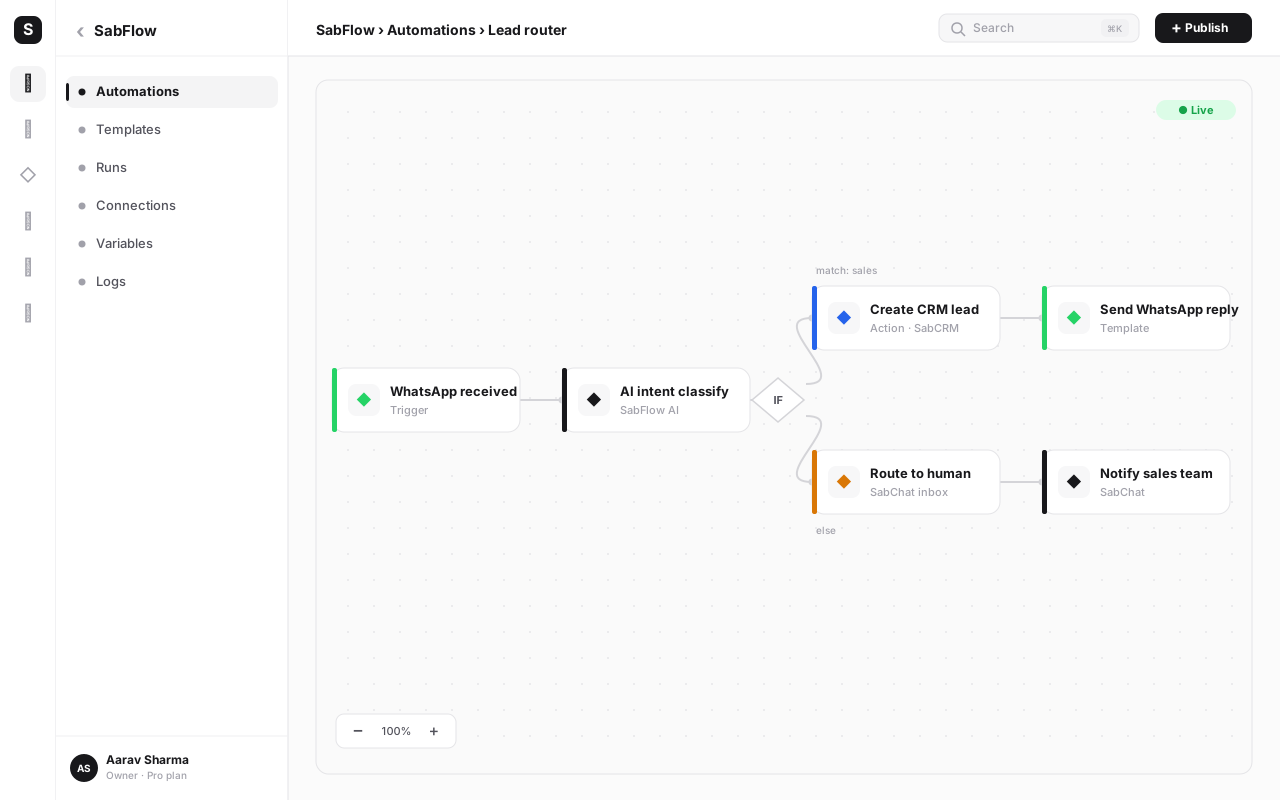
1. Connect WaChat as the trigger. In SabFlow, create a new automation and choose the "WhatsApp message received" trigger from WaChat. This fires the flow every time a customer messages your WhatsApp Business number. The trigger passes the message text, the sender's number and any existing contact match into the flow.
2. Add the welcome message. Drop a Send WhatsApp Message node. Write your greeting, and attach an interactive list or reply buttons for the top intents — for example Talk to Sales, Order Status, Book a Demo, Something Else. Buttons reduce typos and keep people on the rails.
3. Branch with a Condition (rule-based path). Add a Condition node that reads the button the customer tapped. Each branch routes to its own sub-flow. This is your deterministic backbone for the common paths.
4. Add an AI Intent node for free text. For the Something Else branch — and for anyone who types instead of tapping — add SabFlow's AI Intent Classification node. Give it your list of intents (FAQ, pricing, support, booking, complaint) and a confidence threshold. It reads the free-text message and outputs the matched intent plus a confidence score, which you branch on next.
5. Build each intent sub-flow. For each branch, chain the nodes that do the work — a Send Message node with the FAQ answer, a sequence of Question nodes to qualify a lead, a catalog lookup, a booking node, or a payment link node (covered below).
6. Add the fallback. Wire a path for low AI confidence or an unrecognised reply: re-prompt once with a clarifying question, then resurface the menu, then route to a human. Cap the loop so no one is ever stuck.
7. Add the handoff node. Drop an Assign to Agent / Handoff node that moves the conversation into the shared inbox, tags it, and attaches the transcript. More on this below.
8. Test in the canvas, then publish. Use SabFlow's test runner to walk each branch, then publish. The bot is live the moment you save.
A worked branch: lead qualification#
To make this concrete, here's the Talk to Sales branch as a sequence of nodes:
- Send Message: "Great — I'll grab a couple of details so the right person can help. What are you looking for?" with buttons for your product lines.
- Question node: capture budget or team size.
- Question node: capture timeline ("Now / This quarter / Just exploring").
- Create/Update Lead node: push all answers into SabCRM, set the lead source to WhatsApp Bot, and assign an owner.
- Condition: if the lead is hot (budget set, timeline = now), route straight to a human and notify the rep; otherwise send a nurture template and tag for follow-up.
The customer answered three taps; your CRM has a qualified, owned, sourced lead; and a human only got pulled in for the leads worth their time.
Connecting the bot to your CRM, catalog, bookings and payments#
A chatbot that only chats is a toy. The value appears when the conversation drives action in the rest of your business — and because SabNode shares one data model, those connections are native nodes, not brittle integrations.
| Capability | SabNode module / node | What it lets the bot do |
|---|---|---|
| Lead capture | SabCRM — Create/Update Lead | Create or update a contact, set source, owner and tags from the conversation |
| Product browsing | WaChat catalog | Send catalog items and let customers pick products inside the chat |
| Order status | SabCRM / SabFlow lookup | Look up an order by phone or order ID and return live status |
| Appointment booking | SabFlow booking node | Offer available slots and confirm a booking back to the calendar |
| Payments | SabPay payment link | Generate a UPI/card payment link and send it in the chat, then confirm on payment |
| Re-engagement | WaChat templates | Send an approved template to reopen a conversation outside the 24-hour window |
For commerce, the bot sends catalog items from WaChat; the customer selects, and a SabFlow node assembles the order. For bookings, a booking node reads availability and writes the confirmed slot back — useful for clinics, salons, coaching and services. For payments, drop a SabPay node that generates a payment link on the fly; the customer pays by UPI in two taps, and a webhook fires the confirmation message and reconciles the order. Because the contact, the order and the payment all live on one record, the timeline stays whole.
You don't wire these as external APIs. Lead creation, catalog, booking and payment are first-class SabFlow nodes because they're all part of the same platform. That's the difference between a chatbot bolted onto your stack and one that's part of it.
Handing off to a human — the part most bots get wrong#
No chatbot resolves everything, and pretending otherwise is the fastest way to frustrate customers. The mark of a well-built bot is a clean handoff. Three things trigger it:
- Explicit request — the customer types "talk to a human", "agent", or taps a Talk to a person button.
- Low confidence — the AI intent node returns a score below your threshold twice in a row.
- Sensitive intent — a complaint, a refund, or a high-value enquiry you've flagged to always go to a person.
When any of those fire, the Handoff node moves the conversation into the shared team inbox, assigns it to the right team or agent (by skill, language or availability), and — crucially — attaches the entire bot transcript and CRM history. The agent opens one conversation and sees everything: what the bot asked, what the customer answered, the lead record, past orders. The customer never repeats themselves.
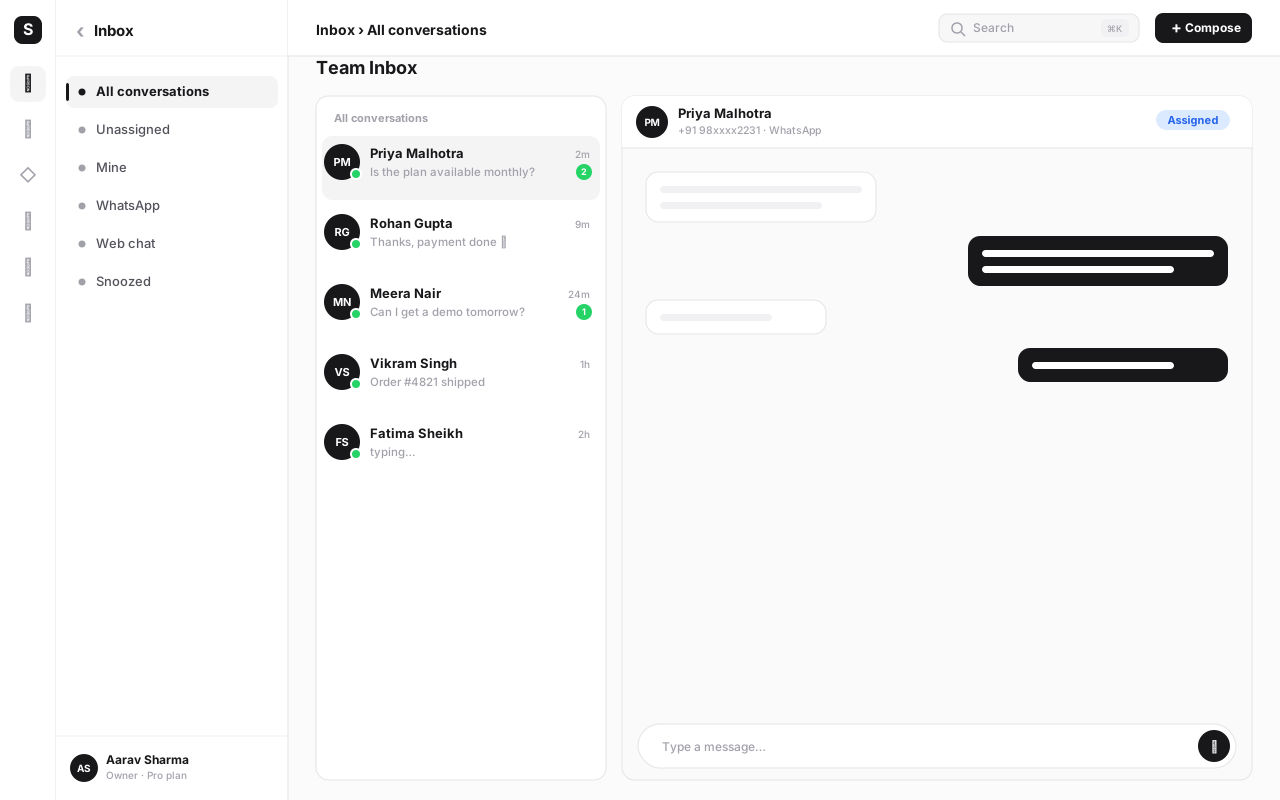
Set a rule for the reverse direction too: when the agent resolves the issue, the conversation can return to the bot, or simply close. The handoff is a doorway, not a one-way street.
The 24-hour window and template re-engagement#
WhatsApp has one rule that shapes every chatbot decision: the 24-hour customer service window. Inside 24 hours of the customer's last message, you can send any free-form message — text, media, buttons, whatever your flow needs. Outside that window, you can only send pre-approved message templates.
For a chatbot, this means two modes:
| Situation | Inside 24-hour window | Outside 24-hour window |
|---|---|---|
| Customer just messaged you | Bot replies freely with any content | — |
| Abandoned booking or cart | Bot nudges with a free-form message | Send an approved re-engagement template |
| Order shipped / status update | Free-form update | Approved utility template (reopens window on reply) |
| Promotional follow-up | Allowed with opt-in | Approved marketing template, opt-in required |
In practice: your bot runs unrestricted while a customer is actively chatting. To restart a conversation later — a delivery update, a follow-up on an unfinished booking — SabFlow sends a WaChat template. When the customer replies to that template, a fresh 24-hour window opens and the bot can resume free-form. Design your flows so they know which mode they're in; sending a free-form message outside the window simply fails, and over-sending templates risks your quality rating. Pre-build and submit your re-engagement templates early, since approval takes time. For the deeper mechanics of templates and broadcasts, see the WhatsApp Business API guide.
Four use-cases worth building first#
You don't build the whole bot at once. Ship one high-value intent, prove it, then add the next. These four deliver the fastest return for most businesses.
1. FAQ deflection. The highest-volume win. Map your top 10–15 repeated questions — hours, location, pricing, returns, shipping — to instant answers behind a menu plus AI catch-all. This alone can deflect a large share of inbound messages and frees your team for real conversations.
2. Lead qualification. Catch every inbound enquiry, ask two or three qualifying questions, create a sourced and owned lead in SabCRM, and route hot leads to a human immediately. You stop losing leads that arrive after hours and you stop wasting rep time on tyre-kickers.
3. Order status. Customers asking "where's my order?" is pure, repetitive load. A bot that looks up an order by phone number or order ID and returns live status deflects nearly all of it, instantly, at any hour.
4. Appointment booking. For services, clinics, salons and coaching, a bot that shows open slots and confirms a booking around the clock captures appointments you'd otherwise miss to voicemail and missed calls.
Testing before you launch#
A chatbot that breaks in front of a customer costs trust you can't easily win back. Test deliberately.
- Walk every branch. In SabFlow's test runner, click through each menu option and confirm it lands where it should. Dead ends are the most common bug.
- Break the AI on purpose. Type vague, misspelled and off-topic messages. Confirm low-confidence cases fall to the menu or a human, not into a loop or a wrong answer.
- Test the handoff end to end. Trigger every handoff path and confirm the conversation reaches the inbox with the full transcript attached.
- Test the window logic. Confirm that re-engagement outside 24 hours uses a template and that the bot resumes free-form after a reply.
- Test on a real phone. Buttons, lists and media render differently on devices — always do a final pass on an actual WhatsApp client, not just the canvas.
- Pilot with a slice of traffic. Route a small percentage of conversations to the bot first, watch the transcripts, fix what surprises you, then scale.
Measuring whether it actually works#
A bot you don't measure is a bot you can't improve. SabNode rolls metrics across WaChat, SabFlow and the CRM, so you see deflection, conversion and revenue in one place rather than three. Watch these:
| Metric | What it tells you | What good looks like |
|---|---|---|
| Containment rate | Share of conversations resolved without a human | Trending up as you add intents |
| Qualified leads created | Bot's contribution to the pipeline | A steady, sourced flow into SabCRM |
| Bookings / orders completed | Revenue the bot directly drives | Climbing as commerce intents mature |
| Handoff rate & time | How often and how fast the bot escalates | Right-sized — neither too sticky nor too eager |
| Fallback / "didn't understand" rate | Gaps in your intents | Falling as you patch missing intents |
| Post-chat CSAT | Whether customers liked the experience | Stable or rising after bot conversations |
The fallback rate is your improvement backlog: every "I didn't understand that" is a missing intent or a misrouted phrase. Read those transcripts weekly and close the gaps. A WhatsApp chatbot is never finished — it's a system you tune against real conversations.
Build your WhatsApp chatbot without code
Connect WaChat to SabFlow and ship a bot that qualifies leads, books appointments and takes payments on autopilot — with a clean handoff to your team. Start free and launch your first intent today.
Common mistakes when building a WhatsApp chatbot#
- No way to reach a human. The number-one complaint about bots. Always offer an obvious Talk to a person path from every branch.
- Trying to automate everything at once. Ship one intent, prove it, expand. A sprawling untested bot fails publicly.
- Walls of text. WhatsApp rewards short messages, buttons and lists. If a customer has to scroll to read a reply, rewrite it.
- Ignoring the 24-hour window. Trying to send free-form messages outside the window silently fails. Build template re-engagement in from the start.
- No fallback or infinite loops. When the bot doesn't understand, it must re-prompt once and then escalate — never loop forever.
- Hiding that it's a bot. Be upfront. Customers forgive a bot that's honest and helpful; they resent one pretending to be human.
- Forgetting to connect the CRM. A bot that doesn't write to your CRM throws away the lead the moment the chat ends. Wire the Create Lead node early.
- Launching without measuring. If you can't see containment, conversion and fallback rate, you can't improve. Set up the dashboard before you go live.
Conclusion#
A WhatsApp chatbot earns its place when it does a few jobs reliably — deflecting FAQs, qualifying leads, sharing order status, booking appointments and taking payments — and hands off gracefully for everything else. On SabNode you build that without code by pairing WaChat for the WhatsApp Business API channel with SabFlow for the automation, then connecting the conversation to your CRM, catalog, bookings and SabPay so it can actually act, not just talk.
Start narrow: pick the one intent that drowns your inbox, build it, test every branch, design the handoff, and respect the 24-hour window. Measure containment and conversion, read the fallbacks, and expand from there. The result is a 24/7 assistant that gives every customer an instant first response and writes every conversation to one timeline your whole team can see.
Ready to build? Explore the products, compare the pricing, or go deeper with the WhatsApp Business API guide and the workflow automation guide.
Frequently asked questions
What is a WhatsApp chatbot?
A WhatsApp chatbot is an automated agent that holds conversations with customers inside WhatsApp — answering questions, qualifying leads, booking appointments, sharing order status and collecting payments — without a human typing every reply. On SabNode it's built by connecting WaChat (your WhatsApp Business API channel) to SabFlow (a no-code automation builder), so messages trigger flows that branch on what the customer says.
Do I need to know how to code to build a WhatsApp chatbot?
No. SabNode's chatbot is built visually in SabFlow's drag-and-drop canvas. You add a WhatsApp trigger, then chain message, question, condition and AI nodes to design the conversation. Coding is only needed for advanced custom integrations, and even those are usually handled with built-in connectors rather than scripts.
What's the difference between a rule-based and an AI WhatsApp chatbot?
A rule-based bot follows a fixed script — menus and buttons where each choice leads to a predetermined branch. An AI bot uses natural-language understanding to interpret free-text messages and figure out intent, so customers can type 'where's my order' instead of pressing a number. The best WhatsApp chatbots combine both: structured menus for common paths and AI intent classification for everything else.
Can a WhatsApp chatbot hand off to a human agent?
Yes, and it should. A good chatbot detects when it's out of its depth — frustration, a complex request, or an explicit 'talk to a human' — and routes the conversation to a live agent in the shared team inbox with full context. The agent sees the entire bot transcript and CRM history, so the customer never has to repeat themselves.
What is the WhatsApp 24-hour window and how does it affect chatbots?
WhatsApp lets businesses send free-form messages only within 24 hours of the customer's last message. Outside that window, you can only re-engage using pre-approved message templates. A chatbot operates freely inside the window; to restart a conversation later — an abandoned booking, a delivery update — it sends an approved template that reopens the window when the customer replies.
How do I measure if my WhatsApp chatbot is working?
Track containment rate (the share of conversations the bot resolves without a human), qualified leads created, bookings or orders completed, average handoff time, and customer satisfaction after bot chats. SabNode rolls these across WaChat, SabFlow and the CRM so you can see deflection, conversion and revenue from one dashboard rather than guessing.