The Shared Team Inbox Playbook for Fast, Organised Support
Personal WhatsApp and email forwarding break the moment your support volume grows. This playbook shows how a shared team inbox unifies every channel, routes work fairly, and keeps replies fast as you scale.
A shared team inbox is one workspace where every customer message — WhatsApp, email, live chat, and social — arrives as a trackable conversation that any agent can see, claim, assign, and answer. It replaces personal accounts and forwarding with clear ownership, routing rules, and reporting, so replies stay fast and nothing slips as your volume grows.
What a shared team inbox actually is#
A shared team inbox is a single, multi-agent workspace where customer conversations live as structured records rather than as messages buried in one person's phone or mailbox. Every incoming message — a WhatsApp query, a website chat, a support email, a comment on your Instagram — becomes a conversation object with a status, an owner, a channel, a timestamp, and a history. Any authorised agent can open it, see what was said before, and respond as the business, not as themselves.
The word that matters is shared. In a personal setup, a message belongs to whoever received it. If that person is on leave, in a meeting, or simply distracted, the customer waits. In a shared inbox, a message belongs to the team. It enters a queue, gets routed by rules you control, and stays visible until someone resolves it. The business owns the relationship, not an individual.
For SabNode customers, the shared team inbox is the SabChat module. It was built for Indian SMBs that start support on WhatsApp and a personal Gmail, then hit a wall the moment two people need to answer customers at once. SabChat keeps the familiar conversational feel your customers expect on WhatsApp while adding the structure your team needs to stay organised.
Inbox vs. ticketing vs. personal channels#
People often conflate three different things. A personal channel (a staffer's WhatsApp or email) has zero shared infrastructure — no routing, no reporting, no handover. A classic ticketing tool is structured but feels formal and slow, which clashes with how Indian customers actually message — quick, chatty, on WhatsApp at 9pm. A modern shared team inbox sits in the middle: it carries the structure of ticketing but presents as a real-time conversation, so the customer feels like they are chatting with a person, while your team works a disciplined queue behind the scenes.
| Capability | Personal WhatsApp / email | Classic ticketing tool | Shared team inbox (SabChat) |
|---|---|---|---|
| Multiple agents on one channel | No (shared login at best) | Yes | Yes |
| Routing and assignment rules | None | Yes | Yes |
| Real-time conversational feel | Yes | Weak (email-style) | Yes |
| Response and resolution reporting | None | Yes | Yes |
| Customer history across channels | Fragmented | Per-channel | Unified |
| Audit trail and handover on leave | None | Yes | Yes |
Why personal WhatsApp and email forwarding fail at scale#
Almost every Indian SMB starts the same way. The founder hands out a personal number on the visiting card. Orders, complaints, and "is this in stock?" all land on one phone. It works beautifully — until it doesn't. The failure is not gradual; it arrives the week you grow.
The first crack is single-person dependency. When everything sits on one device or one inbox, that person becomes a bottleneck and a risk. They go on a wedding trip, the phone dies, and a week of customer conversations is invisible to everyone else. You cannot hand over a personal WhatsApp without literally handing over the phone.
The second crack is no ownership. Forwarding a customer email to "team@" or a WhatsApp group means everyone sees it and nobody owns it. Each person assumes a colleague has it. The customer is answered twice or not at all. There is no record of who was supposed to act.
The third crack is duplicate and contradictory replies. Two agents open the same group message, both type a reply, and the customer receives two different answers — sometimes contradictory pricing or stock information. It looks unprofessional and erodes trust.
The fourth crack is zero measurement. On a personal phone you cannot answer the most basic business questions: How fast do we reply? How many conversations did we close today? Who is overloaded? Without numbers, you cannot staff, improve, or hold anyone accountable.
Sharing one WhatsApp login across a team is not the same as a shared inbox. WhatsApp's app is built for one person; pass a single login around and you lose typing visibility, get logged out unexpectedly, and still have no routing or reporting. For multi-agent WhatsApp you need the WhatsApp Business API behind a proper inbox — see our WhatsApp Business API guide.
The fifth crack is lost context on channel switching. A customer messages on Instagram, then follows up by email, then calls. On personal channels these are three strangers to your team. Nobody connects them. The customer repeats their problem three times and gets frustrated each time. This is exactly the problem an omnichannel inbox solves.
Omnichannel: every channel in one inbox#
The core promise of a modern shared inbox is omnichannel: WhatsApp, a live-chat widget on your website, email, and social messages all flow into the same place, threaded against the same customer. Your agents stop juggling five apps and five tabs. They work one screen.
Why this matters is simple human behaviour. Customers do not think in channels. They think, "I have a question," and they use whatever is closest. The same person might start on WhatsApp because it is on the product packaging, switch to your website chat while comparing options, and email a screenshot of an error. To your customer, that is one conversation. To a fragmented support setup, it is three. An omnichannel inbox makes your view match the customer's reality.
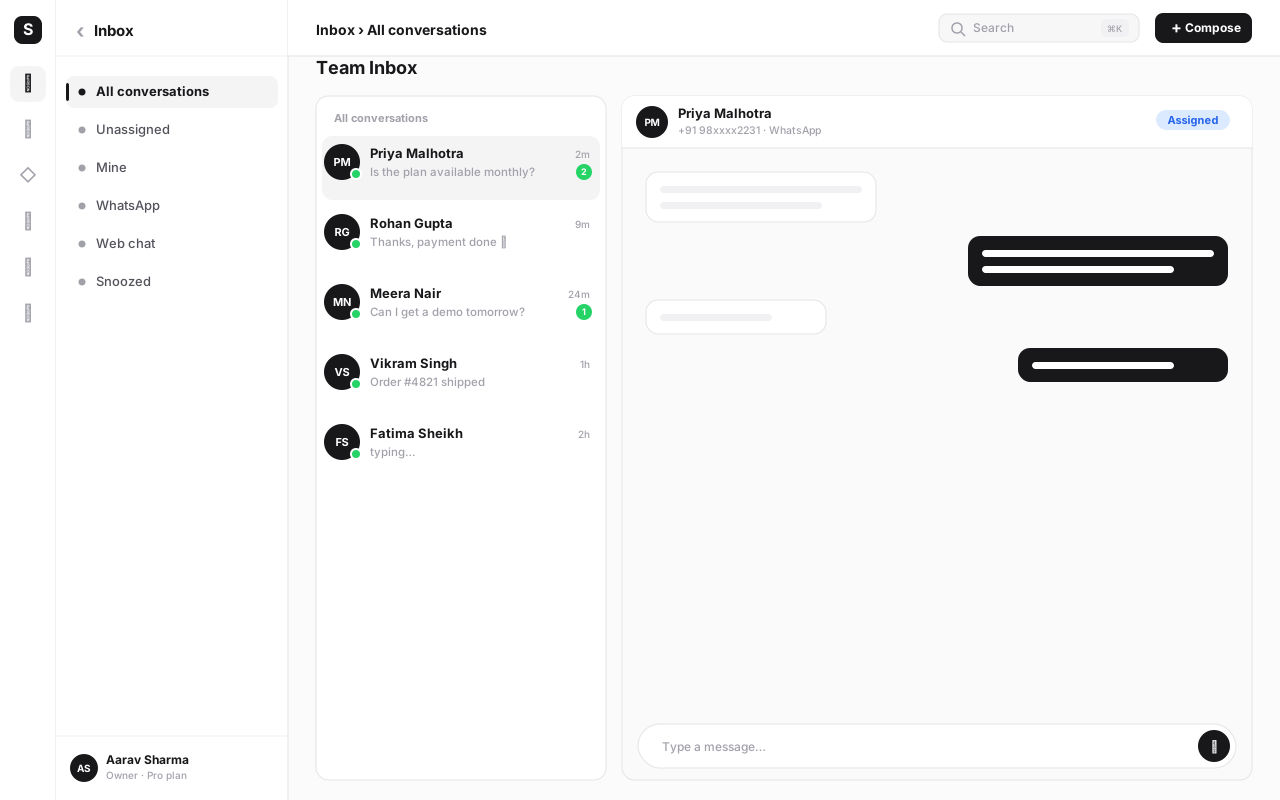
The channels a shared inbox should cover#
WhatsApp Business API is non-negotiable for India. It is where most customer conversations actually happen. The API (not the consumer app) is what enables multiple agents, automation, and a green-tick verified profile. SabChat connects to the WhatsApp Business API so your whole team can work one number.
A live-chat widget on your website captures visitors at the moment of intent — while they are reading your pricing page or stuck at checkout. The widget feeds the same inbox, so a website chat and a later WhatsApp from the same person stitch together.
Email still matters for formal queries, invoices, and B2B threads. Pulling support email into the shared inbox means email gets the same routing, SLAs, and reporting as chat instead of rotting in a forgotten mailbox.
Social messages — Instagram DMs, Facebook Messenger — increasingly carry purchase intent for Indian D2C brands. Bringing them into the inbox means a comment on a reel does not get lost between two interns.
For a deeper look at orchestrating all of these together, our omnichannel customer engagement guide covers strategy beyond the inbox itself.
| Channel | Best for | Typical Indian SMB use | What the inbox adds |
|---|---|---|---|
| WhatsApp Business API | Fast, personal, high-volume queries | Orders, stock checks, post-sale support | Multi-agent access, routing, automation |
| Website live chat | Capturing intent during browsing | Pre-sales questions, checkout help | Visitor context, instant assignment |
| Formal, document-heavy threads | Invoices, B2B, escalations | SLAs, ownership, searchable history | |
| Instagram / Facebook | Social commerce and brand reach | D2C product DMs, comment replies | Unified history, no missed DMs |
Assignment and routing: who answers what, and by when#
Once messages land in one queue, the next question is who handles each one. Leaving it to "whoever sees it first" recreates the old chaos — fast agents drown, slow ones coast, and tricky queries bounce around. Routing rules make the decision for you, consistently.
Auto-assignment strategies#
The simplest model is round-robin: conversations are handed to available agents in turn, so load spreads evenly. This works well for general support where any agent can handle any query.
Skill- or team-based routing sends conversations to the right group. A billing question goes to the accounts team; a technical query goes to the product team; a query in Tamil routes to an agent who speaks Tamil. You define the conditions — channel, keyword, language, tag, or which page the chat started on — and the inbox routes accordingly.
Load-balanced assignment considers how many open conversations each agent already has, so a swamped agent stops receiving new ones until they catch up. This protects quality during rushes, like a festival sale.
You will usually layer these. For example: route all billing conversations to the Accounts team, then round-robin within that team, but skip anyone already holding more than ten open chats.
SLAs and business hours#
A Service Level Agreement (SLA) is a promise about timing — for example, first reply within 15 minutes during business hours, resolution within 24 hours. The inbox tracks each conversation against its SLA and warns you before a breach, so a slipping reply gets escalated instead of forgotten.
Business hours make those promises honest. If you operate 9am to 8pm IST, the SLA clock should pause overnight and resume in the morning, and after-hours messages should trigger an auto-reply that sets expectations ("We're offline now; we'll reply by 10am") rather than leaving the customer wondering. This single setting prevents the most common support complaint: silence.
Start with one realistic SLA, not five aspirational ones. A 15-minute first-reply target during business hours that you actually hit beats a 5-minute target you miss all day. Tighten the target once your median response time consistently beats it.
Working the queue as a team without colliding#
The hardest part of shared work is not the customer — it is the coordination between agents. A good inbox has tools specifically for keeping a team in sync.
Collision detection is the headline feature. When you open a conversation, your teammates see that you are viewing it; when you start typing, they see a typing indicator. This prevents the classic shared-account disaster of two agents sending two different answers to the same person within seconds. The conversation effectively gets a soft lock — others know to leave it to you.
Private notes let agents talk to each other inside the conversation without the customer seeing. You can drop context — "this customer is a wholesale account, give them the bulk rate" — that the next agent reads before replying. The note is part of the conversation history, so context never lives in a separate chat the customer's record can't see.
@mentions turn a private note into a direct ask. Mention a colleague — @Priya can you confirm the refund was processed? — and they get notified and pulled into the thread. This is how front-line agents loop in a specialist or a manager without leaving the inbox or starting a side conversation on WhatsApp.
Together, these three features replace the WhatsApp group that most teams use for "internal coordination." Instead of context scattered across a group chat that nobody can search later, everything stays attached to the customer conversation where it belongs.
Faster replies: canned responses, macros, and tags#
Speed in support comes less from typing fast and more from not retyping the same thing. Two features do most of the heavy lifting here.
Canned responses (saved replies) are pre-written messages for common situations — your return policy, GST invoice steps, "we've shipped your order" — that an agent inserts with a couple of keystrokes. They keep wording consistent and on-brand, and they cut reply time dramatically for the questions you get fifty times a day. Good canned responses support placeholders like the customer's name or order number so they still feel personal.
Macros go a step further: one action that both inserts a reply and performs operations — set a tag, change status, assign to a team, trigger a follow-up. For example, a "Refund initiated" macro can send the refund-confirmation message, tag the conversation refund, set status to "pending finance," and @mention the accounts team — all from one click.
Tags are how you make the inbox searchable and measurable. Labelling conversations with refund, delivery-delay, pre-sales, bug, or vip lets you filter the queue, build views ("show me all open delivery complaints"), and — crucially — see trends. If delivery-delay tags spike one week, that is a logistics problem surfacing through support before it shows up anywhere else.
Segmentation builds on tags and customer data. You can group conversations and contacts — wholesale vs. retail, repeat buyers vs. first-timers, by city, by plan — to prioritise, route, and report differently for each. A VIP customer's chat can jump the queue; a first-time buyer can get an onboarding flow.
Measuring satisfaction with CSAT surveys#
A reply being fast does not mean it was good. CSAT (Customer Satisfaction) surveys close that gap. After a conversation is resolved, the inbox sends a short prompt — usually a rating and an optional comment — asking the customer how the experience was. The score attaches to the conversation, the agent, and the channel.
This gives you three things you cannot get any other way. First, a direct quality signal per agent and per team, separate from speed. Second, early warning: a string of low scores on delivery-delay conversations tells you the problem is operational, not your agents. Third, a coaching tool — you can read the actual comments behind a low score and fix the real issue rather than guessing.
Keep the survey short. A single rating with an optional one-line comment gets far higher response rates than a five-question form, and for WhatsApp-first audiences, a quick button tap converts much better than a link to an external survey page.
Deflection: chatbots, help centre, and knowledge base#
The cheapest support conversation is the one your team never has to touch. Deflection is about answering routine questions automatically so agents spend their time where humans add value.
A chatbot sits at the front of your inbox. It greets the customer, answers common questions from a script or your knowledge base, collects details (order number, issue type), and only escalates to a human when needed. A well-built bot can resolve a large share of "where is my order?" and "what are your timings?" queries entirely on its own, around the clock — including the 9pm-to-9am window when no agent is online. When it does hand over, it passes the full context, so the customer never repeats themselves.
A help centre / knowledge base is the library the bot — and your customers — draw from. Articles on returns, sizing, payment methods, and troubleshooting let customers self-serve, and let agents link an authoritative answer instead of re-explaining. Every good knowledge-base article is a conversation that does not need to happen.
The combination compounds: a strong knowledge base feeds a smarter bot, which deflects more, which frees agents to give better answers to the conversations that remain — which then become new knowledge-base articles. Deflection is not about removing the human; it is about reserving the human for the moments that need one.
Treat deflection as a funnel, not a wall. The goal is not to block customers from reaching a human — it is to resolve the easy 60–70% instantly and route the rest to an agent with full context. A bot that traps frustrated customers in a loop does more damage than no bot at all. Always offer a clear "talk to a person" exit.
Reporting: the numbers that run a support team#
A shared inbox is also a measurement system. Because every conversation is a structured record, you finally get the metrics that were impossible on a personal phone. Three families of numbers matter most.
Response and resolution times. First response time (how long until the first human reply), median and 90th-percentile response time, and resolution time (open to closed). These tell you whether you are meeting your SLAs and where the slow points are.
Volume and load. Conversations per day per channel, open vs. resolved, and per-agent load. This is your staffing data — it tells you when to add an agent, which channel is growing, and who is overloaded versus idle.
Quality. CSAT score by agent, team, and channel, plus reopened-conversation rate (a resolved chat the customer had to reopen is a quality miss). Speed without quality is just fast wrongness.
| Metric | What it tells you | A healthy direction |
|---|---|---|
| First response time | How quickly customers get acknowledged | Down, and within your SLA |
| Resolution time | How long problems take to close | Down, without a rise in reopens |
| Conversations per agent | Workload distribution and capacity | Even across the team |
| CSAT score | Quality as the customer felt it | Up, with low scores investigated |
| Reopened rate | Whether "resolved" means resolved | Low and falling |
| Bot deflection rate | Share handled without an agent | Up, while CSAT holds steady |
How the inbox ties into your CRM#
A support conversation is far more useful when you know who you are talking to. Linking the shared inbox to your CRM gives every conversation a context panel: the customer's profile, their open and past deals, previous tickets, orders, and notes — all beside the live chat. The agent answers as someone who already knows the customer, not a stranger asking "can you share your order ID again?"
The flow runs both ways. Inbound conversations match to an existing CRM contact (or create a new one), so support never starts blind. Outbound, the conversation, its outcome, tags, and CSAT score log to the CRM timeline automatically. That means sales sees that a prospect raised a support issue, and the next salesperson to call knows the full story. Support and sales stop working from two different versions of the customer.
This is where SabNode's all-in-one approach pays off: SabChat and the CRM are part of the same platform, so the link is native rather than a fragile integration you maintain. For the CRM side of this, our CRM software guide explains how the timeline and contact records work. And if you are weighing whether to run support, CRM, calling, and messaging on one system, the SabNode platform guide lays out the trade-offs.
For high-volume or repetitive workflows, you can also wire the inbox into automations — auto-tagging, follow-up sequences, escalations — which our workflow automation guide covers in depth.
Setting up your shared team inbox: a step-by-step plan#
Here is a practical sequence to go from scattered channels to an organised shared inbox without overwhelming your team.
- Connect your channels first. Add the WhatsApp Business API number, install the live-chat widget on your website, connect your support email, and link your Instagram and Facebook accounts. Confirm that test messages from each channel land in the single inbox.
- Add your agents and set roles. Invite your team, and assign roles — agents who handle conversations, and supervisors who can reassign, view reports, and manage settings. Define which teams exist (e.g., Sales, Support, Accounts).
- Define routing rules. Decide how new conversations are distributed: round-robin for general queries, and condition-based routing (by keyword, channel, language, or tag) for specialised ones. Add load balancing so no one is buried.
- Set business hours and SLAs. Enter your operating hours in IST, write an after-hours auto-reply, and set one realistic first-response SLA. Turn on breach alerts so slipping conversations escalate.
- Build your canned responses and macros. Write saved replies for your ten most common questions, then turn the repetitive multi-step ones (refund, shipping update, escalation) into macros that also tag and route.
- Create your tag taxonomy. Agree on a small, clear set of tags (
pre-sales,refund,delivery-delay,bug,vip). Fewer, well-used tags beat dozens of vague ones. - Turn on collision detection and train the team. Walk agents through claiming a conversation, using private notes and @mentions, and resolving rather than just replying. This habit shift is the real adoption work.
- Stand up deflection. Publish your first knowledge-base articles for top questions, then configure a chatbot to answer from them and collect details before handing over — with a clear path to a human.
- Switch on CSAT and reporting. Enable a one-tap satisfaction survey on resolved conversations, and set up your reporting dashboard for response time, load, and CSAT.
- Connect the CRM. Link conversations to contact records so the context panel populates and outcomes log to the CRM timeline. Verify with a test contact end to end.
Work through these in order and you can be live in a day, refining routing and canned replies over the first couple of weeks as real volume shows you what to tune.
Common mistakes to avoid#
Even with the right tool, teams trip on the same predictable mistakes. Avoiding them is half the battle.
Keeping a personal "backup" channel. The most common failure is running the shared inbox and still letting a couple of customers message the founder's personal WhatsApp. Those conversations stay invisible, unmeasured, and stranded. Migrate everyone to the shared number and retire the personal one for business use.
Too many tags, too many SLAs, too many rules. Over-configuring on day one creates a system nobody follows. Start lean — one SLA, a handful of tags, simple routing — and add complexity only when a real need appears.
Treating "replied" as "resolved." If agents reply but never set a conversation to resolved, your queue and reports become meaningless. Make resolving the conversation a required final step, supported by macros that set status automatically.
Letting the bot trap customers. A deflection bot with no "talk to a person" exit frustrates exactly the customers you most need to keep. Always offer an easy escape to a human, and review the conversations the bot couldn't resolve to improve it.
Ignoring the reports. A shared inbox generates data only useful if someone looks at it. Set a weekly habit — review response times, agent load, CSAT, and the top tags — and act on what you see. The inbox surfaces problems; you still have to fix them.
Skipping the CRM link. Running support without contact context wastes the inbox's biggest advantage. Connect the CRM early so agents answer informed, and so support and sales finally share one view of the customer.
Bring every customer conversation into one inbox
Run WhatsApp, live chat, email, and social from a single shared inbox with routing, SLAs, collision detection, and CRM-linked history. Explore the SabNode product suite or compare options on pricing.
Conclusion#
A shared team inbox is the difference between support that scales and support that breaks the week you grow. Personal WhatsApp and forwarded email work until two people need to help customers at once — then ownership, speed, and trust all fall apart. Moving to a single, omnichannel inbox restores order: every message becomes a trackable conversation, routing decides who handles what and by when, and collision detection plus private notes let a team work the same queue without colliding.
The compounding wins come from the layers on top. Canned responses and macros cut the repetitive typing. Tags and segmentation make the queue searchable and the trends visible. CSAT tells you whether fast also meant good. A chatbot and knowledge base deflect the easy questions so agents focus on the hard ones. And the CRM link ensures every reply is informed by the customer's full history while logging outcomes back to the timeline.
For Indian SMBs, this is the most direct path from "we answer customers on a phone" to "we run a support operation." With SabChat as your shared team inbox inside the wider SabNode platform, you get the conversational feel your customers expect on WhatsApp and the structure your team needs to keep up. Start lean, connect your channels, set one honest SLA, and tighten from there — your customers will feel the difference in your very next reply.
Frequently asked questions
What is a shared team inbox?
A shared team inbox is a single workspace where every customer message — from WhatsApp, email, live chat and social channels — lands as a trackable conversation that multiple agents can see, claim, assign and reply to without forwarding messages or sharing a personal login.
Why is personal WhatsApp or email forwarding bad for support?
Personal accounts have no assignment, no audit trail and no reporting. Messages get lost when one person is on leave, two agents reply to the same customer, and you cannot measure response time or resolution. A shared inbox fixes all of this with routing, ownership and visibility.
How does collision detection work in a shared inbox?
Collision detection shows a live indicator when another agent has a conversation open or is typing a reply. It prevents two agents from sending duplicate or contradictory answers to the same customer, which is the most common embarrassment of a shared account.
Can a shared inbox handle WhatsApp, email and live chat together?
Yes. An omnichannel inbox like SabChat merges WhatsApp Business API, a website live-chat widget, email and social messages into one threaded view, so a customer's full history stays in one place even if they switch channels.
Do I need a chatbot if I have a shared inbox?
A chatbot is optional but valuable. It deflects repetitive questions, captures details before an agent joins, and answers from your knowledge base around the clock. Agents then handle only the conversations that genuinely need a human, which lowers your reply volume.
How does a shared inbox connect to my CRM?
Each conversation links to the contact's CRM record, so the customer's deals, past tickets, orders and notes appear beside the chat. Replies and outcomes are logged to the CRM timeline automatically, giving sales and support a shared, complete history.