The Complete Guide to the WhatsApp Business API (2026)
What the WhatsApp Business API is, how it differs from the free Business app, how to get verified, how message templates and conversation pricing work, and how to send broadcasts, build chatbots and run a shared team inbox — without getting your number blocked.
The WhatsApp Business API — officially the WhatsApp Business Platform — is the programmatic way for businesses to send and receive WhatsApp messages at scale through software instead of a phone. It has no app of its own. You connect it to a platform like SabNode's WaChat to run broadcasts, chatbots and a shared team inbox, with many agents working from one verified number.
That one paragraph answers the headline question, but it raises five more: how the API differs from the free Business app, how you actually get access, what templates and the 24-hour window mean, how Meta's conversation pricing works, and how to stay compliant so your number doesn't get throttled. This guide — the pillar for everything WhatsApp on SabNode — walks through all of it in order, with the India context that matters for most teams reading this.
What the WhatsApp Business API actually is#
WhatsApp gives businesses three different products, and confusing them is the most common mistake new teams make. Think of them as a ladder.
Consumer WhatsApp is the green app on two billion phones. It's built for personal chat, one account per number, one device (plus linked devices). No business is meant to run customer support from it at scale, and it has no automation, no analytics and no way to share access across a team.
The WhatsApp Business app is a free, separate download aimed at solo owners and micro-businesses. It adds a business profile, catalog, away messages, quick replies and labels — useful features, but still fundamentally one person on one phone. There's no real multi-agent support, no bulk template sending and no API to plug into your other systems.
The WhatsApp Business API (the WhatsApp Business Platform) is a different animal. It's a cloud-hosted messaging service with no consumer app at all. Instead, software talks to it: your CRM, your e-commerce store, your support desk, or an all-in-one platform like SabNode. Through that software, many agents can answer from a single business number, you can send template messages to thousands of opted-in customers, run chatbots, and pull every conversation into your customer record automatically.
The API is not an app you install — it's a connection your business software makes to WhatsApp's servers. Whenever someone says "we're on the WhatsApp API," they mean their number is connected to a platform (like WaChat) that handles the messaging on their behalf. The interface you and your agents actually use belongs to that platform, not to WhatsApp.
A quick comparison#
| Capability | WhatsApp Business app | WhatsApp Business API |
|---|---|---|
| Cost to use the channel | Free | Per-conversation (Meta) + platform fee |
| Users per number | One person, one phone | Unlimited agents via software |
| Bulk / broadcast messaging | Tiny broadcast lists only | Template broadcasts to opted-in lists |
| Chatbots & automation | Basic away/quick replies | Full chatbots, routing, workflows |
| CRM / system integration | None | Native — API, webhooks, integrations |
| Analytics | Very limited | Delivery, read, conversation reporting |
| Green tick (verified badge) | Not available | Available after Meta verification |
| Best for | Solo owner, single shop | Teams, support desks, scale |
Who the WhatsApp Business API is for#
If a single person handles all your customer chat from one phone and that's working fine, the free Business app is genuinely the right tool — don't over-engineer it. The API earns its keep the moment any of these become true:
- More than one person needs to answer the same WhatsApp number.
- You want to send order updates, appointment reminders, OTPs or promotions to many customers at once.
- You're losing context because WhatsApp chats live on a phone, separate from your CRM and your other channels.
- You want chatbots to handle FAQs, qualify leads or take orders before a human steps in.
- You need reporting on response times, delivery rates and conversation volume.
In India specifically, the API has become the default for SMBs in e-commerce, real estate, healthcare, education, logistics and services — anywhere customers already prefer WhatsApp to email and expect fast, mobile-first replies. A clinic sending appointment reminders, a D2C brand confirming COD orders, a coaching institute broadcasting batch schedules: all of these need template broadcasts and multi-agent access that only the API provides.
If you're weighing WhatsApp against other channels for outbound, our breakdown of WhatsApp marketing vs SMS marketing covers reach, cost and use-case fit. For the bigger picture of running every channel together, see the omnichannel customer engagement guide.
How to get access: the onboarding path#
Because the API has no app, you don't "download" it — you get onboarded through a Business Solution Provider (a Meta partner). SabNode is your provider, and the modern path uses Meta's embedded signup, a popup flow that connects everything in a few clicks instead of the old multi-week manual process. Here's the full sequence.
- Create or connect a Meta Business account. This is the business identity Meta ties your WhatsApp number to. If your company already runs Facebook/Instagram ads, you likely have one.
- Choose a phone number. It must be a number you control that is not currently active on the regular WhatsApp or WhatsApp Business app. Many teams buy a fresh number specifically for the API. It can receive an SMS or voice OTP for verification.
- Set your display name. This is the business name customers see at the top of the chat. Meta reviews it against its display-name guidelines — it should clearly reflect your real, registered business name (no misleading or generic names).
- Run the embedded signup. Inside WaChat you launch Meta's popup, log in with your Meta Business account, select or create the WhatsApp Business Account, attach the phone number, and authorise SabNode to send on your behalf. This wires the number to your WaChat workspace.
- Complete Meta Business verification. To raise messaging limits and unlock the green tick, Meta verifies your business is real — usually via business documents (registration, address, website, sometimes a domain or phone check). You can start messaging with a lower tier before verification finishes and run verification in parallel.
- Submit your first message templates. You can't message customers cold without an approved template, so submit your essentials — a welcome message, an order/appointment update, an OTP — for review on day one.
- Connect your team and data. Invite agents to the shared inbox, set roles, import your opted-in contacts, and link the API to your CRM so every conversation logs to the right customer.
Template review can take anywhere from a few minutes to a day. Submit your core templates the moment your number connects — before you've finished verification or built any automation — so they're approved and ready when you go live. A rejected template just needs an edit and resubmit; it doesn't block your account.
Phone number, display name and the green tick#
These three are often conflated. They're separate things.
| Element | What it is | How you get it |
|---|---|---|
| Phone number | The business number customers message | Any number you control, not on regular WhatsApp; verified by OTP |
| Display name | The business name shown atop the chat | Set during onboarding; reviewed against Meta's display-name rules |
| Green tick | The official verified badge next to your name | Requested after Meta Business verification; granted at Meta's discretion based on brand notability |
You can run a fully functional API number with no green tick — the badge is a trust signal, not a requirement. Don't let chasing it delay your launch. Get verified, request it, and treat it as a nice-to-have that arrives later. For the full walkthrough of what verification actually requires, see the WhatsApp green tick guide — and if you're still deciding between the Cloud API and older setups, the Cloud API vs On-Premises API guide covers coexistence too.
Message templates and the 24-hour window#
This is the rule set that governs everything you send, so it's worth getting exactly right. WhatsApp deliberately makes it hard to spam, and it does so with two interlocking concepts: templates and the 24-hour customer service window.
The 24-hour customer service window#
When a customer sends your business a message, a 24-hour window opens. Inside that window you can reply with free-form messages — any text, image, document, or interactive message you like, no pre-approval needed. This is your normal back-and-forth support conversation.
The clock resets every time the customer messages you again. But if 24 hours pass with no message from the customer, the window closes. After that, you cannot send a free-form message — to reach out again you must use a pre-approved template.
That single rule is why templates exist: they're the only way to initiate a conversation or re-engage someone outside the window, and Meta reviews them to keep business-initiated messaging useful rather than spammy.
Inside the 24-hour window: free-form messages, no template needed (this is support). Outside the window or starting fresh: a pre-approved template is mandatory (this is outreach). Memorise this distinction — almost every "why won't my message send?" question comes down to a closed window.
The three template categories#
Every template you submit must declare a category, and the category determines both how Meta reviews it and how it's billed.
| Category | What it's for | Examples |
|---|---|---|
| Marketing | Promotions, offers, announcements, re-engagement | Sale alerts, new product launches, abandoned-cart nudges, newsletters |
| Utility | Transaction- or account-related updates the customer expects | Order confirmations, shipping updates, appointment reminders, payment receipts |
| Authentication | One-time passwords and verification codes | Login OTPs, two-factor codes, account verification |
Marketing templates are the most scrutinised and the most expensive; authentication and utility are cheaper because they carry real value for the customer. Keeping marketing content out of a utility template (and vice-versa) matters — miscategorising can get a template rejected or your account flagged.
Templates support variables (Hi {{1}}, your order {{2}} has shipped), media headers (image, video, document), buttons (quick replies and call-to-action buttons like "Track order" or "Visit site"), and even list and product messages. Build them well and a single template does the work of a mini-app. For a deeper dive into categories, approval and real examples, see the WhatsApp message templates guide; for the specific case of OTPs, see the WhatsApp OTP API guide; and for order/shipping-style updates, see the WhatsApp order notifications guide.
Quality rating and messaging limits#
Meta scores each number's quality rating based on how recipients react — blocks and "report spam" taps drag it down; engagement keeps it high. Your rating, combined with your verification status, sets your messaging tier (how many unique customers you can message in a rolling 24 hours, climbing from 250/1K/10K/100K to unlimited as you demonstrate good behaviour and volume). Protect your rating and the limits take care of themselves. Abuse it and you get throttled or restricted — which is the single most expensive mistake on this channel. The broadcast limits and quality rating guide goes deeper on how to scale volume without tripping these limits.
How WhatsApp conversation pricing works#
WhatsApp does not charge per message. It charges per conversation — a 24-hour window of messaging between your business and a customer. Open a conversation, and every message either way within that 24-hour window is covered by one charge.
A few principles to internalise (Meta updates the exact rates and country tables periodically, so treat the numbers in your provider dashboard as the source of truth):
- Pricing is by category. Marketing, utility and authentication conversations are priced differently. Marketing typically costs the most; utility and authentication less.
- Pricing is by country. The rate for a conversation depends on the customer's country code. India has its own rate card, distinct from the US, Brazil, etc.
- Service conversations are generally free. When a customer messages you first and you reply within the 24-hour window, that customer-initiated service exchange is usually free of Meta's per-conversation charge — a deliberate nudge toward responsive support.
- You pay Meta's conversation charge plus your provider's platform fee. Your Business Solution Provider adds its own fee on top of Meta's wholesale rate.
The practical takeaway: outbound marketing is your real cost driver, not support. A team that answers customers promptly inside the service window and reserves marketing templates for genuinely relevant, opted-in audiences spends a fraction of what a spray-and-pray sender does — and keeps a higher quality rating into the bargain.
SMS is billed per message; WhatsApp is billed per conversation. If you carry an SMS cost model into WhatsApp planning you'll badly over- or under-estimate spend. Model in conversations: how many unique 24-hour windows you'll open per month, split by category and country.
SabNode bills conversations transparently in rupees with the breakdown visible per category, so you can see exactly where the money goes. Current rates live on the pricing page — or read the full WhatsApp Business API pricing in India breakdown for a worked example.
Sending broadcasts vs 1:1 conversations#
There are really two motions on the API, and they use the rules above in opposite directions.
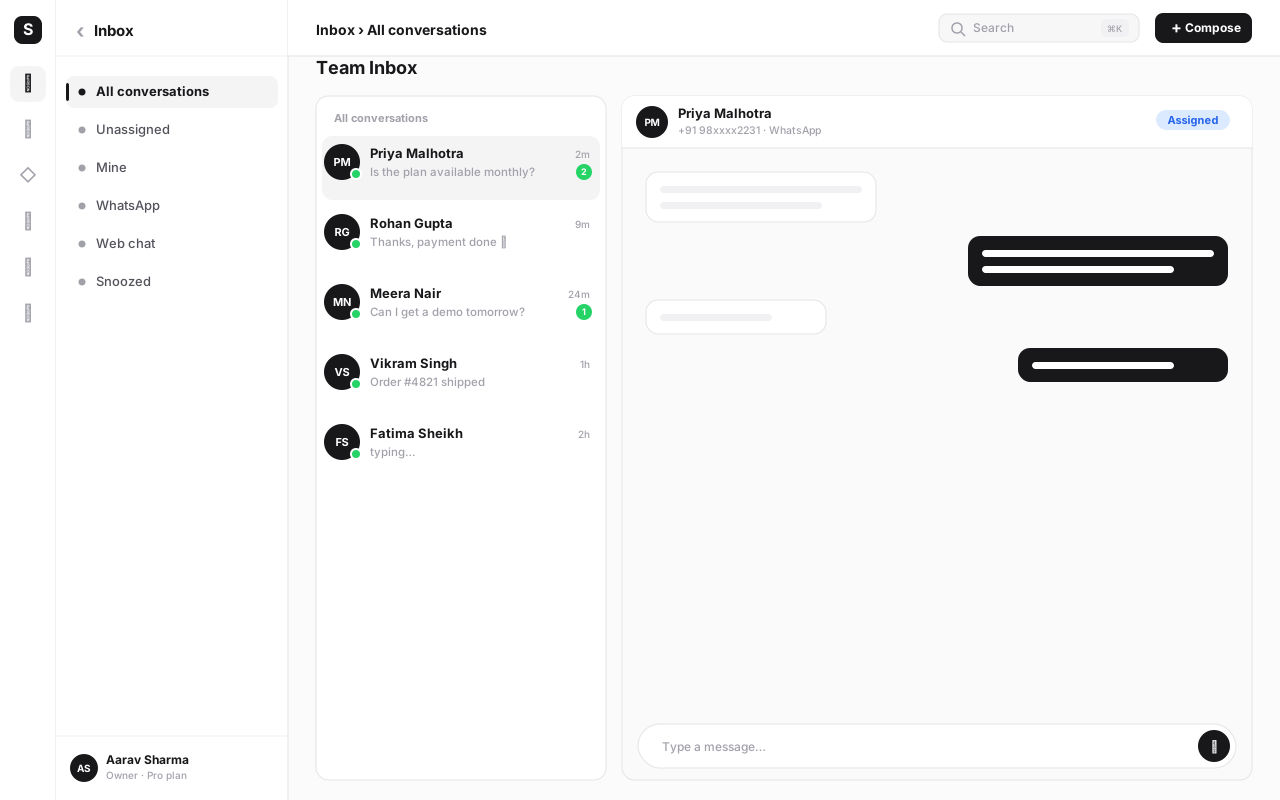
1:1 conversations are reactive support and sales. A customer messages, the window opens, an agent (or a chatbot) replies free-form, the thread lands in your CRM. This is where the shared team inbox lives. It's the bread-and-butter of the channel and, when the customer starts it, often free of Meta charges.
Broadcasts are proactive outreach. You take a list of opted-in contacts, pick an approved template, fill in the variables (often personalised per contact), and send to everyone at once. Each recipient opens a new conversation, billed by the template's category. Done right — segmented lists, relevant content, clear opt-out — broadcasts drive the best open and response rates of any channel. Done wrong — a giant unsegmented blast to a scraped list — they crater your quality rating fast.
The discipline that separates the two: broadcasts demand consent and relevance; 1:1 demands speed. Our deep dive on WhatsApp broadcast campaigns covers list hygiene, segmentation, timing and the template patterns that actually convert.
Building chatbots and automation#
The API's biggest force-multiplier is that software can read and respond to messages, so you can automate the predictable parts of every conversation and let humans handle the rest.
A WhatsApp chatbot on WaChat can:
- Greet and qualify — collect name, intent and basic details before routing to the right team.
- Answer FAQs — pricing, hours, location, order status — instantly, 24/7.
- Take action — place an order, book an appointment, fetch a tracking number, trigger an OTP — by calling into your CRM, store or backend.
- Route intelligently — hand off to a human (or a specific queue) when the conversation needs judgment, with full context preserved.
- Re-engage — fire a utility or marketing template (with consent) when an event happens elsewhere: cart abandoned, payment received, ticket resolved.
You build these without code on a visual canvas, branching on what the customer says and wiring in your own data and systems. Because WaChat sits in the wider SabNode platform, a WhatsApp automation can reach straight into your CRM, payments or calling modules — a feature stand-alone WhatsApp tools can't match.
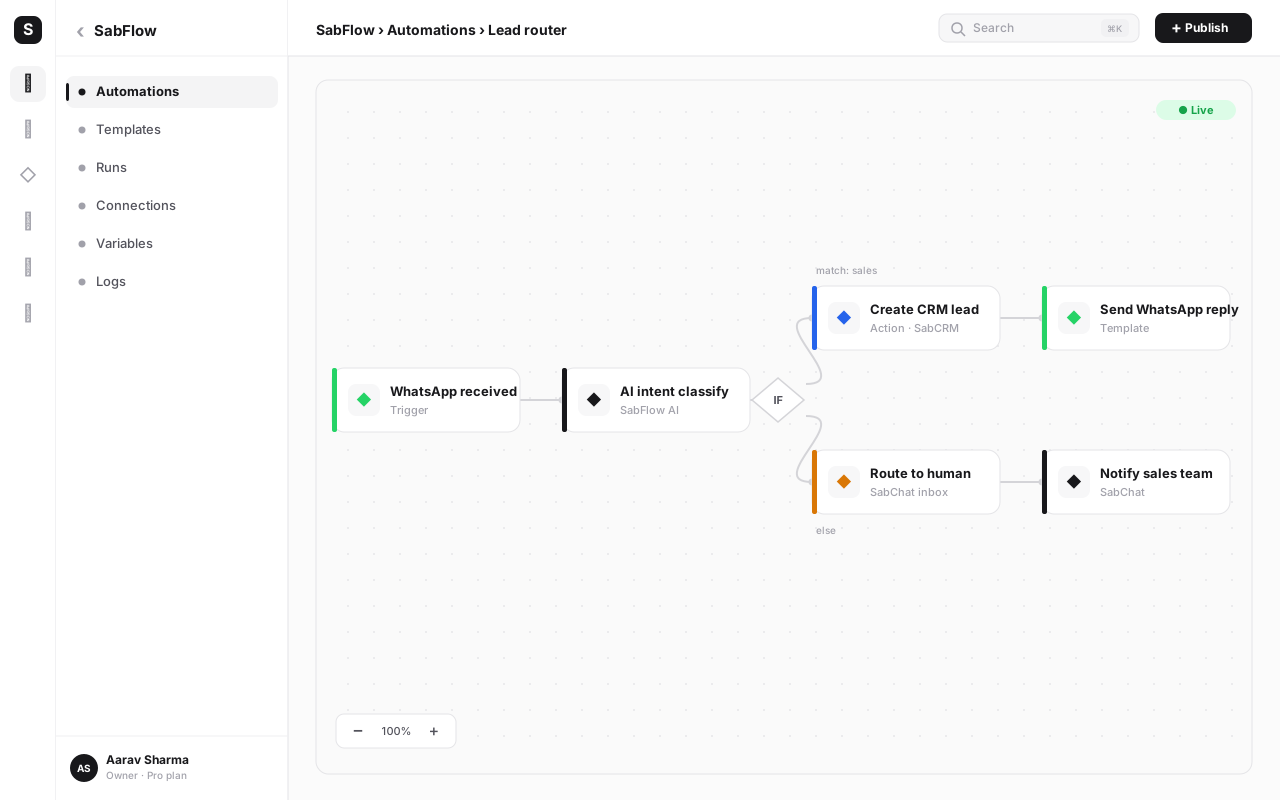
For the full build playbook — flow design, fallback handling, handoff rules and measuring deflection — see the WhatsApp chatbot automation guide. If your automations need to reach beyond WhatsApp into other apps, the workflow automation guide shows how SabFlow connects everything.
The shared team inbox#
The reason most businesses move to the API in the first place isn't broadcasts — it's that one phone can't run a support team. The shared inbox solves that.
Every conversation on your WhatsApp number lands in one place where your whole team works. Agents see who's handling what, conversations get assigned and routed, internal notes stay invisible to the customer, canned replies speed up common answers, and labels keep the queue organised. A supervisor can see response times and open volume across the team. And because it's WaChat inside SabNode, each conversation is stitched to that customer's full history — past calls, orders, deals — not stranded in a messaging silo.
The shared team inbox guide goes deep on routing rules, SLAs, agent roles and the metrics that matter for a team running WhatsApp at volume — or read the WhatsApp-specific shared inbox guide for the WABA-number angle covered here.
Step-by-step: launching WhatsApp on the API the right way#
Here's the order of operations we recommend to every team going live. Following it keeps your quality rating high from day one.
- Pick your number and provider. Choose a dedicated number not on regular WhatsApp, and onboard through SabNode's WaChat using Meta's embedded signup.
- Verify your business with Meta. Submit your documents early; verification unlocks higher limits and the green-tick path, and it runs in the background while you build.
- Submit your core templates. Welcome, order/appointment update, OTP, and one or two marketing templates — categorised correctly — on day one so they're approved before launch.
- Collect real opt-in. Add WhatsApp consent to your website forms, checkout, ads and existing channels. Log when and how each contact opted in. Never message a number that hasn't agreed.
- Set up the shared inbox and roles. Invite agents, define routing, write canned replies, and create labels for your common conversation types.
- Build your first chatbot flow. Start small — a greeting that qualifies and routes — then expand to FAQs and actions once it's reliable.
- Connect your CRM and systems. Wire WaChat to your CRM so conversations log to the right contact, and to your store/backend so the bot can fetch real data.
- Send a small, segmented broadcast. Test on a relevant, opted-in segment before scaling. Watch delivery, read and response rates — and your quality rating.
- Measure and tighten. Review response times, conversation costs by category, template performance and opt-out rates weekly. Cut what underperforms, double down on what works.
Verify early, template early, and earn opt-in before you ever broadcast. Teams that do these three things almost never see quality-rating problems. Teams that buy a list and blast on day one almost always do.
Opt-in, consent and compliance#
WhatsApp's Business Messaging Policy isn't optional fine print — it's enforced automatically through your quality rating, and breaking it gets numbers restricted. The rules are straightforward.
Get explicit opt-in before the first business-initiated message. The customer must clearly agree to receive messages from your business on WhatsApp specifically. A tick-box at checkout, a "message us on WhatsApp" button, a keyword opt-in, or consent captured on a form all work — as long as it's unambiguous and you keep a record.
Identify yourself. The customer should know which business is messaging them. Your display name and (ideally) green tick handle this.
Honour opt-outs immediately. Give a clear way to stop — a "reply STOP" or an opt-out button — and act on it instantly. Continuing to message someone who opted out is the fastest route to spam reports.
Send relevant, expected content. Match the template category to the actual content. Don't dress up a promotion as a "utility" update. Don't message at odd hours. Don't over-frequency people.
Respect the channel's intent. WhatsApp is a personal space; customers tolerate businesses there only when the messaging is wanted. Treat the inbox as a privilege, not a billboard.
In India, layer your normal data-protection hygiene on top: capture consent properly, store it securely, and be ready to show how a contact opted in. WhatsApp itself doesn't run on India's DLT system (that's the SMS regime — see the business SMS marketing guide for that), but the discipline of provable consent is the same.
Common mistakes to avoid#
After onboarding hundreds of Indian businesses onto the API, the same avoidable errors come up again and again.
- Treating the API like the Business app. They're different products. The API has no app, needs a provider, and follows template rules. Expecting a chat app experience leads to confusion on day one.
- Trying to message without a template (outside the window). The "my message won't send" panic is almost always a closed 24-hour window. Outreach needs an approved template — full stop.
- Miscategorising templates. Stuffing promotional content into a utility template to dodge cost or scrutiny gets it rejected and risks your account. Categorise honestly.
- Broadcasting to a bought or scraped list. No opt-in means blocks and spam reports, which crater your quality rating and can restrict your number within hours. Reach is worthless if the number dies.
- Modelling cost per message. WhatsApp bills per conversation by category and country. SMS-style per-message math gives you the wrong budget every time.
- Ignoring the quality rating. It's the early-warning system. A drop from green to yellow is your cue to fix targeting and frequency now, before limits hit.
- Running it outside your CRM. Stranding WhatsApp on its own loses the whole advantage — context. Connect it so every conversation lands on the customer's record.
- Chasing the green tick before going live. It's a discretionary trust badge, not a launch requirement. Get verified, request it, and move on.
- Letting bots run with no human exit. A chatbot that traps frustrated customers in loops is worse than no bot. Always provide a clean handoff to a person.
Where WhatsApp fits in the bigger picture#
The API is most powerful when it isn't an island. A customer who DMs you on WhatsApp, gets a call back, then receives a payment link and an invoice should be one continuous story — not four disconnected tools. That's the case for running WhatsApp inside an all-in-one platform: the conversation, the call, the deal and the payment all live on one customer timeline. Our all-in-one business platform guide lays out that model, and the CRM software guide covers the record everything hangs off. If voice is part of your mix, the cloud calling system guide pairs naturally with WhatsApp for a complete conversation layer.
If you're actively comparing WhatsApp API providers, see how SabNode's WaChat stacks up against Wati, AiSensy and DoubleTick — or read our broader Wati alternative buyer's guide if you're still narrowing down what to look for.
Get on the WhatsApp Business API in days
Connect your number through SabNode's WaChat — embedded signup, template setup, a shared team inbox and no-code chatbots, with transparent per-conversation pricing. Run broadcasts, automate the repetitive work, and keep every conversation tied to the customer.
Conclusion#
The WhatsApp Business API turns WhatsApp from a personal chat app into a real business channel: many agents on one number, template broadcasts to opted-in audiences, chatbots that handle the predictable work, and a shared inbox where it all comes together. The rules that feel restrictive at first — templates, the 24-hour window, conversation pricing, mandatory opt-in — are exactly what keep the channel high-trust and high-converting. Respect them and WhatsApp routinely outperforms email and SMS on engagement.
Start small and in the right order: pick a clean number, onboard through a provider, verify with Meta, submit templates, earn genuine opt-in, then build broadcasts and bots on top. Get those foundations right and the API becomes the most direct line you have to your customers. When you're ready, explore the WaChat module or start free — and read on through the broadcast, chatbot and shared inbox guides to go deeper on each piece.
Frequently asked questions
What is the WhatsApp Business API?
The WhatsApp Business API (officially the WhatsApp Business Platform) is the programmatic, cloud-hosted way for medium and large businesses to send and receive WhatsApp messages at scale through software rather than a phone. It has no app of its own — you connect it to a platform like SabNode's WaChat to run broadcasts, chatbots and a shared team inbox, with multiple agents on one number.
How is the WhatsApp Business API different from the WhatsApp Business app?
The free WhatsApp Business app runs on a single phone for one user and suits a solo owner or tiny shop. The API has no app — it's accessed through business software, supports many agents on one number, sends bulk template messages, runs automation and chatbots, and exposes analytics and webhooks. The API is for teams and volume; the app is for individuals.
How do I get access to the WhatsApp Business API?
You go through a provider like SabNode using Meta's embedded signup. You need a Meta Business account, a phone number not currently active on regular WhatsApp, a display name, and Meta Business verification. The provider walks you through connecting the number, verifying your business and submitting your first message templates — most businesses are live in a few days.
How much does the WhatsApp Business API cost?
Meta bills on a conversation model: you pay per 24-hour conversation window, and the price varies by category (marketing, utility, authentication) and country. Service replies inside the 24-hour customer window are generally free. On top of Meta's per-conversation charge, your provider adds a platform fee. SabNode bills transparently per conversation with no hidden markup; see /pricing for current rates.
What is the 24-hour customer service window?
When a customer messages you, a 24-hour service window opens during which you can reply with free-form messages (no template needed). After 24 hours of customer silence, you can only re-initiate contact using a pre-approved message template. The window is WhatsApp's core rule for keeping business messaging consent-based and non-spammy.
What are WhatsApp message templates?
Message templates are pre-approved message formats you must use to start a conversation or message a customer outside the 24-hour window. Each template is submitted to Meta for review and falls into a category — marketing, utility or authentication — which determines how it's billed. Templates can include variables, buttons, media headers and quick replies.
Do I need opt-in before messaging customers on WhatsApp?
Yes. WhatsApp's Business Messaging Policy requires clear opt-in before you send the first business-initiated message. Customers must agree to receive messages from your business on WhatsApp, you must identify yourself, and you must honour opt-outs. Sending without consent risks low quality ratings, number restrictions and blocking.