Business SMS Marketing in India, Done Right
Promotional, transactional, OTP — every business SMS in India runs through DLT. This guide covers sender IDs, content templates, consent, timing, segmentation and delivery reports, then walks you through launching a campaign in SabSMS.
Business SMS marketing in India is the practice of sending promotional, transactional and OTP text messages to customers through DLT-registered sender IDs and pre-approved content templates, governed by TRAI's commercial-communication rules. Done right, it's the most reliable channel you own: it reaches every phone, needs no app, and lands even when the internet doesn't.
This is the pillar guide to getting it right. We'll cover the three types of SMS and when each applies, how India's DLT regime actually works (sender IDs, templates, consent, scrubbing, timing), how to write messages that fit 160 characters and still convert, how to build and segment an audience, how to read delivery reports, and how to wire up an SMS API for OTPs. Then we'll walk through launching a campaign step by step in SabSMS, SabNode's SMS module.
Why SMS still matters in 2026#
It's fashionable to declare SMS dead. The numbers say otherwise. SMS sits on the network layer of every phone sold in India — no install, no login, no data plan required. A feature phone in a village and a flagship in a metro both receive it identically. That universality is exactly why banks, airlines, hospitals, e-commerce platforms and government services route their most important messages — OTPs, payment confirmations, appointment reminders — over SMS and nothing else.
For a business, SMS occupies a specific, defensible slot in the channel mix:
The trade-off is that SMS is tightly regulated in India, far more than email or even WhatsApp. You cannot just upload a list and blast it. Every header, every template and every campaign passes through the DLT framework. Treat that as a feature, not a bug: the same rules that slow you down at setup are what keep your messages out of spam folders and your sender reputation intact. If you're weighing SMS against chat-first channels, our breakdown of WhatsApp marketing vs SMS marketing covers exactly where each one wins.
The three types of business SMS#
Before you send a single message, you need to know which of three categories it falls into, because the category determines the header you use, the hours you can send, and whether you can reach DND-registered numbers.
| Type | Purpose | Header style | Reaches DND? | Time window |
|---|---|---|---|---|
| Promotional | Offers, discounts, launches, marketing | 6-digit numeric | No (non-DND only) | Daytime only (~9 AM–9 PM) |
| Transactional | Order, booking, payment confirmations | 6-char alphanumeric | Yes | Any time |
| Service (implicit) | OTPs, login codes, account alerts | 6-char alphanumeric | Yes | Any time |
Promotional SMS#
This is marketing in the plain sense: "Flat 30% off ends tonight," "New collection just dropped," "Reactivate your plan and get a free month." Because it's unsolicited commercial content, it's the most restricted. Promotional messages go out only to non-DND numbers (numbers not on the Do Not Disturb registry, or those that have explicitly opted in), only from a numeric sender ID, and only within the permitted daytime window. The platform scrubs DND numbers automatically before the send.
Transactional SMS#
A transactional message confirms something the customer has already done with you: "Your order #4821 is confirmed," "₹1,499 received toward invoice INV-203," "Your booking for 7 PM is set." Because it's service-related and the customer initiated the underlying action, it can reach DND numbers and send at any hour. It uses an alphanumeric header mapped to your brand.
OTP and service-implicit SMS#
OTPs and login codes are the highest-priority traffic on the network. They're triggered directly by the user — someone hits "Login" or "Verify" — so they're treated as service-implicit and delivered around the clock, to any number, with the lowest latency. This is the category most businesses can't live without, and it's almost always wired up through an SMS API rather than a campaign tool.
Getting the category wrong is the single most common cause of rejected SMS. If you send promotional content (an offer, a discount) on a transactional template or header, the operator's content-scrubbing engine will catch the mismatch and block the message. Pick the category first, then write to it.
How India's DLT regime works#
DLT — Distributed Ledger Technology — is the blockchain-backed registration system that India's telecom operators run under TRAI (the Telecom Regulatory Authority of India) to govern all commercial SMS. The goal is to kill spam and spoofing by making every sender, every header and every message template traceable to a verified business. Nothing reaches a handset unless it's registered.
There are four moving parts you have to register, roughly in this order:
| Registration | What it is | Who does it |
|---|---|---|
| Principal Entity (PE) | Your business, verified with GST/PAN and a real address | You, on a DLT platform |
| Telemarketer | The aggregator/platform that actually injects messages | Your SMS provider |
| Sender ID (Header) | The 6-char/6-digit "from" string, e.g. SABNOD | You, linked to your PE |
| Content Template | The approved message body with variable placeholders | You, linked to a header |
Principal-entity and telemarketer registration#
You register your business as a principal entity on one of the operator-run DLT portals (Jio, Airtel, Vodafone Idea and BSNL each run one; registering on one propagates to all). You'll provide GST and PAN details, a business address and a letter of authorization. Your SMS provider — SabSMS, through its upstream aggregator — is registered as the telemarketer that delivers your traffic. You don't manage the telemarketer side; that's the platform's job. For the full walkthrough including documents and timelines, see our DLT registration guide.
Sender IDs (headers)#
A header is the short identity that shows up as the sender of your SMS. Promotional traffic uses a 6-digit numeric header; transactional, service and OTP traffic use a 6-character alphanumeric header derived from your brand name — something like SABNOD or MYSHOP. Each header is registered to your principal entity and categorized. You can hold multiple headers for different brands or message types under one entity.
Content templates and the consent + scrubbing layer#
This is the part teams underestimate. Every message body must be pre-registered as a content template tied to a header and a category. Variable data — name, amount, OTP, order number — is marked with placeholders like {#var#}. When you send, the operator matches your outgoing text against the approved template; if the fixed text doesn't match, the message is rejected. So you write and register templates before you design a campaign, not after.
Two more obligations sit alongside templates:
- Consent. For promotional sends, you must hold proof that the recipient opted in. Keep a record of when and how consent was captured (a checkbox at checkout, a keyword opt-in, a signup form). TRAI's framework allows recipients to manage consent and preferences, and you're expected to honour opt-outs.
- DND scrubbing. Before a promotional batch goes out, DND-registered numbers must be removed. A good platform does this automatically — you upload the list, it scrubs DND numbers, and only eligible numbers receive the message.
Template approval is the longest pole in your setup. Sender IDs often clear in a day or two; content templates can take a few business days, and rejected templates have to be resubmitted. Register every template you'll need — promotional, transactional, OTP, plus a few content variations — at the start, in parallel with your header, so you're not blocked when it's time to launch.
Writing SMS that actually works#
Within those constraints, the craft of SMS is brutal economy. You have 160 characters per segment in the standard GSM-7 alphabet. Use a non-GSM character — many emojis, certain symbols — and the message switches to Unicode encoding, which drops your limit to 70 characters per segment. Go over a single segment and the message splits into multiple parts (concatenated SMS), each billed separately, with slightly fewer usable characters per part because of the joining header.
| Encoding | Chars per single SMS | Chars per part (multipart) | When it triggers |
|---|---|---|---|
| GSM-7 (standard) | 160 | 153 | Plain Latin text, common punctuation |
| Unicode (UCS-2) | 70 | 67 | Emoji, many special symbols, non-Latin scripts |
Practical rules for writing inside these limits:
- Front-load the value. The first 40 characters are what shows in the notification preview. Lead with the offer or the action, not your brand name — the header already shows who you are.
- One clear CTA. "Reply YES," "Show this SMS," "Tap to track," or a short link. Don't ask for two things.
- Use a short, branded link. Long URLs eat your character budget and look untrustworthy. A link shortener (SabNode includes one) keeps it tight and lets you track clicks.
- Spell out the opt-out for promotional. A compact "To opt out reply STOP" satisfies the requirement without burning much of your budget.
- Match the template exactly. Whatever variables you registered (
{#var#}) are the only things you can change at send time. Write the campaign to the template, not the other way round.
Here's a worked example of a promotional message that fits one GSM-7 segment:
Hi {#name#}, your SABNOD cart is waiting. Flat 25% off ends 9PM today. Grab it: sab.link/d/ab12. To opt out reply STOP
That's under 160 characters, leads with personalization and the offer, has one CTA and one link, and includes the opt-out — all matching a pre-registered promotional template.
Building and segmenting your audience#
A clean, well-segmented list is what separates a campaign that converts from one that burns money on irrelevant sends. In SabSMS, your audience lives as contact lists you can build three ways: upload a CSV, sync from your CRM, or collect opt-ins through a keyword or form.
Good segmentation in SMS is coarser than email by design — you're working with phone numbers and a few attributes, and you're paying per message — so focus on the splits that change the message:
- By consent + category. Keep promotional-opted-in contacts separate from transactional-only contacts. Never send marketing to a list that only consented to service messages.
- By recency / lifecycle. New leads, active customers, and dormant customers should get different copy and different offers.
- By geography or language. If you send in multiple languages, segment so each contact gets the right script (and remember Unicode shrinks your character budget).
- By value or behaviour. High-value customers, cart abandoners, recent purchasers — these are the segments where a targeted SMS earns its cost.
Because SabSMS shares the same contact backbone as the rest of SabNode, a segment you build from CRM data — say, "leads created this week who haven't replied" — stays in sync, and the SMS you send is logged back to each contact's timeline. If you want to chain SMS with other channels and triggers, the workflow automation guide shows how to fire an SMS step from any event.
Scheduling, drip campaigns and timing#
Timing in SMS is half regulatory, half strategic.
The regulatory half: promotional SMS only sends in the permitted daytime window (typically 9 AM–9 PM). Schedule a promotional batch for 10 PM and it'll be held or rejected. SabSMS enforces the window so you don't accidentally violate it — but you should still plan around it. Transactional and OTP messages have no such restriction.
The strategic half: even inside the legal window, when you send matters. Mid-morning and early evening tend to outperform the dead middle of the afternoon for retail offers. For a launch or a flash sale, sending slightly before the action window (e.g. a "sale starts at noon" message at 11:30 AM) beats sending after.
Drip and triggered sequences are where SMS stops being a one-shot blast and becomes a system:
- Welcome drip: a new opt-in gets message 1 immediately, message 2 after two days, message 3 after a week.
- Abandoned-cart nudge: an SMS fires 1 hour after a cart is left, with a second reminder the next morning if there's no purchase.
- Re-engagement: dormant contacts get a single, well-timed offer rather than a barrage.
Each step is just a scheduled or event-triggered send against a registered template, with delays in between. Keep drips short — SMS fatigue is real and opt-outs climb fast if you over-send.
Reading delivery reports (DLR)#
You don't get to assume a message arrived. The network gives you back a delivery report (DLR) — a status the operator returns for each message. Reading DLRs is how you measure deliverability, catch problems early, and prove sends for compliance.
| DLR status | Meaning | What to do |
|---|---|---|
| Delivered | Message reached the handset | Nothing — this is the goal |
| Sent / Submitted | Accepted by operator, not yet confirmed delivered | Wait; it usually resolves to delivered or failed |
| Failed | Could not be delivered (invalid number, switched off) | Clean the number from your list |
| Rejected / Blocked | Template or header mismatch, DND, or content scrub | Check template match, category and DND status |
| Expired | Validity period elapsed before delivery | Recipient unreachable for the message lifetime |
In SabSMS, every campaign shows a live breakdown of these statuses plus a delivery rate, so a sudden spike in Rejected tells you a template or category problem immediately — before you've wasted a whole batch. Track your delivery rate over time; a healthy promotional list should sit well above 90% delivered, and a falling rate usually means list decay (dead numbers) or a content/template issue.
SMS API for OTPs and transactional messages#
Campaigns are the marketing side of SMS. The other side — and for many businesses the more important one — is programmatic SMS: your application sending an OTP the instant someone logs in, or a confirmation the moment an order is placed. That runs through an SMS API, not a campaign UI.
The pattern is simple: your backend makes an authenticated API call with the recipient number, the registered template ID and the variable values (the OTP, the order number), and SabSMS injects it into the network and returns a message ID you can use to poll the DLR. Because it's transactional or service-implicit, it delivers instantly, at any hour, to any number including DND.
A few things that matter for API-driven SMS:
- Use the right template and category. OTPs go on a service-implicit template. Don't reuse a promotional template for an OTP — it'll be throttled or blocked.
- Keep OTPs short-lived and single-use. Expire codes in a few minutes and invalidate on use.
- Handle the DLR callback. Wire up a webhook so failed OTPs trigger a fallback (resend, or offer a call).
- Rate-limit on your side. Don't let a script hammer the OTP endpoint — it's a cost and an abuse vector.
Step by step: set up SabSMS and launch your first campaign#
Here's the end-to-end path from zero to a live, compliant campaign. The setup steps (1–5) are one-time; the launch steps (6–11) you'll repeat for every campaign.
- Create your SabSMS workspace. Sign up for SabNode and open the SabSMS module. Create an SMS project — this is the workspace that holds your headers, templates, contacts and campaigns.
- Complete DLT registration. Register your business as a principal entity on a DLT platform with your GST/PAN and authorization letter. Follow the DLT registration guide for the exact documents and portal steps.
- Register your sender ID (header). Add your numeric header for promotional and your alphanumeric header (e.g.
SABNOD) for transactional/OTP, linked to your principal entity. Wait for approval. - Register your content templates. Create and submit each message template — promotional, transactional, OTP — with variable placeholders. Submit them all at once so approval runs in parallel.
- Connect everything in SabSMS. In the SMS project settings, map your approved headers and template IDs so SabSMS knows which template to match at send time.
- Build your audience. Upload a CSV or sync a CRM segment. Confirm you have opt-in proof for any promotional list.
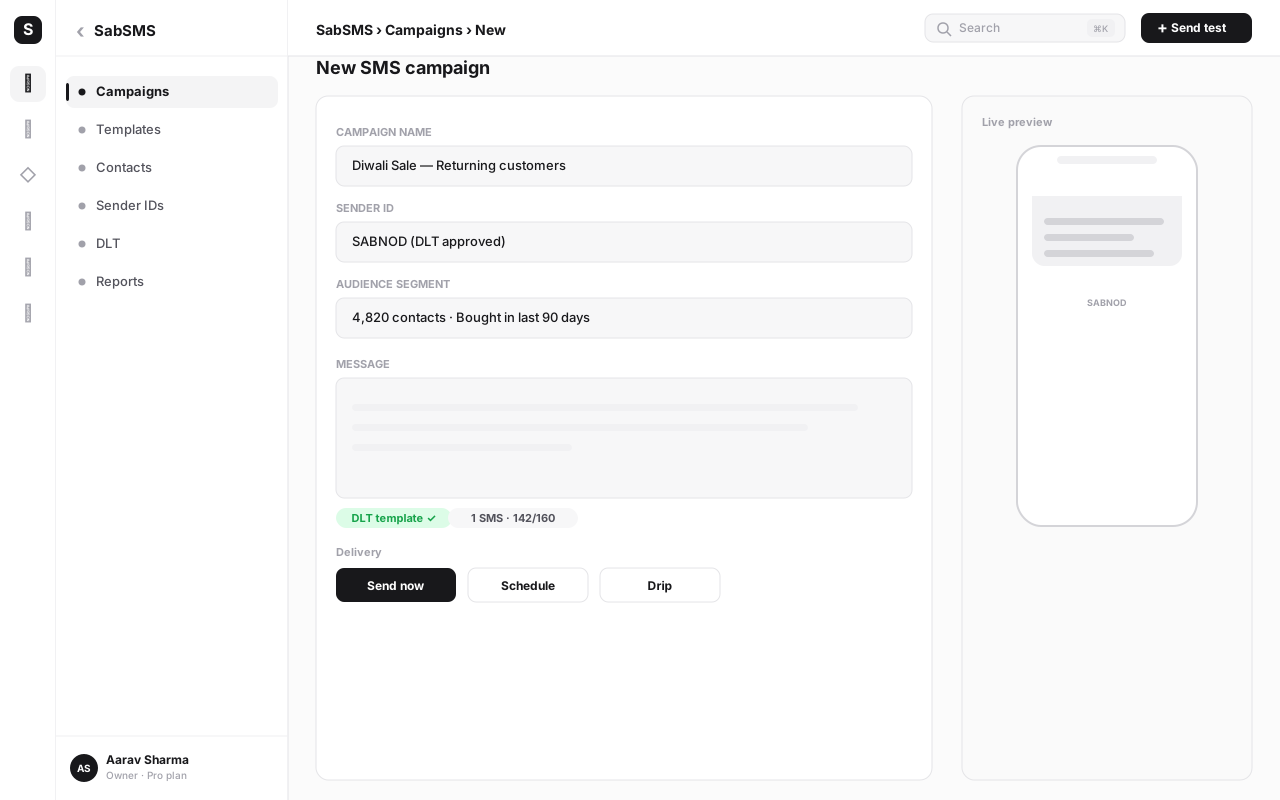
- Create a campaign and pick a template. Start a new campaign, choose the category (promotional/transactional), and select one of your approved templates. SabSMS only lets you send content that matches.
- Fill in the variables and preview. Map your audience fields to the template placeholders (name, offer, link). Preview the rendered message and check the segment count and encoding — confirm it's GSM-7 and one segment if you want a single charge.
- Let the platform scrub. For promotional sends, SabSMS removes DND numbers automatically. Review the eligible-recipient count.
- Schedule inside the legal window. Pick a daytime slot for promotional, or send transactional immediately. Confirm the scheduled time respects the promotional window.
- Send, then watch the DLRs. Launch the campaign and monitor the live delivery-report breakdown. A healthy delivered rate confirms your setup; a spike in rejected means a template or category mismatch to fix before the next send.
Common mistakes to avoid#
Most SMS failures aren't subtle — they're the same handful of mistakes, repeated.
- Sending before templates are approved. You can't send content that isn't registered. Teams build a whole campaign, then discover at launch the template is still pending. Register templates first.
- Putting promotional content on a transactional header. The content scrubber catches the mismatch and blocks the message. Match category to content every time.
- Sending promotional SMS at night. Outside the daytime window, promotional sends are rejected. Schedule inside the window — or let the platform stop you.
- Skipping DND scrubbing. Sending marketing to DND numbers without explicit opt-in is a violation and tanks your sender reputation. Always scrub.
- Ignoring the encoding. One stray emoji flips the whole message to Unicode and halves your character budget — turning a one-segment send into two and doubling the cost. Check the encoding in preview.
- Burying or omitting the CTA. A message with no clear next step is a wasted send. One CTA, front-loaded.
- Never reading DLRs. If you don't watch delivery reports, you won't know your list is decaying or your templates are mismatched until it's expensive. Check them every campaign.
- Over-sending. SMS fatigue drives opt-outs faster than any other channel. Fewer, better-targeted messages beat frequent blasts.
When SMS beats other channels#
SMS isn't the answer to everything — for rich, two-way conversations, WhatsApp is better, and our WhatsApp Business API guide covers that channel in depth. But there are clear cases where SMS is the right, often the only, tool:
- OTPs and authentication. Instant, any-hour, any-number delivery with no app dependency. This is SMS's home turf.
- Time-critical transactional alerts. Payment received, order shipped, appointment in an hour — service messages that must land regardless of DND.
- Phone-only audiences. When all you have is a number and no opt-in for other channels, SMS is your reach.
- Maximum deliverability. When a message absolutely must arrive — no internet required, no app to be installed, no algorithm deciding whether it's shown.
For everything else — ongoing conversations, media, catalogs, support — pair SMS with WhatsApp and email. The point of running them on one platform like SabNode is that you choose the right channel per message while everything logs to the same customer record.
Run compliant SMS campaigns from one place
Start freeConclusion#
Business SMS marketing in India rewards discipline. The DLT framework — principal-entity registration, sender IDs, content templates, consent and DND scrubbing — looks like friction at the start, but it's exactly what makes SMS the most trusted, highest-delivering channel you own. Get the foundations right once: register your entity and headers, approve your templates, keep proof of consent, and respect the promotional time window. Then the day-to-day becomes simple — pick a template, build a clean segment, write tight copy inside 160 characters, send in the right window, and read your delivery reports.
Do that, and SMS earns its place alongside WhatsApp, email and calling in your mix: the channel you reach for when the message has to arrive, no matter what. To see how SMS fits the wider stack, explore the SabNode platform guide, or compare plans on the pricing page and start sending.
Frequently asked questions
Do I need DLT registration to send business SMS in India?
Yes. Every business that sends SMS in India — promotional, transactional or OTP — must register as a principal entity on a DLT (Distributed Ledger Technology) platform run by the telecom operators under TRAI's framework. You then register your sender IDs (headers) and content templates before any message can be delivered. Sending without DLT registration results in messages being blocked by the operators.
What is the difference between promotional, transactional and OTP SMS?
Promotional SMS markets offers and is sent to non-DND numbers within permitted daytime hours from a numeric sender ID. Transactional SMS confirms an action the customer already took — an order, a booking, a payment — and can reach DND numbers because it is service-related. OTP SMS delivers one-time passwords and codes; it is treated as a service-implicit message and is delivered at any hour because it is triggered by the user.
What is a sender ID or SMS header?
A sender ID (also called a header) is the short alphabetic or numeric string that appears as the 'from' name on an SMS — for example SABNOD. Promotional messages use a 6-digit numeric header; transactional, service and OTP messages use a 6-character alphanumeric header mapped to your registered brand. Each header is registered on the DLT platform and tied to your principal entity.
Can I send promotional SMS at night in India?
No. Promotional SMS is restricted to permitted daytime hours, typically 9 AM to 9 PM, under TRAI's commercial communication regulations. Sending promotional content outside that window is a violation and messages are blocked or rejected. Transactional and OTP messages are not subject to the time restriction because they are service-triggered.
How do SMS content templates work under DLT?
Every message body must match a content template you pre-register on the DLT platform, linked to your sender ID and category (promotional, transactional, service-implicit or service-explicit). Variable fields like name, amount or OTP are marked with placeholders. At send time the operator matches your message against the approved template; non-matching content is rejected, so you register templates before you build campaigns.
When is SMS better than WhatsApp or email for a business?
SMS wins when you need guaranteed reach with no app dependency: OTPs and login codes, time-critical transactional alerts, and audiences where you only have a phone number and no opt-in for other channels. SMS lands on every handset, needs no internet or installed app, and has near-universal open rates, which makes it the most reliable channel for service-critical and authentication messages.