DLT Registration for SMS: A Step-by-Step Guide (India)
Before a single business SMS reaches an Indian phone, you have to clear DLT. Here's the entity, header, content-template and consent flow in plain language — and how to avoid the rejections that stall most first-timers.
DLT (Distributed Ledger Technology) registration is the TRAI-mandated process every Indian business must complete before it can send commercial SMS. You register your company as an entity, register your sender IDs (headers), register the exact text of each message as a content template, and capture consent — all on a telecom operator's DLT portal. Until that's done, your SMS won't be delivered.
This guide walks you through the whole thing in plain language: what DLT is, why it exists, who the players are, and a numbered, start-to-finish walkthrough of registering your entity, headers, content templates and consent — plus the rejection reasons that trip up most first-timers and how to keep your templates healthy over time. It pairs with our broader business SMS marketing guide for India; think of DLT as the compliance foundation that everything else sits on.
What DLT is and why TRAI made it mandatory#
DLT stands for Distributed Ledger Technology — the same family of technology that underpins blockchains. In the context of Indian SMS, it's a shared, tamper-resistant registry where every commercial sender, sender ID and message template is recorded and cryptographically pinned. Because the ledger is distributed across the telecom operators, no single party can quietly alter an entry, and every commercial message can be traced back to a verified business that has the recipient's consent.
The Telecom Regulatory Authority of India (TRAI) introduced this under the Telecom Commercial Communications Customer Preference Regulations (TCCCPR), 2018, and operators rolled enforcement out through 2020 and 2021. The driving problem was Unsolicited Commercial Communication (UCC) — spam. For years, Indian phone users were drowning in unwanted promotional texts, fraudulent OTP-style scams and messages from senders who couldn't be held accountable. The old "Do Not Disturb" registry was leaky and reactive. DLT flips the model: instead of trying to block bad messages after they're sent, the network only lets through messages from pre-registered, verified senders using pre-approved content to recipients who haven't opted out.
For a legitimate business, that's actually good news. Once you're on DLT, your messages are trusted by the network, your delivery rates climb, and you're insulated from the spam crackdowns that hit unregistered traffic. The trade-off is the up-front paperwork — which is exactly what this guide is here to make painless.
Every category of commercial SMS — promotional offers, transactional alerts (OTPs, payment receipts), and service messages — must be sent under a registered entity, an approved header and an approved template. The only messages exempt are genuine person-to-person texts. If a business is the sender, DLT applies.
Who the players are in the DLT ecosystem#
Before you start clicking through a portal, it helps to know the cast. DLT has a small number of clearly defined roles, and understanding which one you are saves a lot of confusion.
| Player | Who it is | Their role in DLT |
|---|---|---|
| Principal Entity (PE) | Your business — the brand whose messages go out | Registers the entity, owns the headers, templates and consent; legally responsible for the content |
| Telemarketer / Aggregator | Registered intermediaries that deliver SMS on a brand's behalf | Connect your approved headers and templates to the operator networks and push the traffic |
| SMS Provider / Platform | Software you actually send from (e.g. SabSMS) | Stores your Entity ID, headers and template IDs and validates each message before dispatch |
| DLT Operators | Jio, Vodafone Idea, Airtel, BSNL (each runs a portal) | Host the registration portals and maintain the shared registry the networks scrub against |
| TRAI | The telecom regulator | Sets the TCCCPR rules that the whole system enforces |
Two points worth internalising. First, you are the Principal Entity — the registration is in your business's name, on your PAN and GST, and you're accountable for what goes out. Second, you register on one operator's DLT portal, not all four. The major portals — Jio's (Truedt/Vilpower), Vodafone Idea's, Airtel's, and BSNL's — all feed the same shared registry, so an entity and header approved on one operator's portal are honoured across networks. Pick the portal your aggregator or provider recommends and do everything there.
A common beginner mistake is assuming you must register four times, once per operator. You don't. One registration, one set of approvals, propagated network-wide.
What you'll need before you start#
DLT registration goes fastest when your documents are ready and consistent. Gather these before you create an account:
| Document / detail | Used for | Notes |
|---|---|---|
| Company PAN | Entity registration | The PAN of the registered business, not a personal PAN (unless you're a proprietor) |
| GST certificate | Entity verification | Some portals accept alternatives (e.g. CIN, TAN, or a letter) if you're not GST-registered |
| Authorisation letter | Proving the signatory can act for the entity | On company letterhead, signed by an authorised director or proprietor; portals provide a format |
| Authorised person's details | Account owner / signatory | Name, designation, email and mobile — used for OTP verification throughout |
| Proposed headers | Sender ID registration | Have 3–5 options ready; your first choice may already be taken |
| Draft message content | Content template registration | Write the exact text, with variables marked, for every distinct message you'll send |
The single most important habit here is consistency: the legal name on your PAN, GST and authorisation letter must match exactly. A mismatched or abbreviated company name is the most common reason an entity gets bounced back for re-submission, and it's entirely avoidable.
The four things you register on DLT#
DLT isn't one form — it's four related objects, registered in order, each depending on the one before it. Get this mental model right and the portal stops feeling confusing.
- Entity — your business. Registered once. Produces an Entity ID that ties everything else together.
- Header (Sender ID) — the short name recipients see as the sender. Registered against your entity. Promotional headers are 6-character numeric (operator-assigned in some flows); transactional/service headers are 6-character alphanumeric (e.g.
SABNOD). - Content Template — the exact text of one message, with placeholders for dynamic data. Each distinct message needs its own template. Mapped to a category (promotional, transactional, or service).
- Consent Template — a record of how and where you collect opt-in from recipients, plus the scope of what you'll send them.
Everything flows downhill from the entity. You can't register a header without an entity; you can't register a content template without a header to attach it to; and your promotional sends depend on having consent on file. The next section walks each step.
Step-by-step: registering on DLT, start to finish#
Below is the full sequence. The exact button labels differ slightly between the Jio, Airtel, Vi and BSNL portals, but the flow is identical everywhere. Do these in order.
Step 1 — Create your portal account and register the entity#
- Go to your chosen operator's DLT portal and select Sign up / Register as Enterprise (Principal Entity).
- Enter the authorised person's email and mobile number and verify both with the OTPs the portal sends.
- Choose your entity type (Private Limited, LLP, Partnership, Proprietorship, etc.) — this determines which documents you upload.
- Enter the legal business name exactly as it appears on your PAN. Do not abbreviate or add "Pvt Ltd" if your PAN doesn't.
- Upload your company PAN and GST certificate (or the accepted alternative), plus the authorisation letter on letterhead using the portal's format.
- Submit and wait for verification. On approval you receive a unique Entity ID (a long numeric string). Save it — every header, template and provider link references it.
Entity approval typically lands within one to three business days. If it's rejected, the portal states the reason — almost always a name mismatch or an unreadable document scan. Fix and resubmit.
Step 2 — Register your headers (Sender IDs)#
- Inside your approved entity, open Header registration (sometimes labelled "Sender ID").
- Choose the header type by use case: Promotional for marketing offers, or Transactional / Service for OTPs, alerts and service updates.
- Enter your proposed 6-character header. For transactional/service it's alphanumeric (e.g.
SABNOD,MYSHOP); for promotional flows it may be numeric or operator-assigned. Have alternates ready in case your first choice is taken. - Select the category the header maps to (e.g. Banking, E-commerce, Education) — this must match your real business activity.
- Submit. Header approval is usually quick — one to two business days. Approved headers appear in your entity's header list, ready to attach to templates.
A header is reusable: you'll send many different templates under the same one. Most businesses register two — one transactional/service header and one promotional header.
Step 3 — Register your content templates#
This is where care pays off. Each distinct message you want to send is a separate template.
- Open Content Template registration and choose the template type / category:
- Promotional — marketing, offers, discounts (sent only to opted-in or non-DND numbers in defined windows).
- Transactional — OTPs and messages tied to a transaction the customer initiated (e.g. an OTP for a login or payment).
- Service – Implicit — service messages arising from an existing relationship (e.g. order shipped).
- Service – Explicit — service messages that need explicit consent (e.g. a renewal reminder that isn't strictly transactional).
- Select the header this template will be sent under (the categories must be compatible).
- Paste the exact message text. Mark dynamic parts with the variable placeholder — commonly
{#var#}. For example:Hi {#var#}, your order {#var#} has shipped and will arrive by {#var#}. Track: {#var#}. - Keep variables for genuinely dynamic data only (names, amounts, dates, OTPs, links). Don't hide whole sentences or offers inside a variable — operators reject that.
- Add your brand identification clearly in the body so recipients know who's messaging them.
- Submit. On approval you receive a Template ID. Content templates are often the fastest to clear — sometimes within hours — though service-explicit and some transactional templates take longer.
Register a separate template for every message variation: order confirmation, OTP, delivery update, payment receipt, promotional offer, and so on. Trying to make one over-flexible template cover everything is a classic cause of rejection and later mismatches.
Step 4 — Register your consent templates#
Promotional and service-explicit messaging depend on consent. A consent template records how you obtained opt-in and what you'll send.
- Open Consent Template registration.
- Select the header / brand the consent applies to.
- Write the consent scope — a short description of what the customer agreed to receive (e.g. "promotional offers and updates from MyShop").
- Note the source of consent (website checkout opt-in, in-store form, app sign-up) so it's documented if challenged.
- Submit for approval and keep your real-world opt-in records (timestamps, source) in your own system — DLT registers the template; you remain responsible for proving consent.
Transactional OTPs don't require a promotional consent template, but you should still only message customers who have a genuine relationship with you.
Step 5 — Link DLT to your SMS provider#
Approvals on the portal are useless until your sending platform knows about them. This final step connects DLT to where you actually send from.
- In your SMS provider — for example, SabSMS — open the SMS settings or compliance area.
- Enter your Entity ID from Step 1.
- Add each approved header and its type.
- Add each approved content template with its Template ID and the variable structure.
- Map the provider's "telemarketer" or aggregator chain if the portal asks you to whitelist one — your provider tells you which IDs to add.
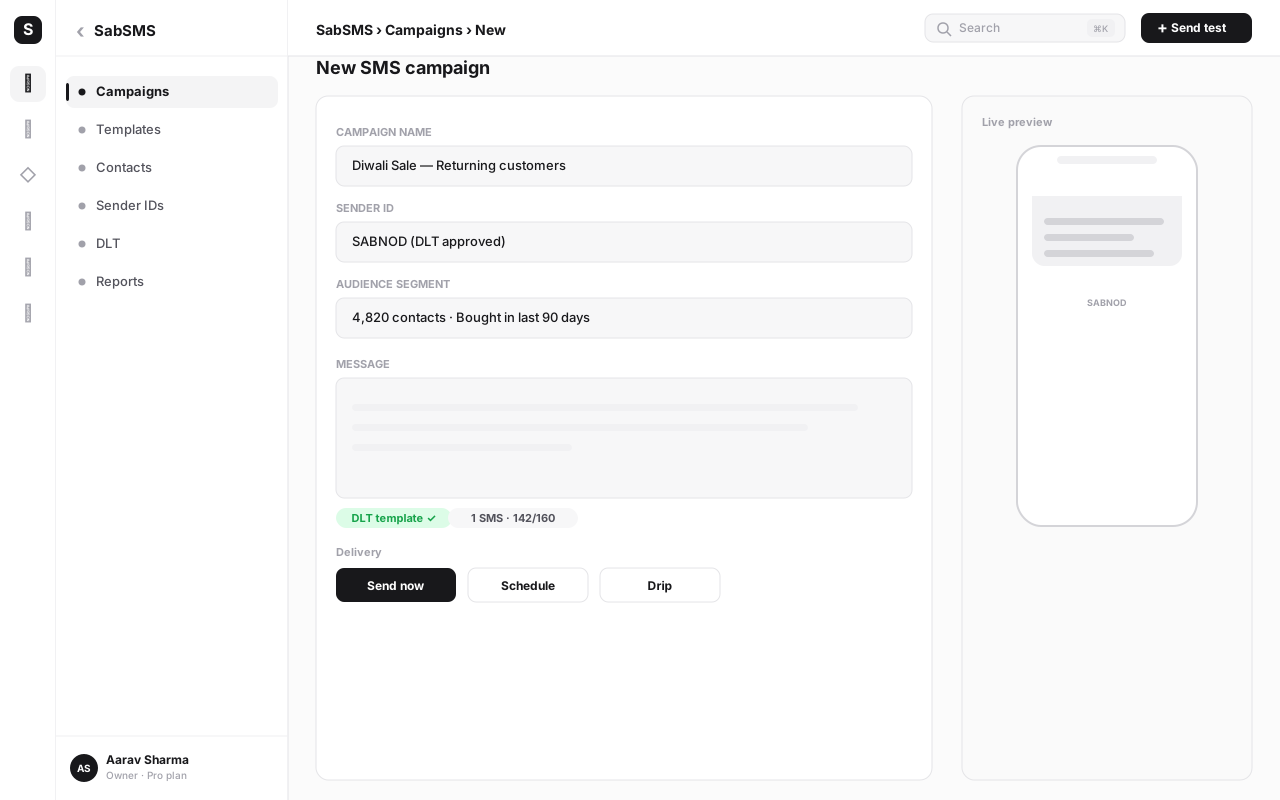
- Save. From now on, every outbound message in SabSMS is validated against your registered headers and templates before it sends, so a campaign physically cannot go out using unapproved content.
In SabSMS this linkage is part of the SMS project setup, alongside your sender configuration. Once it's done, composing a campaign means picking from your approved headers and templates — the compliance is built into the workflow rather than bolted on afterwards.
The number, order and meaning of variables in your registered template must match what you actually send. If your template has three {#var#} placeholders, every message must fill exactly three, in the same positions. A four-variable send against a three-variable template fails the network scrub and silently fails to deliver. This single mismatch is the most common live-traffic failure after registration.
Approval timelines: what to expect#
DLT approvals are faster than most people fear, but they're not instant, so plan around them. These are realistic ranges, not guarantees — operator load and document quality both move the needle.
| Registration step | Typical timeline | What slows it down |
|---|---|---|
| Entity registration | 1–3 business days | Name mismatch, unreadable scans, wrong entity type |
| Header (Sender ID) | 1–2 business days | Header already taken, wrong category mapping |
| Content template | A few hours to 1 day | Variable misuse, prohibited content, brand not identified |
| Consent template | Usually same day to 1 day | Vague consent scope |
| Provider linking | Minutes (self-service) | Mistyped Entity or Template IDs |
The practical takeaway: run steps in parallel where you can. You must register the entity first, but once it's approved you can submit headers and start drafting templates the same day. For a brand-new setup, budget roughly a week to be fully live with a comfortable buffer — far less if your documents are clean and your templates are well written.
Common mistakes and rejection reasons#
Most DLT friction is self-inflicted and predictable. Here are the failures we see most often, and how to dodge them.
A few of these deserve a closer look, because they cause the most wasted time:
Category mismatch. This is the big one. If you map a marketing message to a transactional header to dodge DND windows, the operator scrub catches it and the message is dropped — or worse, the header is flagged. Promotional content goes under a promotional header and category, full stop. Transactional is strictly for messages the customer's own action triggered, like an OTP.
Variable abuse. DLT wants the fixed part of a message locked and only the dynamic part variable. If you try to register Dear customer, {#var#} and then push different full sentences through that variable, it'll be rejected — and even if it slips through, it defeats the entire point of the system and risks your header.
Prohibited content. Misleading offers, guaranteed-return financial pitches, unverified loan or lottery messaging, and anything that can't be substantiated will be rejected. The registry is designed to make exactly this kind of content traceable and stoppable.
Name and document mismatch. At the entity stage, your PAN name is the source of truth. Match it character for character on the GST certificate and the authorisation letter. An auto-filled "M/s" prefix or a missing "Private Limited" is enough to send you back to the queue.
If a submission is rejected, the portal always states a reason. Read it literally, fix the one thing it names, and resubmit — there's no penalty for resubmitting, and most second attempts go through.
Ongoing template management#
DLT isn't a one-time chore you forget after go-live. Treat your registered headers and templates as a living asset:
- Add a template before you need it, not when a campaign is blocked. New message types — a seasonal offer, a new service alert — each need their own approved template. Submit early so approval lands before launch day.
- Never edit the sent text away from the registered text. If your message needs to change, register a new template (or a new version) and switch to it. Drifting from the approved wording is the fastest way to start losing deliveries.
- Keep your provider in sync. Whenever you approve a new header or template on the DLT portal, add its ID to SabSMS straight away. A template approved on the portal but not linked in your provider simply isn't usable yet.
- Audit your consent. As your opt-in sources change, keep your consent templates and your stored records aligned. If you're ever questioned, you want the registered scope and your real opt-in data to tell the same story.
- Watch delivery reports. A sudden drop in delivery for one header often means a template mismatch or a category issue crept in. Catching it in your reports — which SabSMS surfaces per campaign — lets you fix it before it spreads.
Done well, this is maybe an hour of upkeep a month, and it keeps your sender reputation and delivery rates healthy.
DLT is the compliance layer. On top of it sit the things that actually grow your business — segmentation, timing, personalisation and automation. Once you're registered, our business SMS marketing guide for India covers how to turn compliant sends into results, and you can trigger those sends automatically with workflow automation.
How SabSMS makes DLT manageable#
The hardest part of DLT for most teams isn't the portal — it's keeping the entity, headers, templates and the sending platform in sync, and never accidentally sending something that doesn't match. That's exactly the gap SabSMS closes.
When you set up an SMS project in SabSMS, you enter your Entity ID, register your approved headers and link your content templates with their variable structures. From then on, the platform does the matching for you: pick a header, pick a template, fill the variables, and SabSMS confirms the send is compliant before it leaves. There's no way to fire a campaign with an unregistered header or a variable count that doesn't match — the compliance is built into the compose flow, not a checklist you have to remember.
For businesses that also use WhatsApp, the same India-first compliance thinking runs through SabNode's platform — including the separate (but conceptually similar) approval flow for the WhatsApp Business API. One login, one place to manage every regulated channel.
Send DLT-compliant SMS without the guesswork
SabSMS keeps your Entity ID, headers and content templates linked and validates every message before it sends — so compliant SMS is the default, not a checklist. Start free and connect your DLT setup in minutes.
Conclusion#
DLT registration looks intimidating on day one and routine by day three. Strip away the portal jargon and it's four objects registered in order — your entity, your headers, your content templates and your consent — followed by linking those approvals to wherever you send from. TRAI built the system to make commercial messaging in India trustworthy and traceable, and once you're inside it, that trust works in your favour: better delivery, fewer surprises, and a sender reputation you can rely on.
The businesses that breeze through are the ones that prepare their documents carefully, write purpose-built templates with disciplined variables, and map every message to the right category. The ones that stall are usually fighting a name mismatch or a category they tried to bend. Now that you know which is which, you can skip straight to the easy path.
Get your entity approved, register a clean header and a few well-formed templates, link them to SabSMS, and you'll be sending compliant, deliverable SMS across India — with the compliance layer handled and your attention free for the part that actually grows revenue. Explore the full SabNode platform, check pricing, or start free and build your first DLT-linked SMS project today.
Frequently asked questions
What is DLT registration and why is it required for SMS in India?
DLT (Distributed Ledger Technology) registration is a TRAI-mandated process that records every business sender, sender ID and message template on a blockchain-based registry maintained by the telecom operators. Since 2020, Indian operators block any commercial SMS whose sender and template are not pre-registered on DLT. It exists to curb spam and unsolicited commercial communication (UCC) by making every commercial message traceable to a verified, consenting business.
How long does DLT registration take?
Entity registration is usually approved within one to three business days once your PAN, GST and authorisation documents are correct. Header (sender ID) approval typically takes one to two business days. Content templates are often the fastest — frequently within a few hours to a day — though service-explicit and transactional categories can take longer. Build in roughly a week end to end for your first setup, and run header and template work in parallel.
Can I send SMS without DLT registration in India?
No. Promotional, transactional and service SMS to Indian numbers all require a registered DLT entity, an approved header and an approved content template. Operators scrub every message against the DLT registry in real time and reject anything that does not match. Sending without DLT simply means your messages never get delivered.
What is the difference between a DLT header and a content template?
A header (also called a sender ID) is the 6-character name that appears as the sender of your SMS — for example, SABNOD. A content template is the exact text of the message, with placeholders such as {#var#} for dynamic values like names or OTPs. You register headers once and reuse them; you register a separate template for each distinct message you want to send.
Why do DLT content templates get rejected?
The most common reasons are a mismatch between the template variables and how you actually use them, wrong category mapping (sending promotional content under a transactional header), prohibited or misleading content, missing or unclear brand identification, and templates that try to slip in promotional offers under a service-explicit category. Keeping the registered text and the sent text identical — variables and all — prevents most rejections.
How does DLT connect to my SMS provider like SabSMS?
After your entity, headers and templates are approved on the operator's DLT portal, you map (link) them to your messaging provider. In SabSMS you add your Entity ID, your approved headers and your template IDs, and the platform validates each outbound message against them before sending — so a campaign can only go out using a header and template that DLT has already approved.