Cloud Calling for Business, Explained End to End
No PBX box, no copper line. A cloud calling system turns the internet into your phone network — virtual numbers, a softphone in the browser, IVR, queues, recording and every call logged to the CRM. Here's exactly how it works.
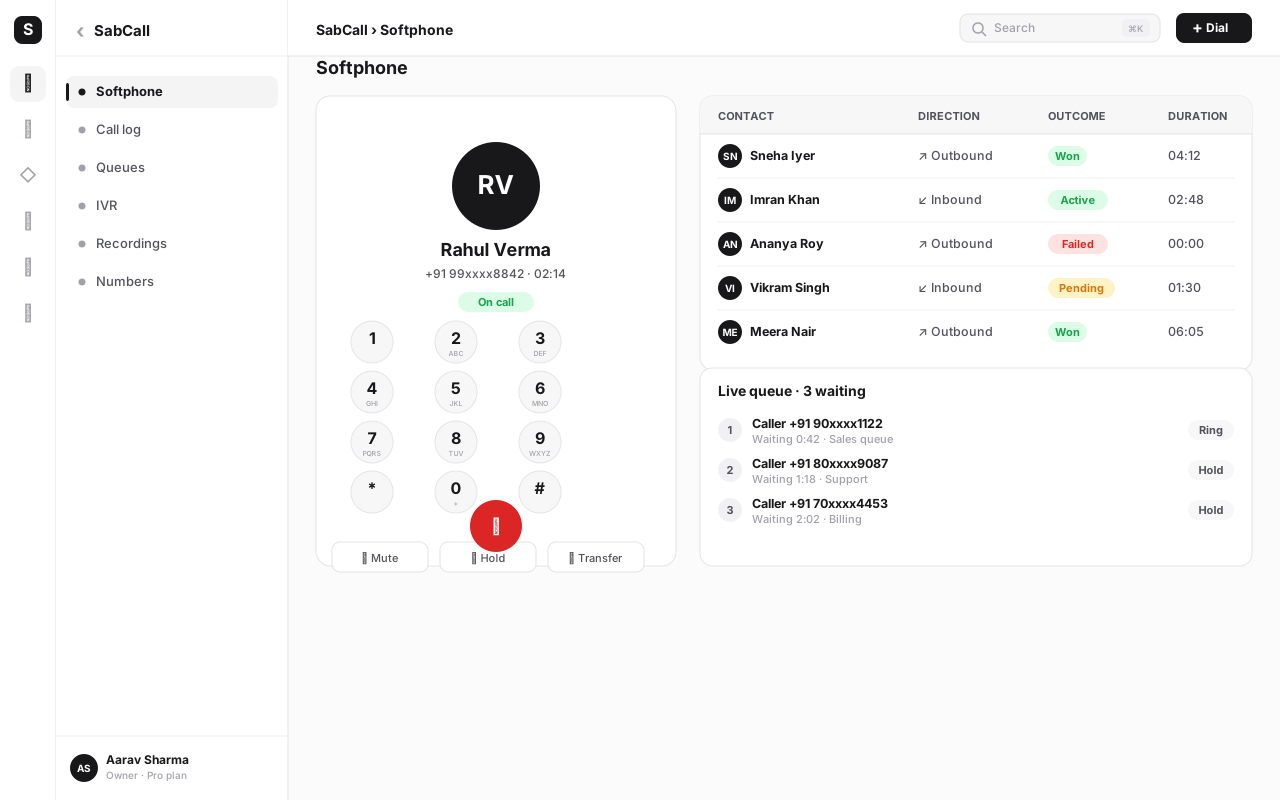
A cloud calling system is a business phone setup that runs entirely over the internet — no PBX box, no copper lines, no desk phones required. Numbers are virtual, calls travel as data, and your team dials and answers from a softphone in the browser. IVR menus, call queues, recording, routing and CRM logging are all configured in software, so the whole phone system lives in a dashboard.
This guide explains cloud calling from the ground up: what it actually is, how it differs from traditional landlines and on-premise PBX, the mechanics of how a call travels over the internet, and the core capabilities — IVR, queues, recording, click-to-call, voicemail, analytics and supervision — that make it useful for a real business. We'll use SabCall, SabNode's self-hosted cloud phone system, as the worked example throughout.
What a cloud calling system actually is#
Strip away the jargon and a cloud calling system is one idea: your phone system is software, and the internet is the wire.
For most of the twentieth century, a business phone meant a physical line — a pair of copper wires from the exchange to a desk phone — and, once you had more than a few staff, a PBX (Private Branch Exchange): a hardware box installed on your premises that switched calls between internal extensions and the outside world. The PBX was expensive, it sat in a cupboard, it needed an engineer to reconfigure, and it tied your phone system to your building. If you moved offices or wanted a new menu option, you booked a visit.
Cloud calling — also called cloud telephony or VoIP (Voice over Internet Protocol) — moves all of that into software running on internet infrastructure. The "exchange" is now a program. Your numbers are virtual. Your extensions are user accounts. Your IVR menu is a flowchart you edit in a browser. And your "desk phone" is a softphone: a calling interface that runs in a web browser or a mobile app, so an agent with a laptop and a headset has a fully functional business line from anywhere.
That shift — from a box you own to software you configure — is what unlocks everything else in this guide.
| Term | What it means | Why it matters |
|---|---|---|
| VoIP | Voice over Internet Protocol — carrying a call as data packets | The core technology that makes internet calling possible |
| Cloud telephony | A phone system delivered as software over the internet | No hardware to buy, install or maintain |
| SIP | Session Initiation Protocol — sets up, manages and ends a call | The "dial tone" of VoIP; how devices find each other |
| DID / virtual number | Direct Inward Dialing — a phone number not tied to a physical line | Get a local, toll-free or India number in minutes |
| Softphone | A phone that runs in a browser or app, not as hardware | Agents call from a laptop or phone, anywhere |
| IVR | Interactive Voice Response — the "press 1 for sales" menu | Routes callers without a human operator |
Cloud calling vs traditional PBX and landlines#
The clearest way to understand cloud calling is to put it next to what it replaces. The difference isn't a feature here or there — it's a different shape entirely.
A landline ties a number to a physical pair of wires and a specific desk. A legacy PBX adds the ability to switch many lines internally, but it's a capital purchase that lives in your building and depends on a technician for every change. Both assume your phone system is a place. Cloud calling assumes it's a service — something you log into, configure in software, and use from wherever your people happen to be.
| Dimension | Traditional landline / PBX | Cloud calling system |
|---|---|---|
| Where it lives | Copper lines + a box on your premises | Software on internet infrastructure |
| Upfront cost | Hardware, installation, wiring | None — sign up and configure |
| Adding a number or extension | Engineer visit, days of lead time | Minutes, in a dashboard |
| Where agents work | At the desk the line runs to | Anywhere with internet |
| Scaling up or down | Buy/return hardware; re-wire | Add or remove users instantly |
| IVR, queues, routing | Limited; often extra hardware | Built in, edited in software |
| Call recording & logging | Add-on appliance, manual storage | Automatic, searchable, CRM-linked |
| Maintenance | Your responsibility / a contract | Handled in the platform |
The practical upshot: a cloud calling system gives a five-person business the same call-handling sophistication that used to require an enterprise PBX and an IT team — and lets that business reconfigure it on a Tuesday afternoon without calling anyone.
A PBX answers the question "which desk does this call go to?" A cloud calling system answers "which person does this call go to, wherever they are right now?" Decoupling the number from a physical location is what makes remote teams, instant scaling and automatic CRM logging possible.
How a cloud call actually travels (the mechanics)#
It helps to know what happens between someone dialing your number and an agent saying "hello." None of this requires you to manage it — the platform does — but understanding it makes every later decision clearer.
-
A caller dials your virtual number. That number is a DID provisioned to your account. It isn't wired to a desk; it's an address the platform owns and points wherever you tell it to.
-
The call enters the platform over a trunk. A SIP trunk is the connection between the public phone network and your cloud system — the on-ramp that carries calls in and out. For India calling, that means a carrier-grade trunk that can originate and receive calls on local numbers.
-
SIP sets up the session. SIP — Session Initiation Protocol — is the signaling layer. It's the part that says "there's an incoming call for this number, here's who's calling, find a device that can answer." It negotiates the connection; it doesn't carry the audio itself.
-
The audio flows as media packets. Once the session is established, your voice is digitized and sent as a stream of small packets (using a media protocol like RTP), compressed by a codec for clarity over the bandwidth available. This is the actual conversation, traveling as data.
-
Routing logic decides where it lands. Before a human is involved, your IVR and routing rules run: play a greeting, offer a menu, check business hours, then send the call into a queue or directly to an agent's softphone.
-
An agent answers in the browser. The agent's softphone — running in their browser or app — rings. They click answer, and the encrypted media stream connects the two ends. No desk phone, no copper, no PBX in a cupboard.
-
Everything is recorded to the record. As the call happens and ends, the system logs it: who, when, how long, the recording, the outcome — and on an integrated platform, all of that is written to the matching CRM contact.
The beauty of this design is that each layer is software you control. Want a different greeting at night? Edit the IVR. Need a new number for a campaign? Provision a DID. Want every sales call recorded? Toggle a setting. None of it touches hardware.
The core capabilities of a cloud calling system#
A cloud phone system is far more than "make and receive calls over the internet." The reason businesses adopt one is the stack of capabilities that come built in — each of which would have been a separate appliance or service in the PBX era. Here are the ones that matter, and how they work in SabCall.
IVR: the menu that routes callers#
An IVR (Interactive Voice Response) is the automated menu a caller hears: "Press 1 for sales, 2 for support, 3 for billing." Instead of every call landing on one overwhelmed person, the IVR greets callers, offers choices, checks business hours, and routes each call to the right team or queue — or to voicemail after hours.
In a cloud system the IVR is a visual flow you build and edit yourself: record or type-to-speech a greeting, add menu options, branch on the key pressed, and point each branch at a queue, an agent group or a fallback. Because it's software, you can change it in minutes — a holiday message, a new department, a temporary "we're experiencing high volume" notice. We cover building one step by step in the IVR setup guide.
Call queues and smart routing#
When more calls arrive than agents can immediately answer, a call queue holds callers in line, plays hold music or position announcements, and connects them to the next free agent. Routing decides which agent — and good routing is the difference between a caller reaching the right person and being bounced around.
Common routing strategies a cloud system gives you:
- Round-robin — distribute calls evenly so no one agent is overloaded.
- Skills-based — send a billing question to the billing-trained group.
- Least-busy / longest-idle — route to whoever's been free longest.
- Time-of-day — different routing for business hours vs nights and weekends.
- Sticky / preferred agent — return a repeat caller to the rep they spoke to before.
These are the building blocks of a real call center, and they're all configured in software rather than wired into a box.
Call recording#
Every call can be recorded automatically, stored securely, and attached to the contact and the agent who handled it. Recordings are used for quality and coaching ("let's listen to how that objection was handled"), for compliance and dispute resolution, and increasingly as input to AI that transcribes and summarizes calls. In SabCall, recordings can be archived to your file library, organized by agent, with per-project and per-agent settings controlling what gets captured.
Click-to-call from the CRM#
This is the feature agents feel every day. Instead of reading a number off a screen and typing it into a separate dialer, an agent clicks a call button right on the contact record and the cloud system dials it. No transcription errors, no app-switching, and — critically — the call is logged to that exact contact without anyone lifting a finger.
Voicemail and missed-call automation#
When no one can answer, a cloud system takes a voicemail, transcribes it, and drops it onto the contact's timeline so it can't be lost in a personal phone. Better still, missed-call automation turns a missed call into action: fire a workflow that sends a WhatsApp or SMS apology with a callback link, create a follow-up task, or add the caller to a callback queue. A missed call stops being a lost lead and becomes a triggered conversation.
Analytics and reporting#
Because every call is data, a cloud system measures what a landline never could: call volume by hour, answer rate, average wait time, average handle time, abandonment rate, missed-call rate, and per-agent performance. Supervisors get a live view of queues and a historical view of trends, so staffing and coaching decisions are made on numbers, not hunches.
Agent supervision: barge, whisper, monitor#
For teams, live supervision lets a manager support agents in real time on an active call:
- Monitor (listen) — hear a live call silently for quality assurance.
- Whisper — speak only to the agent, unheard by the customer, to coach mid-call.
- Barge — join the call fully to rescue a difficult situation.
These three modes turn a new agent's first weeks from sink-or-swim into guided, real-time coaching.
| Capability | What it does | Business outcome |
|---|---|---|
| IVR | Auto-greets and routes callers via a menu | Fewer misrouted calls, no front-desk bottleneck |
| Call queues & routing | Holds and distributes calls to the right agent | Lower wait times, fairer agent load |
| Call recording | Captures and stores every conversation | Quality, compliance, coaching, AI summaries |
| Click-to-call | Dials straight from the CRM record | Faster dialing, zero untracked calls |
| Voicemail & missed-call automation | Captures and reacts to unanswered calls | No lost leads; instant follow-up |
| Analytics | Measures volume, wait, handle, answer rates | Data-driven staffing and coaching |
| Supervision (barge/whisper/monitor) | Live manager support on calls | Faster agent ramp, rescued conversations |
Why the CRM link is the real prize#
You can buy a standalone cloud calling tool, and it will do most of the above. But the capability that changes how a business feels is the one that only appears when calling lives on the same platform as your customer data: every call is automatically part of the customer's story.
In a stitched-together setup, the calling app and the CRM are strangers. An agent makes a call in one tool, then — if they remember, and they often don't — opens the CRM and types a note. Half the calls never get logged. Missed calls vanish into a personal phone. Nobody knows the customer was already called twice this week.
On an integrated platform like SabNode, the calling module (SabCall) and the CRM share one data model. Open a contact and you see, in one timeline, the WhatsApp enquiry, the call your agent made (with its recording and outcome), the proposal, and the payment. Click call on the record and SabCall dials it — and writes the result straight back. There's no sync to break, no note to forget, no call that escapes the record.
That continuity is what lets a small team operate like a much larger, more organized one. Any agent can pick up any conversation with full context, supervisors can see the whole picture, and automations can react to calls the same way they react to messages.
How to set up a cloud calling system: a practical walkthrough#
Setting up cloud calling is dramatically simpler than the PBX era — there's no installation, no wiring, no engineer visit. Here's the path from zero to a working business line.
-
Create your workspace and project. In SabNode, spin up a SabCall project. This is the container for your numbers, agents, IVR and settings.
-
Get a virtual number (DID). Provision a number from the dashboard — a local India number, a toll-free line, or a number for a specific city or campaign. If you have an existing number, you can start the porting process in parallel and use a temporary number meanwhile.
-
Add your agents. Invite the people who'll make and take calls. Each becomes a user with a browser softphone — no hardware to ship, no desk phones to configure. Assign roles so supervisors get monitoring rights and agents get the dialer.
-
Build your IVR. Create the menu callers hear: a greeting, options ("1 for sales, 2 for support"), business-hours logic, and a fallback to voicemail after hours. The IVR setup guide walks through this in detail.
-
Set up queues and routing. Group agents into queues (sales, support, billing), pick a routing strategy for each, and decide what happens when everyone's busy — hold with music, offer a callback, or send to voicemail.
-
Turn on recording and CRM logging. Enable call recording at the project and agent level, and confirm calls are writing to the CRM. Verify by placing a test call and checking it appears on the contact's timeline.
-
Wire up missed-call automation. Connect a workflow so a missed call triggers an SMS or WhatsApp follow-up and a callback task — so no caller falls through the cracks.
-
Test, then go live. Place inbound and outbound test calls, walk the IVR, check the recording and the CRM entry, and confirm supervisors can monitor. Then point your published number at the system and start taking real calls.
Cloud calls ride your internet connection, so audio quality tracks connection quality. A stable broadband or 4G/5G link comfortably carries HD voice. For call-heavy teams, give agents wired or strong Wi-Fi connections and a decent headset, and the platform can fail over to mobile or voicemail if a link drops mid-call.
Cloud calling in the India context#
For Indian businesses, a few specifics matter. Virtual numbers — local DIDs for major cities, toll-free numbers, and the ability to present a proper Indian caller ID — are central to looking like a real, reachable business to Indian customers. A cloud system provisions these from a dashboard rather than through a telecom paperwork marathon, and routes them to agents anywhere in the country (or working from home).
Caller ID handling matters for outbound calling: presenting a verified Indian number rather than an unknown international one materially improves answer rates. And because calling sits alongside SMS and WhatsApp on the same platform, a missed call can instantly trigger a DLT-compliant SMS or a WhatsApp message — turning India's most common first touch (the missed call) into an automated, compliant follow-up. SabCall is built India-first for exactly these patterns: India trunks, Indian virtual numbers, and tight integration with the rest of the SabNode stack.
When a cloud calling system is the right call#
Cloud calling fits the overwhelming majority of modern businesses, but it's worth being clear about where it shines and the trade-offs to plan for.
If your team is remote or hybrid, scaling, tired of paying for hardware that can't move, or simply losing calls because nothing gets logged, cloud calling isn't a marginal upgrade — it's a different category of phone system. The few genuine cons are about planning (a failover for outages, a porting window) rather than fundamental limitations.
Common mistakes when adopting cloud calling#
- Treating it like a dialer, not a system. The value isn't just making calls over the internet — it's the IVR, routing, recording and CRM logging working together. Set those up, don't just hand out a softphone.
- Skipping the IVR design. A lazy "press 1, press 2" menu frustrates callers. Map your real call types first, then build a menu that routes them in as few steps as possible. The IVR guide helps.
- Ignoring internet readiness. Putting agents on flaky Wi-Fi and blaming the platform for choppy audio is the most common self-inflicted problem. Sort connections and headsets before you scale.
- Not turning on CRM logging. A cloud system that isn't writing calls to the contact record is throwing away its biggest advantage. Verify logging works on day one.
- Forgetting missed-call automation. Every unanswered call is a lead you can recover with an instant SMS or WhatsApp. Wire it up; don't leave it on the table.
- No supervision plan for the team. If you have more than a couple of agents, set up monitor/whisper/barge and a quality routine from the start — it's how new agents get good fast.
Put your business phone in the cloud
Get a virtual number, a browser softphone, IVR and call recording — with every call logged to your CRM automatically. Start free with SabCall and add agents as you grow, no hardware required.
Conclusion#
A cloud calling system reframes the business phone from a place you own to a service you configure. Numbers become virtual, the PBX in the cupboard becomes software, and the desk phone becomes a softphone your team carries anywhere. On top of that foundation sit the capabilities that actually run a calling operation — IVR, queues, routing, recording, click-to-call, voicemail, analytics and live supervision — all edited in a dashboard instead of wired into hardware.
The deepest advantage, though, is what happens when calling lives on the same platform as your customer data: every call, answered or missed, becomes part of one continuous customer story. That's the difference between a phone that rings and a phone system that grows your business. To go deeper, explore SabCall and the wider platform, compare the pricing, and read the IVR setup guide and the call center software guide to build out the rest of your calling stack.
Frequently asked questions
What is a cloud calling system?
A cloud calling system is a business phone setup that runs over the internet instead of over copper phone lines or an on-site PBX box. Calls are carried as data, numbers are virtual rather than tied to a physical line, and your team makes and receives calls from a softphone in their browser or app. Features like IVR, call queues, recording and CRM logging are configured in software, not wired into hardware.
How is cloud calling different from a traditional landline or PBX?
A traditional landline ties a number to a physical copper line and a desk phone, and a legacy PBX is a hardware box on your premises that switches those lines. A cloud calling system replaces both with software running on internet infrastructure. There's no box to buy or maintain, numbers and extensions are created in a dashboard in minutes, agents can work from anywhere, and capacity scales up or down without an engineer visit.
Do I need special hardware or desk phones for cloud calling?
No. A cloud calling system works through a browser softphone or a mobile app, so a laptop with a headset or a phone is enough. You can still connect physical SIP desk phones if you prefer them, but no PBX hardware, gateway box or wiring is required to start making and taking calls.
Can I get a virtual phone number for my business in India?
Yes. A cloud calling system provisions virtual numbers — including India numbers and toll-free or local DIDs — from a dashboard. The number isn't tied to a desk; it routes to your IVR, your queues and your agents wherever they are, and the same number can ring multiple people or fall back to voicemail or a callback.
Are cloud calls logged to my CRM automatically?
On an integrated platform, yes. With SabCall, every call — inbound or outbound, answered or missed — is written to the matching CRM contact automatically, along with its duration, recording and outcome. Agents can also click-to-call straight from a contact record, so there's no copying numbers between apps and no calls that go untracked.
Is cloud calling reliable and secure enough for business?
Yes, when set up correctly. Voice runs over encrypted signaling and media, calls can be recorded for compliance, and access is governed by roles and permissions. Reliability depends mostly on internet quality at each agent's location; a decent broadband or 4G connection comfortably carries HD voice, and the system can fail over to mobile or voicemail if a connection drops.
How long does it take to set up a cloud phone system?
Core setup — creating the workspace, getting a virtual number, building a simple IVR menu and inviting agents — typically takes an afternoon. Numbers that need provider verification or porting an existing number can take a few business days, which you can run in parallel while your team starts on a new number.