Payment Links: Get Paid in Two Taps
No website, no checkout to build, no card details to handle. A payment link is a URL you create in seconds and send over WhatsApp, SMS or email — and the customer pays in two taps. Here's the full playbook.
A payment link is a shareable URL that opens a secure checkout page where a customer pays you a fixed amount — by UPI, card, netbanking or wallet — with no website, app or code of your own. You create one in seconds, send it over WhatsApp, SMS, email or a QR code, and the customer pays in two taps.
That single idea quietly removes most of the friction in getting paid. No invoice to chase by phone, no card machine to carry, no "send me your account number" back-and-forth, no abandoned cart because checkout was clumsy. This guide covers exactly how payment links work, when to use them, how to create and send one step by step, and how to track, reconcile, refund and secure them — all through SabPay, SabNode's Stripe-style payment gateway built on India's payment rails.
What a payment link actually is#
Strip away the jargon and a payment link is just a web address that points to one thing: a checkout page for a specific amount. When you create a link in SabPay, the gateway generates a unique URL — and a matching QR code — that, when opened, shows your business name, the amount, a description, and a list of ways to pay. The customer chooses one, completes the payment on the gateway's secure page, and that's the entire transaction.
Three things make this powerful for a small or growing business:
- You own nothing technical. The checkout page, the encryption, the bank connections, the fraud checks — all of that lives with the gateway. You provide an amount and a description; the gateway does the rest.
- It's a pull, not a chase. Instead of telling a customer your bank details and hoping they transfer the right amount, you hand them a button that already knows what they owe. The amount can't be fat-fingered, and you get an instant, structured confirmation.
- It works everywhere a link works. WhatsApp, SMS, email, a printed poster, an Instagram bio, an invoice PDF — anywhere you can paste a URL or print a QR code, you can take a payment.
A payment link is not a website and not an app — it's a single-purpose checkout you generate on demand. Think of it as a "Pay Now" button you can teleport into any conversation. The customer never leaves WhatsApp to look you up; the request to pay comes to them, already filled in.
When to use a payment link (and when not to)#
Payment links shine whenever the sale happens in a conversation rather than on a storefront. If you're closing deals over WhatsApp, sending invoices by email, or taking bookings over a call, a link fits naturally into that flow.
| Situation | Why a payment link works |
|---|---|
| No website or online store | You can sell and collect money with nothing but a link — the gateway hosts the checkout for you. |
| Invoices and pro-forma bills | Attach a "Pay now" link to the invoice so the customer settles in one tap instead of a manual bank transfer. |
| In-chat sales on WhatsApp | Confirm the order and drop a link in the same thread — the customer pays without leaving the conversation. |
| Bookings, deposits and advances | Send a link for a deposit to lock a slot, then a balance link later. Partial payments handle this cleanly. |
| Event tickets and registrations | One reusable link plus a QR code on the poster collects from many buyers. |
| Recovering an abandoned cart | Follow up a drop-off with a link for exactly what was in the basket. |
Payment links are less ideal when you have a high-volume online store with a full catalogue and cart — there, an embedded checkout or a hosted payment page tied to product pages is a better fit. They also aren't the right tool for in-person card-present retail, where a POS terminal or a static UPI QR at the counter is faster. The rule of thumb: if the conversation comes before the payment, use a link; if the catalogue comes before the payment, use a checkout. For the broader picture of how hosted checkouts, embedded forms and links fit together, see the payment gateway integration guide.
How a payment link works under the hood#
It helps to understand the journey so you can debug the rare hiccup. When a customer opens your link, here's the sequence:
- Link resolves. The unique URL maps to a payment-link record in SabPay holding the amount, currency (₹), description, status and any rules you set.
- Hosted checkout loads. SabPay serves a secure, mobile-optimised page on its own domain, showing your business name and the amount due.
- Customer picks a method. UPI, card, netbanking or wallet. For UPI, they can tap to open their UPI app or scan the on-screen QR.
- The gateway talks to the bank. Card and UPI credentials are entered on the gateway's encrypted page and sent to the acquiring bank and networks — never to you.
- Authorisation returns. The bank approves or declines. On success, the link's status flips to Paid.
- Confirmation fans out. SabPay shows the customer a success screen, records a settled transaction, and fires a webhook to your systems so everything downstream updates instantly.
Money flows from the customer's bank to the acquiring bank, through the gateway, and settles into your linked business bank account on the gateway's settlement cycle — typically T+1 or T+2 in India, net of fees.
Because SabPay is built India-first, every link supports UPI out of the box, and UPI is what most Indian customers will reach for. It's instant, costs the customer nothing, and the link's QR code doubles as a scan-to-pay code. Keep card, netbanking and wallets enabled too — but expect the majority of link payments to land via UPI.
How to create and send a payment link: step by step#
Here's the full flow in SabPay, from a blank screen to money in the bank. The whole thing takes under a minute once you've done it once.
- Open Payment Links and click Create. From the SabPay sidebar, go to Payment Links and start a new one.
- Enter the amount in rupees. This is what the customer will pay. For a fixed-price sale, type the exact figure; for a donation or "pay what you want" case, you can allow the customer to choose.
- Write a clear description. Something the customer recognises on the checkout page — "Order #1043 — 2× Wireless Earbuds" or "Consultation fee — Dr. Rao, 5 July." This also becomes your own reference later.
- Attach a customer (optional but recommended). Pick an existing contact or add a new one. Linking a customer pre-fills their details and ties the eventual payment to their CRM record automatically.
- Set rules if you need them. Add an expiry (the link stops accepting payments after a date/time), allow partial payments (the customer can pay in instalments toward the total), cap a quantity (useful for limited tickets), or toggle which payment methods are offered.
- Save to generate the link. SabPay creates a unique URL and a matching QR code, and the link appears in your list with a status of Active / Unpaid.
- Share it. Copy the URL, download the QR, or send it directly — over WhatsApp, SMS or email — from inside SabPay. (More on each channel below.)
- Get paid and confirmed. When the customer pays, the status flips to Paid, you (and optionally they) get a notification, and a settled transaction is recorded.
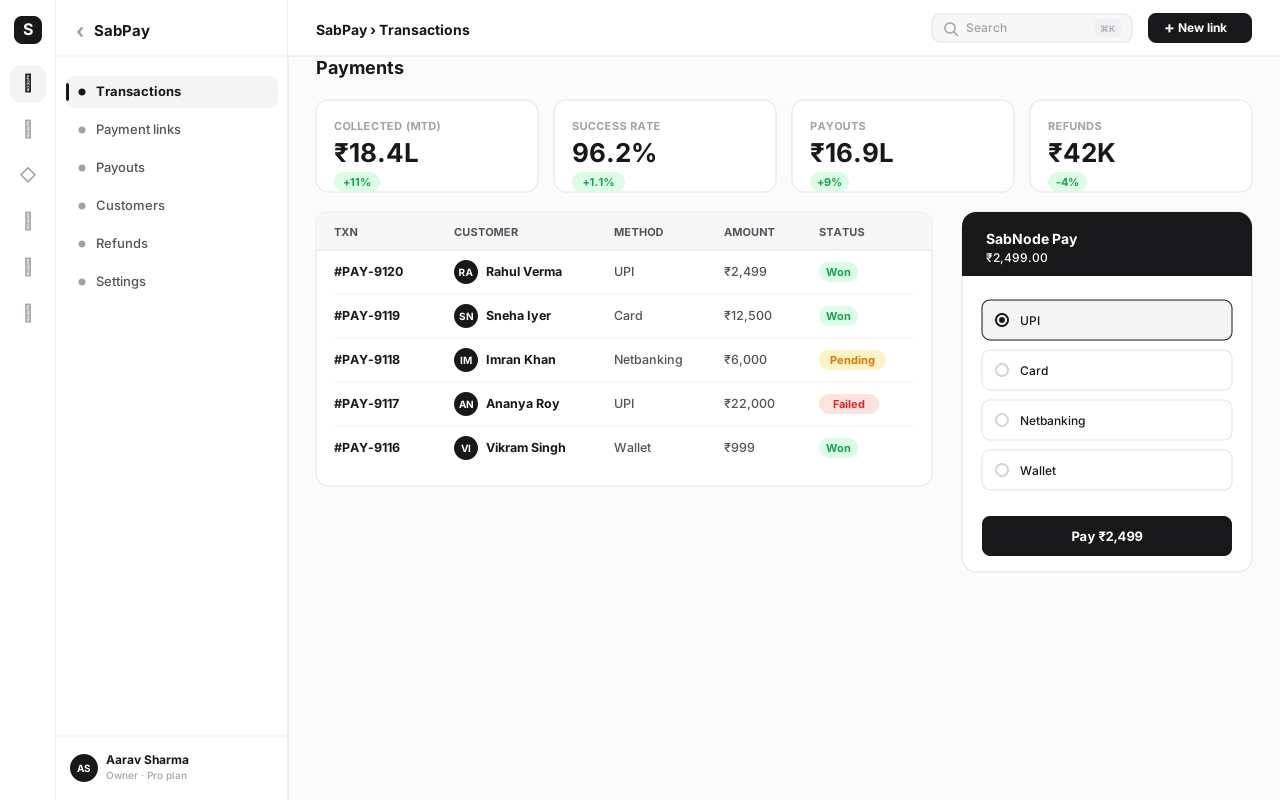
That's the core loop. Everything else — sharing channels, tracking, refunds, recurring links — builds on top of this single object.
Sharing the link across channels#
A link is only useful once it reaches the customer. SabPay lets you push the same link through whichever channel the customer already uses.
| Channel | Best for | How it lands |
|---|---|---|
| In-chat sales, order confirmations, follow-ups | The link arrives in the conversation; the customer taps and pays without leaving WhatsApp. | |
| SMS | Customers without WhatsApp, time-sensitive reminders | A short text with the URL; works on any phone, no app needed. |
| Invoices, B2B billing, formal receipts | A "Pay now" button in the email body next to the invoice details. | |
| QR code | Posters, counters, events, packaging, menus | The customer scans with any camera or UPI app and pays — no typing. |
The QR code deserves special attention. Because every SabPay link ships with one, you can print it on a flyer, a table tent, a delivery box or a digital screen and turn any physical surface into a checkout. If you lean on QR codes across your business, the QR codes for business guide covers dynamic codes, tracking and design.
Collecting payments inside WhatsApp#
For India-first businesses, WhatsApp is where the sale actually happens — so the most natural place to collect is right there in the thread. SabNode connects SabPay to WaChat, the WhatsApp Business module, so an agent (or a bot) can generate and send a payment link without ever leaving the conversation.
The flow looks like this: a customer messages asking to buy. Your agent confirms the order, clicks to attach a SabPay link for the right amount, and sends it. The customer taps the link, lands on the hosted checkout, pays by UPI in two taps, and returns to the chat. The agent sees the status change to Paid on the same screen, and the payment is logged to the contact.
Because the conversation and the payment live in the same platform, you get something most standalone payment tools can't offer: the message that led to the sale and the payment that closed it sit on one timeline. To get the most out of in-chat selling, it helps to understand the WhatsApp Business API itself — the WhatsApp Business API complete guide explains messaging windows, templates and how commerce features fit in.
On WhatsApp, you don't need to send the customer to a separate store. The chat is the cart, the link is the checkout, and the payment confirmation comes back into the same thread. That continuity is why in-chat link payments convert so well — there's no context switch and no second app to open.
Tracking, reconciliation and webhooks#
Creating a link is half the job; knowing what happened to it is the other half. SabPay gives every link a live status and a full audit trail.
Reading the status of a link#
Each link sits in one of a few clear states, so you always know where you stand:
| Status | What it means | What to do |
|---|---|---|
| Active / Unpaid | The link is live and waiting for payment. | Send a reminder if it's been a while. |
| Partially paid | The customer has paid some of the total (partial payments on). | Track the remaining balance; nudge for the rest. |
| Paid | The full amount has cleared. | Fulfil the order; the transaction is recorded. |
| Expired | The link passed its expiry date unpaid. | Issue a fresh link if the customer still wants to pay. |
| Cancelled | You deactivated the link manually. | None — it no longer accepts payments. |
| Refunded | A paid amount was returned to the customer. | Reconcile the refund against your books. |
Reconciliation#
When a link is paid, SabPay records a settled transaction containing the amount, the payment method, the gateway fee, the customer, and a timestamp. At settlement time those transactions roll up into a payout to your bank. Reconciliation is the act of matching three things: the payments SabPay says it collected, the payout that lands in your bank statement, and the orders or invoices in your books. Because SabPay stamps each transaction with the link description and customer you set, that matching is mostly automatic — and you can export the data for your accountant or import it into your ledger.
Webhooks: telling your other systems#
A webhook is SabPay calling your software the instant something happens — most importantly, when a link is paid. Instead of polling or checking manually, your CRM, ERP or fulfilment system gets a signed message that says "link X was paid, amount ₹Y, by customer Z," and reacts immediately: mark the order paid, trigger a dispatch, send a receipt, update a dashboard.
The "signed" part matters. SabPay signs each webhook with a secret only you and the gateway know, so your system can verify the message genuinely came from SabPay and wasn't forged. Always verify the signature before acting on a webhook — it's the single most important security step in any payment integration. The mechanics of webhook signatures, retries and idempotency are covered in depth in the payment gateway integration guide.
Recurring and subscription links#
Not every payment is one-and-done. Memberships, SaaS plans, EMIs, rent, retainers and maintenance fees all recur — and asking a customer to pay a fresh link every month is a recipe for churn. SabPay handles this with recurring and subscription links built on India's e-mandate and UPI AutoPay rails.
Here's how it differs from a one-time link. With a recurring link, the customer authorises a mandate once — agreeing that you may charge a stated amount on a stated schedule, up to a cap. After that single authorisation, SabPay charges automatically: weekly, monthly, quarterly or yearly. If a charge fails (an expired card, insufficient balance), the gateway retries on a schedule and notifies you. The customer can see and cancel the mandate, which keeps the whole thing transparent and compliant.
Use a one-time link for a single purchase, a deposit or an invoice; use a recurring link whenever the same customer will pay you again on a predictable rhythm. Mixing them up is the most common mistake — see the next section.
Refunds#
Things go wrong: an order is cancelled, an item is out of stock, a customer is double-charged. SabPay lets you issue a refund against any paid link directly from the transaction. You can refund the full amount or a partial amount, and the money goes back to the original payment method — to the customer's card, UPI app or bank account — through the same rails it came in on.
A few practical points. Refunds take a few business days to reach the customer's account, depending on their bank, even though you initiate them instantly. The refund creates its own record so your reconciliation stays accurate, and it fires a webhook so your other systems can update. And the gateway fee on the original transaction may or may not be returned depending on the pricing model — describe the policy to customers up front to avoid surprises. Always refund through SabPay rather than sending a separate manual transfer, so the original payment and its reversal stay linked on one record.
Security: PCI compliance and what you never touch#
The single biggest worry about collecting money online is "where do the card details go?" With a properly built payment link, the answer is: never to you.
When a customer pays a SabPay link, they enter their card or UPI credentials on the gateway's PCI-DSS-compliant, encrypted hosted page. That page belongs to the gateway, served over its secure infrastructure. Your business never sees, transmits or stores a card number. This isn't just convenient — it dramatically shrinks your PCI scope, the compliance burden that falls on any business that handles card data. Because you never handle it, most of that burden simply doesn't apply to you.
| Security layer | What it protects | Who handles it |
|---|---|---|
| PCI-DSS hosted checkout | Card data is entered only on the gateway's encrypted page | SabPay / the gateway |
| No card storage on your side | You can't leak what you never hold | SabPay (you stay out of scope) |
| Webhook signatures | Confirms a payment notification is genuine, not forged | You verify; SabPay signs |
| Link expiry and caps | Limits the window and amount a link can be abused | You configure per link |
| 3-D Secure / UPI PIN | Confirms the payer is the real cardholder/account owner | Bank + networks |
The takeaway: your job is to verify webhook signatures, set sensible link rules, and serve links over HTTPS — all of which SabPay makes easy. The heavy lifting of encryption, card vaulting and network compliance sits with the gateway, which is exactly where it should be.
Reconciling a payment against the CRM deal#
This is where doing payments inside an all-in-one platform pays off. In a typical stack, your payment tool and your CRM are separate, so a paid link is just a number in a payments dashboard with no idea which deal it closed. You then reconcile by hand — matching amounts to opportunities in a spreadsheet.
Because SabPay lives inside SabNode alongside SabCRM, that gap disappears. When you attach a customer to a link and they pay, SabPay can write the payment straight onto that contact's record and the matching deal. The opportunity in your pipeline shows the payment, the amount and the date; the deal can advance its stage automatically; and a follow-up workflow can fire — send a receipt, schedule onboarding, notify the account owner. To wire those reactions together across modules without code, see the workflow automation guide, which shows how a "payment received" event can drive everything downstream.
The result is a single source of truth: the conversation that started the sale, the link that collected the money, the payment that cleared, and the deal it closed — all on one customer timeline, with nothing typed twice.
Common mistakes (and how to avoid them)#
After watching thousands of links go out, the same handful of avoidable errors come up again and again.
- Vague descriptions. "Payment" tells the customer nothing and tells future-you even less. Always describe the link precisely — order number, service, date — so the customer recognises it and your reconciliation is effortless.
- No expiry on time-sensitive links. A deposit link or a limited-ticket link with no expiry can be paid weeks late, after the slot is gone or the price has changed. Set an expiry whenever the offer has a deadline.
- Using a one-time link for recurring revenue. Sending a fresh link every month for a subscription guarantees missed payments and churn. Use a recurring/subscription link so the customer authorises once.
- Not attaching a customer. A link with no customer is an orphan payment — harder to reconcile and invisible to your CRM. Attach a contact so the payment lands on the right record automatically.
- Ignoring webhook signature verification. Acting on an unverified webhook is a security hole. Always verify the signature before you mark an order paid or ship anything.
- Refunding by manual transfer. Sending money back outside the gateway breaks the link between the payment and its reversal, wrecking reconciliation. Always refund through SabPay against the original transaction.
- Disabling UPI to "look professional." UPI is what most Indian customers want to use and it's instant. Turning it off in favour of cards only adds friction and drops conversion. Keep every method on unless you have a specific reason not to.
- Reusing a single-use link for many customers. A link tied to one order shouldn't be blasted to a list. For many buyers, use a reusable link (with a quantity cap if needed), and a fresh per-order link for individual sales.
The cost of a sloppy link shows up weeks later, at month-end, when you're trying to match a payout to your books and three payments say "Payment" with no customer attached. Spend the extra ten seconds on a clear description and an attached contact at creation time — it saves hours of detective work later.
A quick worked example#
Say you run a small home-bakery. A customer messages on WhatsApp asking for a custom cake — ₹2,400, half as a deposit to confirm the date.
- You reply in WaChat confirming the design and price.
- You generate a SabPay link for ₹1,200, description "Deposit — custom cake, 12 July, Anita," attach Anita as the customer, and set an expiry of 48 hours.
- You send the link in the same WhatsApp thread.
- Anita taps it, pays ₹1,200 by UPI in two taps, and the link flips to Paid.
- SabPay logs the deposit to Anita's CRM record and the deal; a workflow sends her a thank-you and blocks the 12 July slot.
- On delivery day, you send a second link for the ₹1,200 balance, paid the same way.
- At month-end, both payments reconcile cleanly because each carried a clear description and a customer.
No bank details exchanged, no chasing, no missed reconciliation — and the entire story lives on one timeline.
Start collecting with payment links today
Create your first SabPay link in seconds — set an amount in rupees, send it over WhatsApp, SMS or QR, and get paid by UPI, cards or netbanking. Built India-first, PCI-compliant, and connected to your CRM. Start free and take your first payment.
Conclusion#
A payment link is the simplest possible way to get paid: a URL you create in seconds and send into any conversation, where the customer pays in two taps. For an India-first business, it removes the friction that loses sales — no website to build, no card data to handle, no bank details to dictate, no checkout to abandon.
The deeper win comes from where the link lives. In SabPay, a link isn't an isolated payment in a separate tool — it's part of SabNode, so the WhatsApp chat that started the sale, the UPI payment that closed it, and the CRM deal it belongs to all sit on one customer timeline. You set an amount and a description; the platform handles UPI, cards, netbanking, wallets, PCI compliance, webhooks, reconciliation and recurring billing. To go further on the engine behind it — checkouts, webhooks, settlement and integration — read the payment gateway integration guide, or explore the full module on the products page and the plans on pricing. When getting paid is this easy, you close more, chase less, and keep your books clean by default.
Frequently asked questions
What is a payment link?
A payment link is a shareable web URL that opens a secure, hosted checkout page where a customer can pay you a fixed or chosen amount. You create it in a few seconds — set an amount, a description and an optional expiry — and share it by WhatsApp, SMS, email or QR code. The customer taps it, picks UPI, card, netbanking or a wallet, and pays. You need no website, no app and no checkout code of your own.
How do I create a payment link in SabPay?
In SabPay, open Payment Links and click Create. Enter the amount in rupees, a short description, and optionally attach a customer and set an expiry, partial-payment rule or quantity limit. Save, and SabPay generates a unique URL and a matching QR code. Copy the link, or send it straight to a customer over WhatsApp, SMS or email. The moment they pay, the link's status flips to Paid and the payment is logged.
Can customers pay a payment link with UPI?
Yes. SabPay is built India-first, so every payment link supports UPI by default — including UPI apps and scan-to-pay via the link's QR code — alongside debit and credit cards, netbanking and popular wallets. The customer chooses whichever method they prefer on the hosted checkout; UPI is usually the fastest for Indian buyers and settles in seconds.
Is it safe to collect payments through a link?
Yes, when the link is served by a PCI-DSS-compliant gateway like SabPay. The customer enters card or UPI details on the gateway's secure, encrypted hosted page — never on your site or device — so you never see, touch or store any card numbers. That keeps you out of PCI scope, and webhooks plus signature verification ensure the payment confirmation you receive is genuine.
Can I use payment links for recurring or subscription payments?
Yes. Alongside one-time links, SabPay supports recurring and subscription links built on India's e-mandate and UPI AutoPay rails. The customer authorises the mandate once, and SabPay charges the agreed amount on schedule — weekly, monthly or annually — handling retries on failure and notifying you of each cycle. It's ideal for memberships, EMIs, SaaS plans and maintenance fees.
How do I reconcile payment-link income with my accounts?
Every paid link in SabPay produces a settled transaction record with the amount, method, fees, customer and timestamp. You can export these, match them against your bank settlement, and — because SabPay sits inside SabNode — automatically attach the payment to the matching CRM contact or deal. Webhooks let your own accounting or ERP system update itself the instant a payment clears.