Payment Gateway Integration for Modern Businesses
Hosted checkout, payment links, API or SDK — and the flow from checkout to settlement explained. A practical, India-first guide to integrating a payment gateway the right way, with test keys, webhooks and reconciliation done properly.
A payment gateway integration is the connection between your website or app and a payment gateway — the service that securely captures a customer's payment details, sends them to the bank or UPI rails for authorisation, and returns a result to your app. Integrate it once and every transaction flows through it, without your own servers ever touching raw card data.
This guide explains how that integration actually works: the difference between a gateway, a processor and an aggregator; the journey a payment takes from checkout to settlement; the methods Indian customers expect; your integration options; how to handle test mode, webhooks and reconciliation properly; and how to choose a gateway you won't regret. We'll use SabPay — SabNode's payment module — as the worked example, because it's built with a Stripe-style developer experience on India's payment rails.
What a payment gateway actually is#
A payment gateway is the software layer that sits between your checkout and the financial system. When a customer hits "Pay", the gateway is what collects their card number, UPI ID or netbanking choice, encrypts it, and hands it off for authorisation. It then relays the bank's yes-or-no back to your app. Its job is to move sensitive data safely and return a clear result — nothing more, nothing less.
People conflate a few different things here, and the confusion causes real integration mistakes. Let's separate them cleanly.
| Term | What it does | Who you deal with |
|---|---|---|
| Payment gateway | Captures and encrypts payment details at checkout, passes them on, relays the result | Your developers integrate it |
| Payment processor | Routes the transaction between issuing bank, card network and acquiring bank to move the money | Usually hidden behind the gateway/aggregator |
| Payment aggregator | Bundles gateway + processing + settlement under one merchant account, so you don't open your own acquiring relationship | The account you sign up for (e.g. SabPay) |
| Acquiring bank | The bank that holds the merchant account and receives the funds before settling them to you | The aggregator manages this for you |
| Issuing bank | The customer's bank that approves or declines the charge against their account | The customer's relationship, not yours |
In practice, most Indian businesses don't integrate a "bare" gateway and separately contract a processor and an acquiring bank. They sign up with a payment aggregator that wraps all of it into one account with one set of API keys. That's the model SabPay follows: you get a single merchant account, test and live keys, and a unified dashboard, and the routing to banks and networks happens underneath.
The gateway is the front desk — it greets the payment, takes the details and hands them inward. The processor is the back office — it shuttles the money between banks. The aggregator is the building that contains both, with your name on the lease. When you "integrate a payment gateway" in India, you're almost always integrating an aggregator's gateway.
The payment flow: checkout to settlement#
Every successful online payment, no matter the method, walks through the same sequence. If you understand these six stages, you'll debug ninety per cent of payment issues by simply asking "which stage failed?"
1. Checkout#
The customer chooses what to pay for and selects a method — UPI, card, netbanking, wallet or EMI. Your app creates an order on the gateway (an amount, a currency, a reference ID) and opens the gateway's checkout. Creating a server-side order first, rather than trusting an amount sent from the browser, is the single most important security habit in payments.
2. Tokenisation#
If the customer pays by card, the gateway tokenises it — replacing the real card number with a meaningless token. Your servers never see or store the raw number. Under India's card-storage rules, this isn't a nicety; it's how compliant card flows work. For UPI and netbanking there's no card to tokenise, but the same principle holds: sensitive credentials stay with the gateway and the bank, never with you.
3. Authorisation#
The gateway forwards the transaction to the processor, which routes it through the card network to the customer's issuing bank (or, for UPI, to the UPI rails and the customer's bank app). The bank checks funds, runs risk and authentication — for cards in India this includes the OTP/2-factor step — and returns approved or declined. An authorisation reserves the money but doesn't necessarily move it yet.
4. Capture#
Capture is the instruction that actually claims the authorised funds. Many flows auto-capture immediately after authorisation, so the two feel like one step. But the distinction matters: you can authorise now and capture later (useful when you only charge after shipping, for example). For most online sales, auto-capture is the right default.
5. Settlement#
The acquiring bank collects the captured funds for all your transactions and, on a settlement cycle, transfers the net amount (gross minus gateway fees and taxes) toward your account. Settlement is a batch, banking-side step — it's why money doesn't appear in your bank instantly even when the customer's payment succeeded immediately.
6. Payout#
Finally, the aggregator pays out the settled funds to your registered bank account. The timeline depends on your provider and settlement cycle — commonly a rolling cycle measured in business days. Faster or on-demand settlement is offered by some providers, usually at a cost.
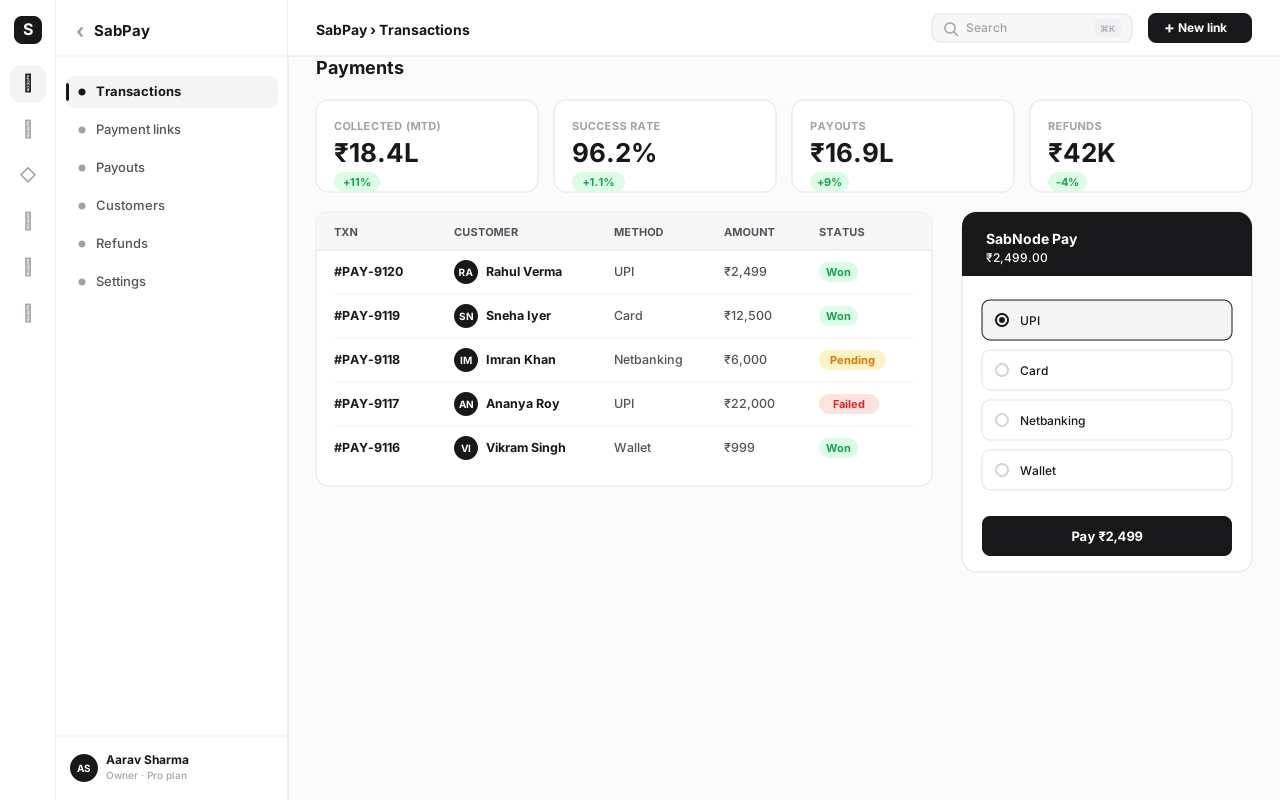
A customer seeing "Payment successful" means the transaction was authorised and captured. It does not mean the money is in your bank — that's settlement and payout, which happen later on a cycle. Build your bookkeeping around settlement reports, not checkout success events, or your numbers will never reconcile.
Payment methods Indian customers expect#
A gateway integration is only as good as the methods it lets your customers use. In India, the method mix is distinctive — UPI dominates in a way it doesn't in most other markets — and offering the wrong set quietly kills your conversion. Here's the landscape and where each method fits.
| Method | How it works | Best for |
|---|---|---|
| UPI | Customer approves a collect request or scans a QR in their UPI app; instant bank-to-bank | Almost everything — the default for most Indian buyers |
| Cards (debit/credit) | Card details entered and tokenised; OTP/2FA authentication; network + bank route the funds | Higher-value purchases, rewards-driven buyers |
| Netbanking | Customer logs in to their bank and authorises the transfer | Customers without UPI/cards; some B2B payments |
| Wallets | Prepaid balance held in a wallet app is debited | Small-ticket, frequent payments |
| EMI | Card or lender splits a large amount into instalments | High-ticket items — electronics, courses, services |
The practical rule for India: lead with UPI, support cards and netbanking as strong seconds, and add wallets and EMI where your average order value justifies them. A checkout that buries UPI or makes it a second-class option leaves conversion on the table. SabPay exposes all of these through one integration, so your checkout reflects how Indians actually pay rather than a card-first template imported from elsewhere.
Your four integration options#
There isn't one way to "integrate a payment gateway" — there are four, and good products use a combination. Pick based on how much control you need versus how little work you want to do.
Option 1: Hosted checkout#
The gateway hosts the entire payment page. You redirect (or open an overlay) to it, the customer pays, and they come back with a result. You write the least code, and because the sensitive form lives on the gateway's domain, your PCI scope is minimal. This is the fastest path to live and the right default for most websites and apps.
Option 2: Payment links#
A payment link is a URL (or QR) that opens a ready-made checkout for a specific amount — no integration required at all. You generate one and share it over WhatsApp, SMS, email or in person. It's ideal for invoices, one-off sales, service businesses and anyone who wants to collect money before building a full site. We cover this end to end in the payment links guide.
Option 3: API / SDK#
You build your own checkout UI and call the gateway's API (server-side) and SDK (client-side) directly. You get full control over the experience and can embed payment deep inside a custom flow — but you take on more responsibility for correctness and, depending on how you collect card details, more PCI scope. Use this when the hosted page genuinely can't fit your product.
Option 4: Webhooks#
Webhooks aren't an alternative to the above — they're the essential companion to all of them. A webhook is a server-to-server callback the gateway sends your backend when something happens (payment captured, refund processed, mandate charged). Because a customer can close the browser before the redirect completes, webhooks are the only reliable way to know a payment's true final state. Never treat the browser redirect as your source of truth.
Start with hosted checkout or payment links to go live fast and keep compliance simple. Add the API/SDK later only for the specific flows that need it. Wire up webhooks from day one regardless of which you choose — they're what makes the integration trustworthy.
A step-by-step integration walkthrough with SabPay#
Here's how a real integration comes together. This is the sequence we recommend with SabPay, and it maps onto most gateways. Follow it in order — each step de-risks the next.
-
Create your account and grab test keys. Sign up for SabPay inside SabNode and open the developer settings. You'll get a test key pair (a key ID and a secret). The secret stays server-side, never in your frontend. Everything you build first runs against these test keys.
-
Create an order on your server. When the customer is ready to pay, your backend calls SabPay to create an order with the amount, currency and a unique receipt/reference ID. Crucially, the amount is decided by your server from your own database — never accepted from the browser. SabPay returns an order ID.
-
Open checkout on the client. Pass the order ID to SabPay's checkout (hosted page or SDK overlay). The customer picks UPI, card, netbanking, wallet or EMI and completes payment. For cards, SabPay handles tokenisation and the OTP/2FA step; for UPI, it triggers the collect request or QR.
-
Verify the result server-side. When checkout returns, your server verifies the payment signature SabPay provides against your secret key. This confirms the success response genuinely came from SabPay and wasn't forged. Only a verified signature should mark an order as paid.
-
Handle the webhook. Configure a webhook endpoint in SabPay and verify the webhook signature on every incoming event. Treat the
payment.captured(andpayment.failed) webhook as the authoritative final state. If the browser never returned but the webhook fired, the webhook wins. -
Make it idempotent. Both the verify step and the webhook handler can fire more than once for the same payment. Key your "mark as paid" logic on the payment ID so processing it twice has no extra effect — no double-fulfilling, no double-counting.
-
Test every path. Using SabPay's test mode and test instruments, run a successful payment, a failed payment, a user who abandons checkout, a refund, and a duplicate webhook. Confirm your database lands in the right state for each. Only when all five behave do you move on.
-
Switch to live keys. Swap the test key pair for your live keys, point the webhook at your production endpoint, run one small real transaction end to end, refund it, and confirm it appears in your settlement report. Now you're live.
First, trusting the browser: if you mark orders paid from a client-side success callback without server-side signature verification and a webhook, a determined user can fake success. Second, skipping idempotency: without it, a retried webhook double-fulfils orders or double-credits wallets. Get both right before you go live, not after an incident.
Test mode, idempotency and reconciliation#
These three are where solid integrations are made — and where rushed ones quietly leak money. They deserve their own section.
Test mode versus live mode. A proper gateway gives you two completely separate environments distinguished by your API keys. Test mode uses test keys and test instruments and moves no real money; live mode uses live keys and processes real payments. Build and verify everything in test mode. The number-one production incident in payments is shipping with a test key still wired in, or a live secret accidentally committed to a frontend bundle. Keep keys in environment variables, keep secrets server-side, and never log them.
Idempotency. Networks retry. Webhooks redeliver. Users double-click. If the same logical operation can reach your server twice, it will. The fix is to make every money-affecting handler idempotent — safe to run repeatedly with the same effect as running once. Use the gateway's payment ID (or an idempotency key on requests you initiate) as the deduplication key, and check "have I already processed this?" before acting.
Reconciliation. Reconciliation is the discipline of matching what your system thinks happened against what the gateway and bank report. At minimum, periodically compare your orders marked paid against SabPay's settlement report, and flag any mismatch — a payment you recorded that didn't settle, or a settlement with no matching order. This is how you catch refunds, chargebacks, fees and rare failures before they distort your books.
| Practice | Why it matters | What good looks like |
|---|---|---|
| Separate test/live keys | Lets you build safely without moving real money | Keys in env vars; secrets server-side only; never in frontend |
| Server-side order creation | Stops tampered amounts from the browser | Amount sourced from your DB, never from the client |
| Signature verification | Confirms the result truly came from the gateway | Verify both checkout response and webhook signatures |
| Idempotency | Prevents double-charging and double-fulfilment | Dedupe on payment ID before any money-affecting action |
| Reconciliation | Catches mismatches, fees, refunds and chargebacks | Regular match of paid orders vs settlement reports |
Subscriptions and recurring payments#
One-off payments are the easy case. Recurring revenue — subscriptions, memberships, instalments, EMIs — needs a mandate: the customer's standing permission for you to debit them on a schedule.
In India, recurring on UPI runs on UPI AutoPay. The customer approves an e-mandate once in their UPI app, authorising debits up to a maximum amount on a set frequency (monthly, quarterly, and so on). On each billing cycle the gateway triggers the debit against that mandate. For amounts above the regulatory threshold, the customer receives a pre-debit notification before the money is taken. Cards follow a parallel e-mandate flow with similar consent and notification rules.
The integration shape is: create a plan, create a subscription (or mandate) for the customer once, then let the gateway charge each cycle and notify you via webhook on each successful or failed debit. Your job is to react to those webhooks — extend access on success, retry or dunning on failure, and revoke on cancellation. SabPay handles the AutoPay and card e-mandate plumbing so you work in terms of plans and subscriptions rather than raw mandate APIs.
Don't think of subscriptions as "store the card and charge it monthly." Think of them as "obtain a mandate once, then charge against the mandate." The mandate — UPI AutoPay or card e-mandate — is the legal and technical object that makes recurring debits valid in India. Your code orchestrates mandates, never stored card numbers.
Refunds and disputes#
Refunds and disputes are the parts teams forget until they need them — and then they're urgent.
Refunds are straightforward to integrate: you call the gateway with the payment ID and an amount (full or partial), and it reverses the funds to the customer's original method. Two things to plan for. First, refunds take time to reach the customer's account — set that expectation clearly. Second, refunds adjust your settlement, so your reconciliation must account for them or your books drift. Always trigger refunds through the gateway and let the webhook confirm completion; never settle a refund off-platform.
Disputes and chargebacks happen when a customer asks their bank to reverse a charge — claiming fraud, non-delivery or duplication. The bank pulls the funds back pending evidence, and you get a window to respond with proof (order details, delivery confirmation, communication). Disputes are more common on cards than on UPI. The best defence is operational, not technical: clear product descriptions, prompt delivery, responsive support, and keeping records you can produce as evidence. A high dispute rate also threatens your standing with the gateway, so treat it as a metric to watch, not just incidents to handle.
Security and compliance#
Payments are regulated for good reason — you're handling other people's money and credentials. The headline rules are simpler than they sound, because a good gateway absorbs most of the burden.
PCI-DSS is the card-data security standard. The single most effective way to shrink your PCI obligations is to never let raw card data touch your servers — use hosted checkout or the gateway's SDK so the card is captured on the gateway's side and you only ever handle a token. This is why hosted checkout is the recommended default: it keeps your PCI scope minimal almost for free.
No raw card storage. Under India's tokenisation regime, storing actual card numbers is largely prohibited; you store a token issued by the gateway instead. For repeat charges you use that token or a mandate. If you ever find yourself wanting a column for "card number", stop — that's a sign the integration is wrong.
Other essentials: serve everything over HTTPS; keep your secret keys server-side and out of version control and frontend bundles; verify every signature; and follow the gateway's authentication flows (OTP/2FA for cards, AutoPay consent for UPI) rather than working around them. SabPay is built so the secure path is the default path — you'd have to go out of your way to do something unsafe.
By choosing a compliant aggregator and using hosted checkout or its SDK, you inherit the heavy lifting — PCI handling, tokenisation, card-storage rules, authentication flows. Your remaining job is small but non-negotiable: HTTPS, server-side secrets, signature verification, and never storing raw card data. Do those four and you're in good shape.
How to choose a payment gateway#
The headline "transaction fee" is the worst way to choose a gateway, because the cheapest rate is meaningless if payments fail or settlement is slow. Weigh the factors that actually move your revenue.
| Factor | Why it matters | What to ask |
|---|---|---|
| Success rate | A few percent more successful payments dwarfs any fee difference | What's the real-world success rate for UPI and cards? |
| Settlement time | Affects your cash flow directly | What's the settlement cycle? Is faster settlement available? |
| Method coverage | Missing UPI or EMI loses sales outright | Are UPI, cards, netbanking, wallets and EMI all supported? |
| Fees model | Total cost includes setup, per-transaction, refund and chargeback fees | What's the all-in cost, not just the headline rate? |
| Developer experience | A clean API and good docs cut integration time and bugs | Test mode, clear webhooks, signature verification, SDKs? |
| Reliability & support | Downtime at checkout is lost revenue you can't recover | Uptime track record and reachable support? |
Don't invent precise MDR figures from a sales deck — confirm the total cost in writing, including setup, per-transaction fees by method, and refund/chargeback handling. Then weight it against success rate and settlement, which usually matter more to your bottom line than a fraction of a percent on the rate. SabPay's pricing is laid out transparently on the pricing page, in rupees, so you can compare like for like.
How SabPay ties payments to CRM and WhatsApp#
Here's where being part of a platform changes the calculation. A standalone gateway gives you money in; SabPay gives you money in plus context, because it lives inside SabNode alongside the CRM and your messaging channels.
Every payment is logged automatically to the customer's record in SabCRM — no syncing, no manual entry. Open a contact and you see their orders, payments, refunds and subscription status on the same timeline as their WhatsApp chats, calls and emails. The payment isn't a row in a separate finance tool; it's part of the customer's story.
And because SabFlow automation spans every module, payment events become triggers. A successful payment can fire a WhatsApp confirmation, a thank-you, an invoice, or a CRM stage change — automatically. A failed payment can trigger a polite reminder. A new subscription can start an onboarding sequence. The flow of "send a UPI link over WhatsApp → customer pays → confirmation goes out → CRM updates → finance reconciles" is one connected pipeline rather than five tools you stitch together by hand.
That connection is the real argument for an integrated gateway in a multi-channel business: payments stop being a silo and become a first-class event in your customer relationships.
Common mistakes to avoid#
Most painful payment incidents trace back to a short list of avoidable errors. Check yourself against these before you ship.
- Trusting the browser. Marking orders paid from a client-side callback without server-side signature verification and a webhook. A user can fake the success response. Verify server-side, always.
- Skipping idempotency. Webhooks and retries fire more than once. Without deduplication you double-fulfil orders and double-credit wallets. Key everything on the payment ID.
- Treating the redirect as final. Customers close the tab. If you only learn outcomes from the redirect, you'll miss payments that succeeded after the browser left. The webhook is the source of truth.
- Shipping with test keys (or leaking live ones). A test key in production takes no real money; a live secret in your frontend bundle is a security incident. Use env vars; keep secrets server-side.
- Storing raw card numbers. It's largely prohibited in India and expands your PCI burden enormously. Store tokens, never card numbers.
- Ignoring reconciliation. Booking revenue from checkout-success events instead of settlement reports means your numbers never match the bank, and refunds and chargebacks silently distort them.
- Card-first checkout in an India-first market. Burying UPI behind cards quietly costs you conversion. Lead with how your customers actually pay.
Conclusion#
A payment gateway integration looks intimidating from the outside, but it reduces to a clear picture: a gateway captures and secures the payment, a processor moves the money, and an aggregator like SabPay wraps both into one account you can integrate in an afternoon. Master the six-stage flow — checkout, tokenisation, authorisation, capture, settlement, payout — and you can reason about any payment problem by asking which stage failed.
The difference between a fragile integration and a reliable one isn't exotic. It's a handful of disciplines done consistently: create orders server-side, verify signatures, lean on webhooks, make handlers idempotent, separate test and live keys, never store raw cards, and reconcile against settlement. Get those right and payments become boring in the best way — they just work.
And when your gateway sits inside the same platform as your CRM and your WhatsApp, every payment also becomes context: logged to the customer, ready to trigger the next message, visible to your whole team. That's the version of payments worth building toward.
Start accepting payments with SabPay
Integrate UPI, cards, netbanking, wallets and EMI through SabPay's Stripe-style gateway — hosted checkout, payment links, API and webhooks, with test and live keys and transparent rupee pricing. Because it's part of SabNode, every payment lands on your CRM timeline and can trigger a WhatsApp message automatically.
Frequently asked questions
What is a payment gateway integration?
A payment gateway integration is the connection between your website or app and a payment gateway that lets you accept money online. The gateway securely collects the customer's payment details, sends them to the bank or UPI rails for authorisation, and returns a success or failure result to your app. You integrate it once — via hosted checkout, a payment link, or an API/SDK — and from then on every transaction flows through it without your servers ever touching raw card data.
What's the difference between a payment gateway and a payment processor?
A payment gateway is the customer-facing layer that captures payment details and securely passes them on; a payment processor is the back-end engine that routes the transaction between the issuing bank, the card network and the acquiring bank to actually move the money. In India most businesses integrate a gateway or aggregator (like SabPay) that bundles the gateway, processing and settlement into one account, so you never deal with the acquiring bank directly.
Why do I need test mode and live mode?
Test mode lets you build and verify your entire payment flow — checkout, success, failure, webhooks, refunds — using fake test keys and test cards, without moving real money. Live mode uses your live keys and processes real payments. Keeping them strictly separate, with different API keys, means you can develop safely and switch to production only when every path is verified.
Is it safe to store customer card numbers?
No — and you generally must not. Storing raw card numbers brings the full weight of PCI-DSS onto your own systems and, under India's tokenisation rules, is largely prohibited. A proper gateway tokenises the card so you store a meaningless token, never the real number. For repeat or recurring charges you use that token or a UPI AutoPay mandate, so sensitive data stays with the gateway, not in your database.
How do recurring payments work on UPI in India?
Recurring payments on UPI use AutoPay, an e-mandate the customer approves once in their UPI app. The mandate authorises future debits up to a set amount on a set frequency. On each cycle the gateway triggers the debit against the mandate, and for larger amounts the customer gets a pre-debit notification. Cards use a similar e-mandate flow. This is how subscriptions, EMIs and instalment plans are collected without re-entering details each time.
How long does it take to settle money to my bank account?
Settlement is the gateway transferring collected funds (minus fees) to your bank account, and the timeline depends on the provider and your settlement cycle — commonly a rolling cycle measured in business days rather than instantly. Some providers offer faster or on-demand settlement. Always confirm the settlement cycle, any reserve held, and how refunds and chargebacks are adjusted before you commit.
Does SabPay connect payments to my CRM and WhatsApp?
Yes. Because SabPay is part of SabNode, every payment is logged to the customer's record in the CRM automatically, and you can trigger a WhatsApp or SMS message on payment success or failure through SabFlow. A UPI link sent over WhatsApp, paid by the customer, and reflected on their CRM timeline is one connected flow — not three disconnected tools.