Electronic Signatures: Legal, Fast and Paperless
No printer, no scanner, no courier. An electronic signature lets anyone sign a contract from a phone in minutes — and, set up correctly, it's legally binding and tamper-evident. This guide covers the law, the mechanics and the audit trail that makes an e-signature hold up.
An electronic signature is a legally recognised way to sign a document online — a typed name, a drawn mark, or a cryptographic key that shows you intend to agree. Under India's IT Act, 2000, and laws like ESIGN and eIDAS abroad, a properly captured e-signature carries the same legal weight as wet ink, while being faster, cheaper and tamper-evident.
This guide explains electronic signatures from first principles: what an e-signature actually is, the law that makes it valid in India and globally, the difference between an electronic signature, a digital signature and Aadhaar eSign, exactly how signing works step by step, and how the audit trail makes a signed document hold up if it's ever challenged. We'll use SabSign, SabNode's e-signature module, as the worked example throughout — including how it connects to the CRM so a contract goes out the moment a deal is won.
What an electronic signature actually is#
Strip away the technology and an electronic signature answers one question that paper has answered for centuries: did this person agree to this, on purpose?
A wet-ink signature is just a mark you make to show intent. The law has never required it to be a beautiful cursive flourish — an "X" from someone who can't write has been a valid signature for generations. What matters is the intent to be bound and a way to connect that intent to a specific person and a specific document.
An electronic signature does exactly the same job using electronic data instead of ink. It can be a typed name, a signature drawn with a finger or stylus, an uploaded image of your signature, a clicked "I agree" button, or a cryptographic key. What turns any of those into a legally meaningful signature is the surrounding context: proof that you did it, proof of when, and proof that the document hasn't changed since. On a real e-signing platform, that context is captured automatically and bound to the file — and that binding is the whole point.
So an electronic signature isn't "a picture of a signature pasted into a PDF." A picture proves nothing. A real e-signature is the mark plus the evidence that makes it trustworthy: who, when, from where, and a fingerprint of the exact document they agreed to.
| Term | What it means | Where it fits |
|---|---|---|
| Electronic signature | Any electronic data attached to a document showing intent to sign | The broad legal category — the umbrella term |
| Digital signature | A cryptographic signature backed by a certificate from a licensed authority | A stronger sub-type of electronic signature |
| Aadhaar eSign | OTP-based digital signature using Aadhaar identity, India-specific | A recognised form of digital signature in India |
| Wet signature | A handwritten mark in physical ink on paper | The traditional method e-signatures replace |
| Audit trail | The recorded history of who did what, when, and from where | The evidence that makes any e-signature defensible |
What makes a signature hold up is not the visual mark — it's the chain of evidence binding that mark to a person, a moment and an unaltered document. Electronic signing captures that evidence far more completely than a pen ever could, which is why a well-signed e-document is often easier to defend than a paper one.
Is it legal? The law behind electronic signatures#
This is the question every business asks first, and the honest answer is: yes, with a short and specific list of exceptions. Let's be precise, because precision is the whole value here.
India: the Information Technology Act, 2000#
India's primary law on electronic signatures is the Information Technology Act, 2000 (the "IT Act"). It does two important things. First, it recognises electronic signatures as a valid way to authenticate an electronic record. Second, it specifically recognises digital signatures — the cryptographic kind — and gives them legal effect. The Act was amended to broaden "digital signature" into the wider concept of "electronic signature" so the law could keep up with new methods like Aadhaar-based signing.
The underlying contract law doesn't change because you signed on a screen. Under the Indian Contract Act, an agreement is binding if there's an offer, acceptance, lawful consideration and the intention to create a legal relationship between competent parties. An electronic signature simply provides the acceptance and intent in electronic form. The medium changed; the principle didn't.
Crucially, the IT Act excludes certain document types from electronic signing. These still require traditional, physical signatures:
| Document type | E-signature allowed? | What to do instead |
|---|---|---|
| Commercial contracts, NDAs, service agreements | Yes | Sign electronically — fully recognised |
| Employment letters, offer letters, policies | Yes | Sign electronically |
| Invoices, quotes, purchase orders, consent forms | Yes | Sign electronically |
| Wills and testamentary dispositions | No | Sign on paper; follow succession-law formalities |
| Negotiable instruments (except cheques) | No | Use physical instruments (e.g. a promissory note) |
| Powers of attorney | No | Execute physically per the Powers-of-Attorney rules |
| Trusts (created by deed) | No | Execute the trust deed physically |
| Sale or conveyance of immovable property | No | Use a registered physical deed |
The everyday documents that run a business — contracts, NDAs, employment letters, vendor agreements, consent forms, quotations — sit firmly in the "yes" column. The excluded list is narrow and specific, and most companies will rarely touch it.
The exclusions above reflect the general shape of the IT Act, but laws are amended and your situation may have specifics — a regulated industry, a foreign counterparty, a document with statutory formalities. For high-value or unusual documents, confirm with a qualified lawyer before relying on electronic signing. The goal of this guide is to make you well-informed enough to ask the right questions, not to replace professional advice.
Global context: ESIGN, UETA and eIDAS#
If you sign with people outside India, two frameworks matter most:
- United States — ESIGN Act (2000) and UETA. Together these establish that a signature, contract or record can't be denied legal effect just because it's electronic. The bar is intent to sign and consent to do business electronically — broadly similar in spirit to India's approach.
- European Union — eIDAS Regulation. eIDAS defines a tiered model: a Simple Electronic Signature (the basic kind), an Advanced Electronic Signature (uniquely linked to and capable of identifying the signer), and a Qualified Electronic Signature (the highest tier, backed by a qualified certificate and a secure signature-creation device, with legal effect equivalent to handwriting across the EU).
The practical takeaway: electronic signatures are recognised across all major economies, but the level of assurance you need scales with the stakes. A click-to-accept is fine for low-risk consent; a high-value cross-border contract may warrant a stronger, certificate-backed signature.
Electronic vs digital vs Aadhaar eSign#
These three terms get used interchangeably, and the confusion causes real mistakes. Here's the clean distinction.
An electronic signature is the umbrella — any electronic intent to sign. A digital signature is a specific, cryptographically strong type of electronic signature. It uses public-key cryptography: the signer has a private key (kept secret) and a public key (shared), and a licensed Certifying Authority issues a certificate vouching that the key really belongs to that person. When you sign, the document is hashed and that hash is encrypted with your private key, mathematically binding your verified identity to the exact contents. Anyone can later verify it with your public key. Tamper with one character and the verification fails.
Aadhaar eSign is India's elegant way to get a digital signature without owning a physical USB token. The signer authenticates with their Aadhaar number and a one-time password sent to their Aadhaar-registered mobile. On successful authentication, a licensed Certifying Authority issues a digital signature certificate for that transaction and applies the signature — all online, in seconds. It's widely used for loan agreements, account opening and KYC, where a high level of identity assurance is required.
| Property | Electronic signature | Digital signature | Aadhaar eSign |
|---|---|---|---|
| Underlying method | Typed/drawn/clicked mark + audit trail | Public-key cryptography + certificate | Aadhaar OTP auth + on-demand certificate |
| Identity assurance | Email/OTP/link verification | Certificate from a licensed authority | Government Aadhaar identity |
| Hardware needed | None — phone or laptop | Often a USB token (for token-based DSCs) | None — OTP to mobile |
| Typical use | Contracts, NDAs, HR docs, consent | Tenders, regulatory filings, high-value deals | Loans, KYC, account opening |
| Strength | Strong with a good audit trail | Highest cryptographic assurance | High assurance, very low friction |
For the vast majority of business documents, a well-implemented electronic signature with a complete audit trail is exactly the right tool — fast, frictionless and legally sound. Reach for a digital signature or Aadhaar eSign when the document or a regulator demands the higher tier of identity assurance.
How electronic signing actually works#
Behind the simple experience of "click to sign," a real platform runs a precise sequence. Understanding it makes the difference between a signature that holds up and a PDF that anyone could dispute.
Here's the lifecycle of a document from upload to legally-binding completion:
- Upload the document. You bring a PDF, Word file or a saved template into the platform. With SabNode, the file comes from SabFiles — your library or a fresh upload — never a pasted external URL.
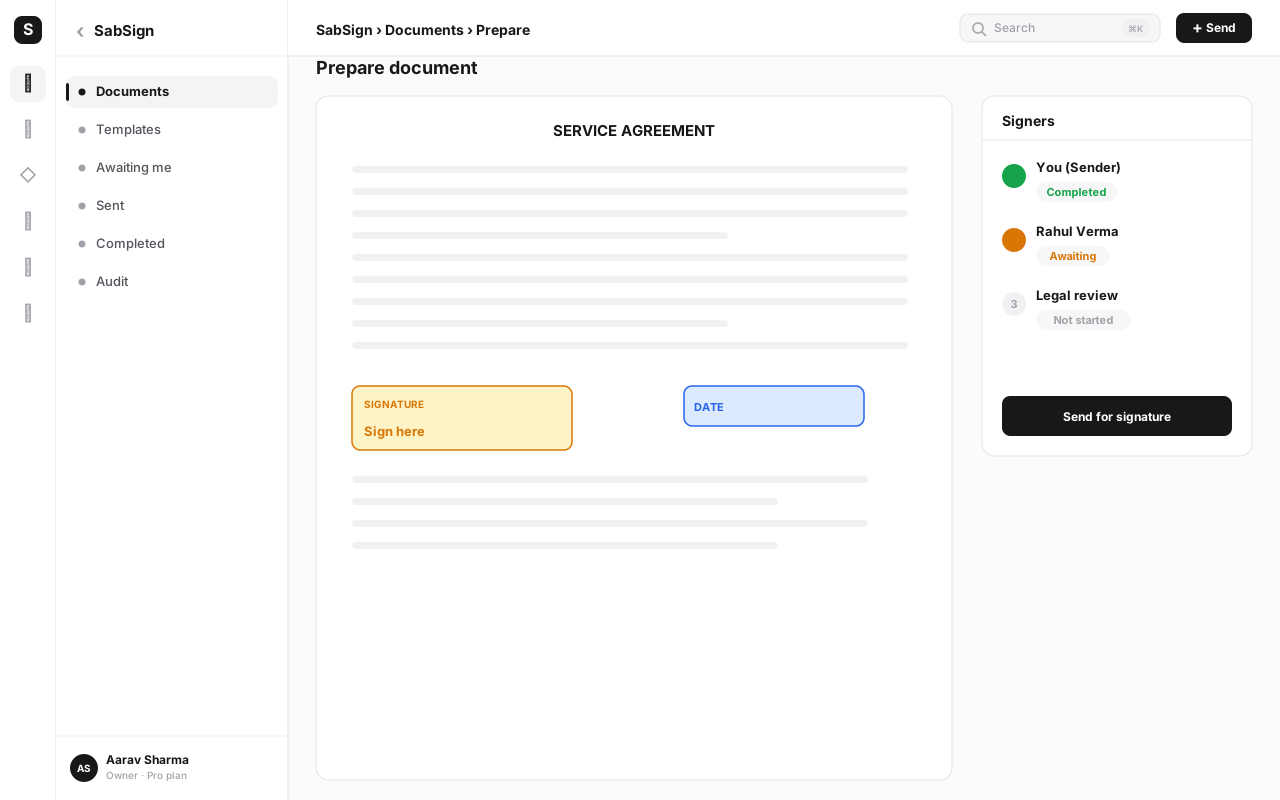
- Place the fields. You drag fields onto the document where input is needed: a signature box, initials, a date, a name, a checkbox, a text field. Each field is assigned to a specific signer, so the right person fills the right blanks.
- Add the signers. You enter each signer's name and email (or phone). For multiple parties, you set a signing order — sequential (signer 2 only gets it after signer 1 finishes) or parallel (everyone signs at once).
- Send the request. Each signer receives a secure, unique link by email or WhatsApp. The link is theirs alone; it can't be forwarded to sign on their behalf without it showing in the trail.
- Signer verifies and reviews. The signer opens the link, optionally passes an identity check (email confirmation, an OTP, or Aadhaar eSign for the high-assurance path), and reads the document. Every view is timestamped.
- Signer signs. They type, draw or adopt a signature style and apply it to their assigned fields, then confirm. At that instant the platform records their identity, IP address, device and the exact time.
- Document is sealed and hashed. Once all signers are done, the platform finalises the PDF and computes a cryptographic hash of the completed file. That hash is the document's fingerprint — change a single pixel later and it won't match.
- Certificate and audit trail are generated. A completion certificate is attached, listing every signer, every action, every timestamp, every IP and the document hash. This is the legal evidence package.
- Everyone gets the signed copy. All parties receive the final signed PDF plus its certificate. On SabNode, the signed document is also saved back to the relevant CRM contact automatically.
The step that people underestimate is 7 and 8: the hash and the certificate. They're what convert "a signed-looking PDF" into "a document I can defend." Without them you have a picture; with them you have evidence.
Templates, bulk send, reminders and expiry#
If every signature request meant rebuilding the document from scratch, e-signing would only be marginally better than paper. The real time savings come from the workflow features layered on top.
Templates are the foundation. Build a document once — your standard NDA, your employment letter, your vendor agreement — with all the fields already placed and the roles defined ("Client", "Company"). Every future request starts from the template; you just fill in the names. For documents you send constantly, this turns a ten-minute task into a thirty-second one.
Bulk send takes one template and dispatches it to many people at once, each as their own private envelope. Onboarding fifty contractors on the same agreement, or collecting a signed policy acknowledgement from every employee, becomes a single action instead of fifty. Each recipient signs their own copy, and each gets its own audit trail.
Reminders and expiry keep deals from stalling. You set automatic reminders ("nudge anyone who hasn't signed after 2 days, then again after 5") so you're not chasing people manually. You set an expiry date after which the link stops working — useful when an offer is time-bound or you don't want a stale contract floating around indefinitely. Both run on their own; you send and move on.
In-person signing#
Not every signature happens over email. Sometimes the signer is standing right in front of you — a customer at your counter, a patient at a clinic, a buyer at a showroom. In-person signing handles this without breaking the legal chain.
You open the document on your own device, hand it to the signer (or pass them a tablet), and they sign on the spot. The platform still captures the full audit trail — the time, the device, and the fact that this was a host-initiated in-person session — and still produces the hash and certificate. So you get the convenience of a face-to-face signature with the same tamper-evident record as a remote one, instead of a scribble on paper that you'd then have to scan and file. It's the bridge between the physical counter and the digital record.
The audit trail: why an e-signature holds up#
This is the section that matters most if you ever face a dispute, so it's worth slowing down. A paper signature gives you exactly one piece of evidence: the ink. If someone claims they didn't sign, or that the terms were changed after signing, you're stuck arguing over handwriting and document custody. An electronic signature gives you a dossier.
For every document, a proper platform records:
- Identity of each signer — the name and the email or phone the link was sent to and opened from.
- Authentication used — email confirmation, OTP, or Aadhaar eSign, depending on the assurance level you chose.
- IP address and device — where, geographically and technically, each action came from.
- Timestamps for every event — when the document was sent, viewed, and signed, to the second, in a consistent time source.
- A cryptographic hash of the final document — a unique fingerprint of the exact signed file.
That last item is the quiet hero. Because the hash is computed from the document's contents, any later change — adding a zero to a price, swapping a date, altering a clause — produces a different hash and fails verification. The document is tamper-evident: you can't silently alter it after the fact. If a signed copy still matches its recorded hash, you have mathematical proof it's the original everyone agreed to.
A handwritten signature proves a mark was made; it can't prove the page wasn't swapped or a figure wasn't edited afterwards. An electronic audit trail proves identity, intent, time and integrity all at once. In a real dispute, "here is the complete signing history and a hash that still matches" is a far stronger position than "here is a piece of paper with a signature on it."
Keep the original signed PDF, the completion certificate and the audit trail together, and you have a self-contained evidence package — everything a counterparty, an auditor or a court would need, in one export.
Security and storage#
A legally sound signature is worthless if the documents leak. So the platform around the signature has to be as serious as the signature itself.
The non-negotiables are: encryption in transit (so the document and signing session can't be intercepted on the network), encryption at rest (so the stored file is unreadable without the keys), and access control by role (so only the right people in your organisation can open, send or download a given document). Signing links should be unique per signer and expirable, so a forwarded email doesn't become a security hole.
On SabNode, signed documents live in SabFiles with the same role-based permissions as the rest of your files, the tamper-evident hash travels with the document, and you can export the original PDF, certificate and trail at any time. Nothing is locked in; the evidence is yours to keep, archive or hand over.
For everyday business documents, the trade-off is lopsided in favour of e-signing. The cons are mostly about knowing which tier you need and keeping the right records — both solved by understanding the material in this guide.
Sending a contract when a deal is won: CRM + e-signature#
The biggest payoff isn't signing faster — it's signing automatically at the right moment. When your e-signature module and your CRM are the same platform, the contract becomes a step in the deal, not a separate errand.
Picture the moment a salesperson marks a deal Won in the CRM. On a connected platform, that single status change can trigger a chain:
- The right contract template is selected for that deal type.
- It's prefilled with the deal's data — the client's name, the agreed amount, the term — pulled straight from the record. No retyping, no copy-paste errors.
- The signature request is sent to the contact on file, with reminders and an expiry already configured.
- When everyone signs, the signed PDF and certificate are saved back onto that contact and deal.
- The next step in your automation fires on its own — generate the invoice, send the welcome email, kick off onboarding, notify finance.
The salesperson did one thing: marked the deal won. Everything else — the right document, sent to the right person, signed, filed and handed to the next process — happened without anyone touching it. That's the difference between e-signing as a tool and e-signing as part of a single connected platform. The signature stops being a bottleneck at the end of the sale and becomes the seam between closing and delivering.
Common mistakes with electronic signatures#
- Treating a pasted signature image as a signed document. Dropping a JPG of your signature into a PDF proves nothing and has no audit trail. Use a real e-signing flow that captures identity, time and a hash — that's what makes it defensible.
- Ignoring the excluded-document list. Trying to e-sign a will, a power of attorney or a property conveyance creates a document that may be void. Know the short list of exclusions under the IT Act and handle those on paper.
- Picking the wrong assurance level. Using a basic click-to-accept for a high-value, high-risk agreement — or, conversely, demanding Aadhaar eSign for a routine internal form — either under-protects or adds needless friction. Match the tier to the stakes.
- Keeping the PDF but not the certificate. The signed file alone isn't the full evidence. Archive the completion certificate and audit trail alongside it, or you've thrown away the part that proves who signed and when.
- No signing order on multi-party contracts. Letting everyone sign in a random sequence can produce a document where a later signer never saw an earlier party's input. Set sequential order when the order matters.
- Skipping reminders and expiry. Sending a request and then chasing it manually wastes the platform's best feature. Turn on automatic reminders and set an expiry so deals don't quietly die in someone's inbox.
- Disconnecting signing from the CRM. Signing in a separate tool and filing the result by hand re-introduces the exact manual work e-signing was meant to remove. Wire the signature to the deal so it's automatic.
Send your first document for signature today
Upload a contract, place the fields, add your signers and send — with reminders, a tamper-evident audit trail and a legally recognised signature. SabSign connects to your CRM, so the contract goes out the moment the deal is won. Start free with SabNode.
Conclusion#
An electronic signature reframes signing from a paper errand — print, sign, scan, courier, file — into a few taps that produce a stronger record than ink ever could. The legal foundation is solid: India's IT Act, 2000 recognises electronic and digital signatures as equivalent to handwriting for the everyday documents that run a business, with only a short, specific list of exclusions like wills and certain property deeds. Abroad, ESIGN, UETA and eIDAS say the same in their own languages.
What actually makes an e-signature hold up isn't the visible mark but the chain of evidence behind it — verified identity, IP and device, timestamps for every action, and a cryptographic hash that makes the document tamper-evident. Layer on templates, bulk send, reminders, expiry and in-person signing, and signing stops being a chore. Connect it to your CRM, and the contract sends, signs and files itself the moment a deal is won. That's electronic signing done properly: legal, fast, paperless — and, set up well, more defensible than the paper it replaces. See how SabSign and the rest of SabNode fit together, or compare plans to start sending documents for signature today.
Frequently asked questions
What is an electronic signature?
An electronic signature is any electronic data — a typed name, a drawn mark, a clicked 'I agree', or a cryptographic key — that a person attaches to a document to show they intend to sign it and agree to its contents. It replaces a wet-ink signature on paper. On a proper e-signing platform the signature is bound to the document and wrapped in an audit trail that records who signed, when, from where and that the document hasn't changed since, which is what gives it legal weight.
Are electronic signatures legally valid in India?
Yes. The Information Technology Act, 2000 recognises both electronic signatures and digital signatures and gives them the same legal status as a handwritten signature for most purposes. The contract law principle is unchanged: an agreement is valid if there is offer, acceptance, consideration and intent. A few document types are excluded by law — including wills and testamentary dispositions, negotiable instruments other than cheques, powers of attorney, and certain property transfer deeds — and those still need traditional signing. This is general information, not legal advice; check your specific document type.
What is the difference between an electronic signature and a digital signature?
An electronic signature is the broad legal category — any electronic indication of intent to sign. A digital signature is a specific, stronger type of electronic signature that uses public-key cryptography and a certificate issued by a licensed Certifying Authority to mathematically bind the signer's identity to the document. Every digital signature is an electronic signature, but not every electronic signature is a digital signature. In India, Aadhaar eSign is a recognised form of digital signature that uses OTP-based Aadhaar authentication.
What is Aadhaar eSign?
Aadhaar eSign is an India-specific online signing method where the signer authenticates using their Aadhaar number and a one-time password sent to their registered mobile, and a licensed Certifying Authority issues a digital signature certificate on the spot. It produces a digital signature under the IT Act without the signer needing to buy and install a physical USB token. It's commonly used for high-assurance documents like loan agreements and KYC.
How does an audit trail make an e-signature legally defensible?
When a document is signed electronically, the platform records a complete history: each signer's identity, email or phone used, IP address, device, the exact timestamp of every view and signature, and a cryptographic hash of the finished document. That hash means any later change to the file is detectable, so the document is tamper-evident. The audit trail is the evidence that proves who agreed to what and when — it's typically stronger than a paper signature, where you only have the ink itself.
Can I send a document for signature from my CRM?
Yes, on an integrated platform. With SabNode, SabSign connects to the CRM so you can trigger a signature request the moment a deal is marked won — the contract is generated from a template, prefilled with the deal's details, and sent to the contact automatically. When all parties sign, the signed PDF and its certificate are saved back to the contact record and the next workflow step (onboarding, invoice, welcome email) can fire on its own.