WhatsApp Business API for Clinics and Healthcare Providers
Fewer no-shows, clearer pre-visit instructions, faster report-ready alerts — done as logistics, not clinical messaging. Here's how clinics use WhatsApp responsibly.
Clinics and healthcare providers use the WhatsApp Business API mainly as a notification channel — appointment confirmations and reminders, pre-visit instructions, and report-ready alerts — rather than as a place to send diagnoses or lab results in free text. Done this way, with clear patient consent, an easy opt-out, and sensitive content kept behind a secure link instead of pasted into a chat, WhatsApp becomes one of the highest-ROI, lowest-risk channels a clinic can add, largely because of how sharply it reduces missed appointments.
Why clinics are adopting WhatsApp — and where the line is#
Patients already live on WhatsApp. For a clinic, that makes it an obvious channel to reach people who don't answer unknown calls, don't check SMS, and let clinic emails sit unread in a promotions folder. A WhatsApp message about tomorrow's appointment gets seen — usually within minutes — in a way that a phone call from an unfamiliar number often doesn't.
But healthcare is not "just another vertical" for messaging, and it's worth being upfront about why this guide draws the line where it does. A missed delivery notification is an inconvenience; a leaked lab result is a different category of harm. So the approach that works well for clinics isn't "use WhatsApp for everything, like a retailer would" — it's "use WhatsApp for the logistics layer around a visit, and keep the clinical content on systems built to hold it."
That's not a limitation so much as a description of where WhatsApp is genuinely strong. Confirmations, reminders, instructions and status nudges are exactly the kind of short, time-sensitive, low-ambiguity messages WhatsApp templates are built to deliver reliably. The moment you're describing symptoms, results or a diagnosis, you've moved into content that belongs behind a login, not in a chat thread that might sit on a shared family phone.
This applies whether you're a single-doctor clinic running one reception desk or a multi-location diagnostic chain booking hundreds of slots a day. The scale changes, but the shape of the problem doesn't: someone has to confirm a booking, remind the patient before it, tell them what to bring or how to prepare, and let them know when a result or a refill is ready. A single clinic can do a version of this by hand for a while; a growing one can't, and that's usually the moment WhatsApp reminders stop being a nice-to-have and start being the thing that keeps the schedule from leaking revenue through no-shows.
Everything in this article describes common, practical patterns clinics use with WhatsApp — it is not a legal or compliance opinion. India's relevant data-protection framework is the Digital Personal Data Protection (DPDP) Act, and healthcare data handling carries its own considerations around consent, data minimization and storage that go beyond what any messaging vendor can advise on. Please consult your own compliance and legal counsel before deciding how your clinic specifically handles patient data, and do not rely on this article as a substitute for that advice.
The five use cases that actually make sense on WhatsApp#
Not every part of a patient relationship belongs on WhatsApp. These five do, and they cover most of what a clinic's front desk spends its day chasing by phone.
| Use case | What it looks like | Why WhatsApp fits |
|---|---|---|
| Appointment confirmation | Sent the moment a booking is made, confirming date, time, doctor and location | Immediate, written confirmation the patient can screenshot or refer back to |
| Appointment reminders | A message ~48 hours before, and a second closer to the slot (e.g. 2 hours before) | Two touchpoints catch both "still time to reschedule" and "don't forget today" |
| Pre-visit instructions | Fasting requirements before a blood test, documents to bring, parking or entry instructions | Patients forget verbal instructions given weeks earlier; a message they can reread doesn't get lost |
| Report-ready / refill notifications | "Your report is ready — view it securely here" or "Your prescription refill is ready for pickup" | A status nudge, not the content itself — drives action without exposing clinical detail |
| Post-visit follow-up | A check-in a day or two after a procedure, or a satisfaction/feedback prompt | Shows the clinic is still paying attention after the visit ends, cheaply |
Notice the shape of every row: each one is about the logistics around care, not the content of care. That distinction is what keeps this list low-risk while still being high-value — arguably the highest-value messaging a clinic sends all week, since a no-show costs a clinic real revenue and a filled slot is money in the door.
Ask "would I be comfortable if this message appeared as a lock-screen notification on someone else's phone?" If the answer is yes ("reminder: appointment tomorrow at 4 PM"), it's a good WhatsApp message. If the answer is no ("your biopsy result is..."), it belongs behind a secure link or portal login instead.
The no-show problem, and why reminders are the best-documented fix#
Ask any clinic manager what the single most annoying, recurring cost in their week is, and a lot of them will say the same thing: no-shows. A missed slot isn't just an empty chair — it's a doctor's time nobody else could book into, a delayed diagnosis for the patient who did show up looking for a same-day slot, and, for anything requiring a specialist or equipment, a genuinely expensive gap.
This is also the single best-documented return-on-investment case for WhatsApp in this vertical. An automated reminder sequence — typically one message roughly 48 hours before the appointment, and a second closer to 2 hours before — measurably cuts missed appointments compared to sending no reminder at all. The two-message pattern works because it hits two different decision points: the 48-hour message gives a patient enough runway to actively reschedule if something has come up, while the same-day message catches the simple case of someone who forgot amid a busy day.
The mechanism is simple and doesn't need to be clever: trigger the first reminder off your booking system roughly two days out, trigger the second a couple of hours before the slot, and let each message include a one-tap way to confirm or ask to reschedule. Everything past that — nicer copy, doctor names, clinic branding — is polish on a pattern that already works.
Bringing WhatsApp into the patient's single record#
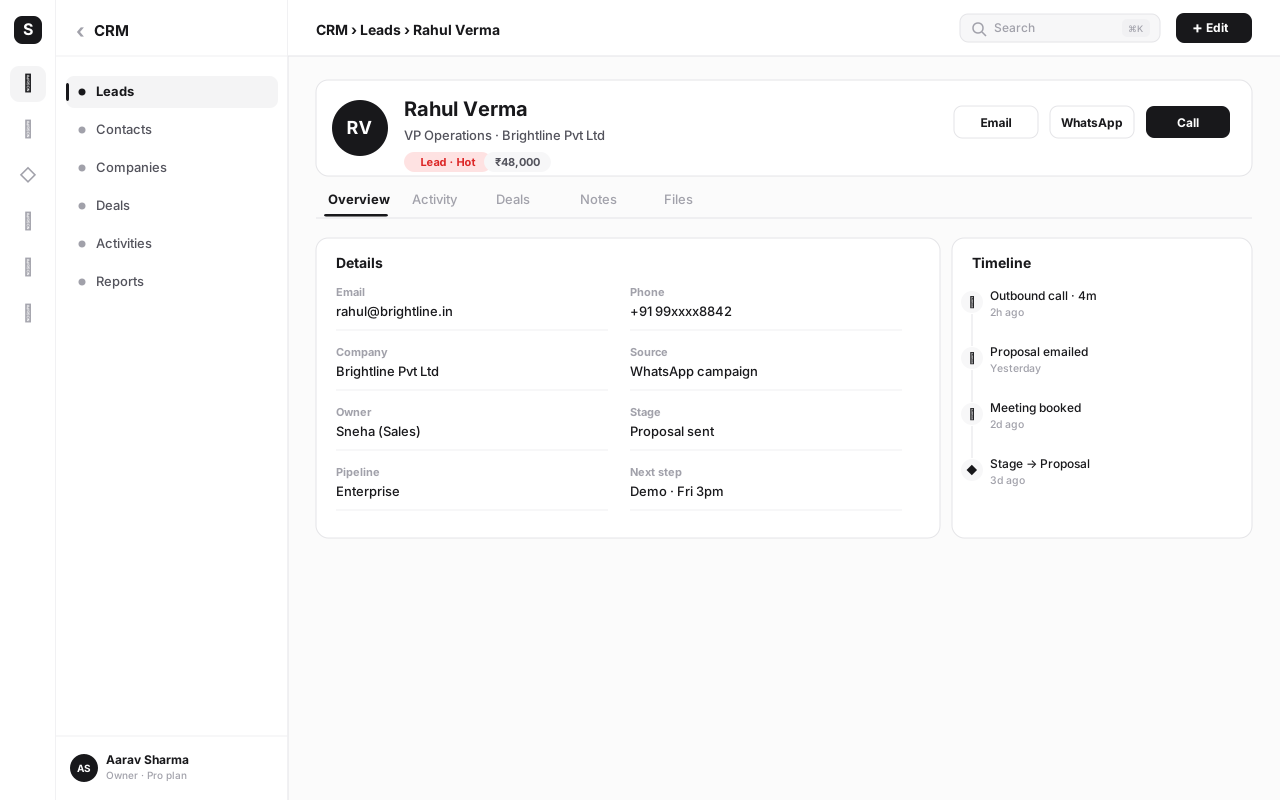
One thing that's easy to miss when a clinic first sets up WhatsApp reminders as a standalone tool: the messages themselves are only half the value. The other half is what happens when those messages, the booking, the patient's contact details and any staff replies all live against the same patient record instead of scattered across a booking spreadsheet, a separate messaging tool, and whatever the front desk remembers from the last call.
When WhatsApp is connected to the same platform as the clinic's CRM and calling, a few things become straightforward that are otherwise fiddly: a staff member can see, in one place, whether a patient confirmed their reminder, whether they've opted out, and what the last message exchange said, before picking up the phone to follow up. A missed reminder reply doesn't vanish into an inbox nobody's watching — it shows up as an open item against that patient's record. And if a patient calls in instead of replying to WhatsApp, the front desk sees the same timeline either way, so nothing depends on which channel the patient happened to pick that day.
This matters more in healthcare than in a lot of other verticals precisely because continuity is the whole point of the relationship — a patient shouldn't have to re-explain their appointment history to whoever answers the phone. A unified timeline (calls, WhatsApp messages, bookings, notes) is what makes a clinic's front desk feel organized rather than reactive, and it's a natural extension of the same discipline this article has been describing: keep the sensitive clinical detail on the clinical system, but let the logistics — who was contacted, when, and how they responded — live in one place everyone on staff can see.
Consent and opt-in: the part that matters more here than almost anywhere else#
Every industry using WhatsApp Business API needs opt-in, but healthcare is where getting it right matters most, because the relationship starts from a position of trust that's easy to damage. A patient who gets a cold WhatsApp message from a clinic they've never explicitly agreed to hear from — even a perfectly innocuous appointment reminder — can reasonably wonder how the clinic got their number and what else it might do with it.
The fix is straightforward and should happen at the point the relationship begins:
- Ask at registration or the first visit. A single checkbox or line on the intake form — "I agree to receive appointment reminders and clinic updates on WhatsApp" — turns an assumption into a documented yes.
- Say what they're opting into. Be specific: reminders, instructions, report-ready alerts. Don't bundle in unrelated marketing without a separate, clearly-labelled opt-in for that.
- Make opt-out effortless and immediate. Every message should carry a plain "reply STOP to opt out" line, and when someone does, that preference needs to stick across every future message, not just silence the current thread.
- Re-confirm periodically for long-term patients. For patients under long-term or recurring care, a periodic reminder of what they're subscribed to (and an easy way to change it) keeps consent current rather than assumed forever from one signature years ago.
Report-ready notifications: nudge to a secure place, don't paste the data#
This is the use case clinics most often get wrong in the early days of adopting WhatsApp, usually with good intentions: someone on staff sees WhatsApp as "just a fast way to message the patient" and pastes a lab value or a line from a report straight into the chat because it feels helpful and immediate.
The safer, and increasingly standard, pattern is to keep WhatsApp as the notification and put the actual content somewhere access-controlled: "Hi Rohan, your blood test results are ready. View them securely here: [link to patient portal]" rather than "Hi Rohan, your HbA1c came back at 7.2%." The link can point to a patient portal, a password-protected file, or any system that authenticates the person opening it — the point is that the sensitive content sits behind a gate WhatsApp itself doesn't provide.
| Situation | Riskier pattern | Safer pattern |
|---|---|---|
| Lab results ready | Pasting the value or "positive/negative" result directly in chat | "Your report is ready — view it securely here" with a portal link |
| Diagnosis discussion | Typing out a diagnosis in a WhatsApp message | "Please call the clinic to discuss your results with Dr. ___" or a scheduled call |
| Prescription refill | Listing medication names and dosages in the message | "Your refill is ready for pickup at the pharmacy counter" with an order reference |
| Insurance / billing detail | Sharing a full invoice with treatment codes over chat | "Your invoice is ready — view or pay securely here" with a link |
This isn't about being unhelpful — a "report ready" nudge still gets the patient to their result faster than waiting for a phone call that may not come. It just moves the last, sensitive step onto a system built to hold it.
Pre-visit instructions and post-visit check-ins#
Two of the least glamorous WhatsApp use cases are also two of the most appreciated by patients, because they replace instructions that are normally given verbally and then half-forgotten by the time they matter.
Pre-visit instructions sent a day or two ahead — "please fast for 10-12 hours before tomorrow's blood test," "bring your previous prescription and any prior scan reports," "parking is available at the rear entrance" — turn a verbal instruction given weeks earlier into something the patient can reread the morning of the visit. This alone reduces the number of patients who show up having eaten breakfast before a fasting test, or without the report a specialist specifically asked them to bring.
Post-visit check-ins, sent a day or two after a procedure or a first visit, are a simple, low-effort way to show the clinic is still paying attention: "How are you feeling after yesterday's procedure? Reply if you have any concerns, or call the clinic on [number]." This isn't a substitute for clinical follow-up where one is medically needed — it's a lightweight signal that catches the patient who's mildly worried but wouldn't otherwise call, and routes them back to the clinic instead of to a search engine.
WhatsApp Flows for structured intake — kept to the logistics layer#
WhatsApp Flows let a clinic present a proper structured form inside the chat instead of a back-and-forth of typed messages — useful for anything with a fixed set of fields. The clean way to use this for a clinic is to keep Flows scoped to booking logistics: preferred date and time slot, department or specialty, whether it's a new or follow-up visit, insurance provider name, and basic contact details.
What shouldn't go in a Flow — or anywhere in WhatsApp — is clinical history: symptoms, past diagnoses, medication history, or anything a proper intake form on a clinical or EMR system is built to hold securely. Think of the Flow as solving "let's get this appointment booked with the right basic details" rather than "let's collect everything the doctor needs to know," which stays on the system designed for that job.
How to set up appointment reminders for a clinic, step by step#
Here's the concrete build, from a blank WhatsApp Business API setup to a running reminder sequence.
- Get WhatsApp Business API access. Sign up and connect a business phone number through a provider like WaChat inside SabNode. This gives the clinic a verified, official WhatsApp presence rather than a personal number.
- Add the consent line to your intake process. Update your registration form or first-visit paperwork with an explicit WhatsApp opt-in line, and make sure whoever captures the patient's number also captures that consent alongside it.
- Write and submit your Utility-category templates. Draft the confirmation and reminder message templates — for example, "Hi {{1}}, this is a reminder for your appointment with Dr. {{2}} on {{3}} at {{4}}. Reply CONFIRM or RESCHEDULE." — and submit them for approval under the Utility category, since these are transactional, not promotional.
- Connect your booking system as the trigger. Whenever a booking is created, changed or cancelled, that event should be able to fire a WhatsApp message — either through a direct integration or via an automation trigger, so nobody has to send reminders manually.
- Schedule the two-touch reminder sequence. Set the first reminder to fire roughly 48 hours before the appointment and the second roughly 2 hours before, both using your approved Utility templates.
- Add pre-visit instructions where relevant. For appointment types that need prep (fasting, documents, procedure-specific notes), attach the relevant instruction message to the first reminder or send it as a separate message the day before.
- Wire up confirm / reschedule replies. Make sure a patient replying CONFIRM or RESCHEDULE actually updates something — ideally the booking status in your system — rather than landing in an inbox nobody watches.
- Set up report-ready and refill notifications separately. Configure these as a distinct trigger from your lab or pharmacy workflow, always linking out to a secure portal rather than including results in the message body.
- Turn on the shared team inbox for replies. Any patient who replies with a question needs a real person to see and answer it — route incoming messages to a shared inbox your front-desk or support team actually monitors, not a dead-end number.
- Test the opt-out path end to end. Reply STOP from a test number and confirm the preference is actually respected on the next reminder cycle — don't assume it works until you've watched it work.
- Review no-show rates after 4-6 weeks. Compare no-show rates before and after the reminder sequence goes live. This is usually the number that justifies the whole project to the rest of the practice.
Cut no-shows without touching a phone
Set up appointment confirmations, a two-touch reminder sequence and a shared inbox for patient replies — all on the WhatsApp Business API inside SabNode. Start free and connect your booking system when you're ready.
Measuring whether it's working#
A reminder program is easy to set up and easy to forget to check on. A handful of numbers tell you whether it's actually earning its place.
| Metric | What it tells you |
|---|---|
| No-show rate, before vs. after | The headline number — did the reminder sequence actually reduce missed appointments |
| Template delivery / read rate | Whether reminders are reaching patients at all, or quietly failing to send |
| Confirm vs. reschedule reply rate | How many patients are actively engaging with the reminder rather than ignoring it |
| Opt-out rate | Whether messaging feels welcome or intrusive — a rising rate is a signal to review frequency and tone |
| Front-desk reply turnaround | How quickly staff respond to patients who reply with a question — slow replies undercut the whole channel |
Check these numbers a few weeks after launch and again every quarter. No-show rate is the one that tends to justify the whole effort to the rest of the practice, but the opt-out rate and reply turnaround are what keep the program healthy over time rather than slowly turning into noise patients tune out.
Common mistakes clinics make with WhatsApp#
- Sending lab results or diagnoses in free text. The single most avoidable risk. Send a secure-link notification instead of pasting the actual clinical content into the chat.
- Messaging patients without documented consent. Using an old patient list to start a WhatsApp reminder program without ever asking. Get an explicit opt-in at registration, not an assumed one.
- No easy opt-out. Forgetting to include (or actually honour) a "reply STOP" instruction. An opt-out that doesn't work is worse than no opt-out at all — it looks like you ignored the request.
- Using promotional templates for transactional messages. Sending an appointment reminder through a Marketing-category template instead of a Utility one, which risks lower deliverability and a worse patient experience.
- Treating WhatsApp as a support hotline with no one watching. Letting patients reply to a reminder and receive silence. If you can message out, staff the inbox for messages back in.
- Collecting clinical history inside a WhatsApp Flow. Using a structured Flow form for symptoms or medical history instead of keeping that on a proper clinical system.
- One-size reminder timing. Sending a single reminder at a fixed, arbitrary time instead of the two-touchpoint pattern (roughly 48 hours and 2 hours out) that actually catches both the "still time to reschedule" and "don't forget today" moments.
- Never re-confirming consent for long-term patients. Assuming a consent given years ago for a one-off visit still covers an ongoing messaging relationship.
Conclusion#
The clinics getting real value from the WhatsApp Business API aren't the ones trying to do everything on it — they're the ones using it precisely for what it's good at: fast, written, time-sensitive logistics around a visit. Confirmations, a well-timed two-touch reminder sequence, pre-visit instructions, and a report-ready nudge that points to a secure link cover most of what a front desk spends its day chasing by phone, and they do it with a channel patients actually read.
The discipline that keeps this safe is simple to state and easy to build into your process from day one: ask for consent explicitly, always offer an easy opt-out, and keep sensitive clinical content off free-text WhatsApp entirely — nudge to a secure system instead. None of that requires exotic technology; it requires a clear policy and a messaging setup that respects it by default.
If you're building this out, start with Utility message templates for the transactional messages, layer in WhatsApp Flows for booking-only structured intake, and connect a shared inbox so replies never go unanswered. You can see the full messaging setup on SabNode's pricing page, or sign up free to configure your first reminder sequence today.
Frequently asked questions
Can a clinic legally use WhatsApp to message patients in India?
Yes, but it should be built on explicit patient consent and used mainly for logistics — appointment confirmations, reminders, pre-visit instructions and report-ready alerts — rather than for transmitting sensitive clinical data. India's relevant framework is the Digital Personal Data Protection (DPDP) Act, not the US HIPAA law, which doesn't apply here. This article is a practical product guide, not legal advice; talk to your own compliance counsel about how your clinic specifically should handle patient data.
Is it safe to send lab reports or diagnoses over WhatsApp?
The safer pattern most clinics use is to send a secure link to a patient portal or a password-protected file rather than pasting results or a diagnosis directly into a WhatsApp message as free text. WhatsApp messages can sit on a shared family phone, get forwarded, or stay in a chat that isn't access-controlled the way a clinical system is, so treat WhatsApp as the notification channel ('your report is ready, tap here') and keep the actual clinical content behind a proper, authenticated system.
Does WhatsApp for healthcare actually reduce no-shows?
It's one of the best-documented ROI cases for this vertical. An automated reminder sequence — commonly one message around 48 hours before the appointment and a second closer to 2 hours before — measurably cuts missed appointments compared with sending no reminder at all, because it catches patients at two different decision points: enough notice to reschedule, and a last nudge on the day.
What kind of WhatsApp message template do I need for appointment reminders?
Appointment reminders are approved under the Utility template category, which is the category Meta treats as transactional rather than promotional. A typical utility template reads something like 'Hi {{1}}, this is a reminder for your appointment with Dr. {{2}} on {{3}} at {{4}}. Reply CONFIRM to keep it or RESCHEDULE to change.' Utility templates get submitted once for approval and then send reliably as your reminder engine triggers them.
How should a clinic collect WhatsApp consent from patients?
Ask at registration or the first visit — a simple opt-in line on the intake form ('I agree to receive appointment reminders and clinic updates on WhatsApp') works better than messaging a number cold from an old file. Every message should carry an easy, working opt-out (a 'reply STOP' instruction is standard), and if a patient opts out, your system should honour that immediately across every future reminder, not just the current one.
Can I use WhatsApp Flows for patient intake?
Yes, for lower-sensitivity structured data — booking details like preferred date and time slot, department, insurance provider name, or basic contact information. Keep actual clinical history, symptoms and medical records on a proper clinical or EMR system rather than inside a WhatsApp Flow, and treat the Flow purely as a fast way to collect the logistics needed to book or confirm a visit.
What's the difference between using WhatsApp for healthcare and for general business marketing?
The mechanics — templates, the Utility category, broadcast tooling, a shared inbox — are the same underlying WhatsApp Business API used across every industry. What changes for healthcare is the content discipline: treat WhatsApp as a notification and logistics channel, get explicit consent before you use it, never put sensitive clinical detail in free text, and always give patients an easy way out. Get that discipline right and the same infrastructure that runs a retailer's broadcast campaigns works well for a clinic's patient communication.