How to Send a Payment Link on WhatsApp (and Get Paid Faster)
A quote agreed in chat shouldn't need five extra steps to get paid. Here's how to send (and automate) a payment link right inside the WhatsApp conversation.
To send a payment link on WhatsApp, generate the link from a payment gateway like SabPay, then share it inside the conversation — either pasted as a plain message or, for business-initiated sends, inside a Utility template with a "Pay Now" button. The customer taps it, completes checkout by UPI, card or netbanking on a secure hosted page, and a confirmation lands back in the same thread. Because SabPay and WaChat run on one platform, the whole loop — quote agreed, link generated, link sent, payment made, receipt confirmed — can also run automatically, so the right amount goes out on its own and the paid status flows straight back to the order or deal.
Why a link inside the chat beats an emailed invoice#
Most small and mid-size businesses in India close a meaningful share of sales inside a WhatsApp conversation — a quote is discussed, a quantity is confirmed, a price is agreed — and then the payment step suddenly jumps to a completely different channel. An invoice goes out by email, or a bank account number gets typed into the chat, and the conversation that built the sale has nothing to do with the payment that closes it.
A payment link removes that jump. It's a unique URL that opens a hosted checkout page — UPI, cards, netbanking, wallets — and because it's just a link, it drops into a WhatsApp message exactly like any other. The chat that convinced the customer to buy becomes the same chat where they pay, with no new app to install and no separate cart flow to navigate.
The advantage isn't only convenience — it's speed, and the numbers behind WhatsApp explain why.
| Channel | Typical open/read behaviour | What that means for getting paid |
|---|---|---|
| WhatsApp message | Very high open and read rates, usually within minutes | A payment link is seen almost immediately, while the quote is still fresh in the customer's mind |
| Email invoice | Often sits unopened for hours or days, easily lost under other mail | A time-sensitive quote or overdue reminder can go unnoticed until it's chased again |
| SMS with a link | Opened reasonably fast, but no ongoing conversation around it | Works as a fallback, but lacks the back-and-forth context WhatsApp keeps in one thread |
| Manual bank transfer request | Depends entirely on the customer acting on typed instructions | Slow, error-prone, and gives neither side an automatic confirmation |
None of this means email invoicing disappears — formal billing and B2B paperwork still often need it. But for anything time-sensitive — a quote that needs same-day payment, a deposit to hold a booking, an overdue reminder that shouldn't wait another week — a payment link sent where the conversation is already happening gets acted on faster than the same request sitting in an inbox.
The manual flow: from "yes, send it over" to money in the bank#
Before automating anything, it helps to see the flow in its plainest, most manual form — the version a single person can run entirely by hand, one customer at a time.
The conversation reaches the point where money needs to change hands. That might be a quote finally agreed after some back-and-forth, a cart the customer has confirmed, or an invoice that's now due. Whatever the trigger, the business — or whoever is handling the chat — knows the exact amount that's owed.
From there, someone opens the payment gateway (SabPay, in SabNode's case) and creates a link for that amount, with a description that ties it back to the conversation — an order number, a service name, a date. The gateway generates a unique URL and, usually, a matching QR code. That link gets pasted or attached into the same WhatsApp thread, often with a short line of context: "Here's the link for the order we just discussed."
The customer taps the link from inside WhatsApp. It opens a hosted checkout page — not a WhatsApp screen, but a secure page served by the gateway — showing the business name, the amount and a choice of payment methods. They pick one, usually UPI, complete the payment in a couple of taps, and land on a success screen.
Back in the gateway (and often back in the chat, if a confirmation message is configured), the link's status flips from unpaid to paid. A receipt or confirmation follows — either automatically from the gateway or manually typed by the business — and the transaction is logged with its amount, method and timestamp.
That's the entire manual loop: quote agreed, link generated, link sent, customer pays, confirmation follows. It works perfectly well at low volume — a handful of orders a day, a boutique service business, a one-person operation. The problem shows up once volume climbs.
One link, one conversation, one person creating it by hand is fine for ten orders a day. At fifty or a hundred, someone is spending real hours just generating links, copying amounts correctly, and manually checking which ones got paid — time that should be going into the next sale, not repetitive data entry.
How to send a payment link on WhatsApp: step-by-step#
Here's the exact sequence, whether you're sending your first link today or standardising how your whole team does it.
- Confirm the amount before you touch the gateway. Re-read the chat and agree the final figure with the customer — quantity, any discount, delivery charges — so the number you generate matches exactly what was discussed. A mismatch here is the single most common source of customer confusion.
- Generate the link in your payment gateway. Open Payment Links in SabPay (or wherever your gateway lives), enter the amount in rupees, and write a description the customer will recognise later — "Order #1043 — 2× Wireless Earbuds" reads very differently to a customer than a bare "Payment."
- Attach the customer if your gateway supports it. Linking the payment to an existing contact means the eventual transaction ties itself to that customer's record automatically, instead of showing up as an anonymous payment with no context.
- Set an expiry for anything time-sensitive. A same-day quote, a limited booking slot or an event ticket should have a link that stops accepting payment after a deadline, so it can't be paid late once the offer or the stock is gone.
- Copy the link and open the WhatsApp conversation. Go back to the exact thread where the sale was discussed — not a new chat, not a broadcast list — so the payment request has full context around it.
- Send it with a short line of context, not the link alone. A message like "Here's the payment link for the earbuds order we discussed — ₹2,400, valid for 24 hours" does more work than a bare URL; it restates the amount so the customer double-checks it matches what they agreed to.
- Watch for the status to flip to paid. Once the customer taps through and completes checkout, the link's status updates and a transaction record is created — this is your cue to fulfil the order or move the deal forward.
- Send a short confirmation in the same thread. Even if the gateway fires its own receipt, a quick "Got it, payment received — shipping today" in the WhatsApp thread keeps the whole story in one place for the customer.
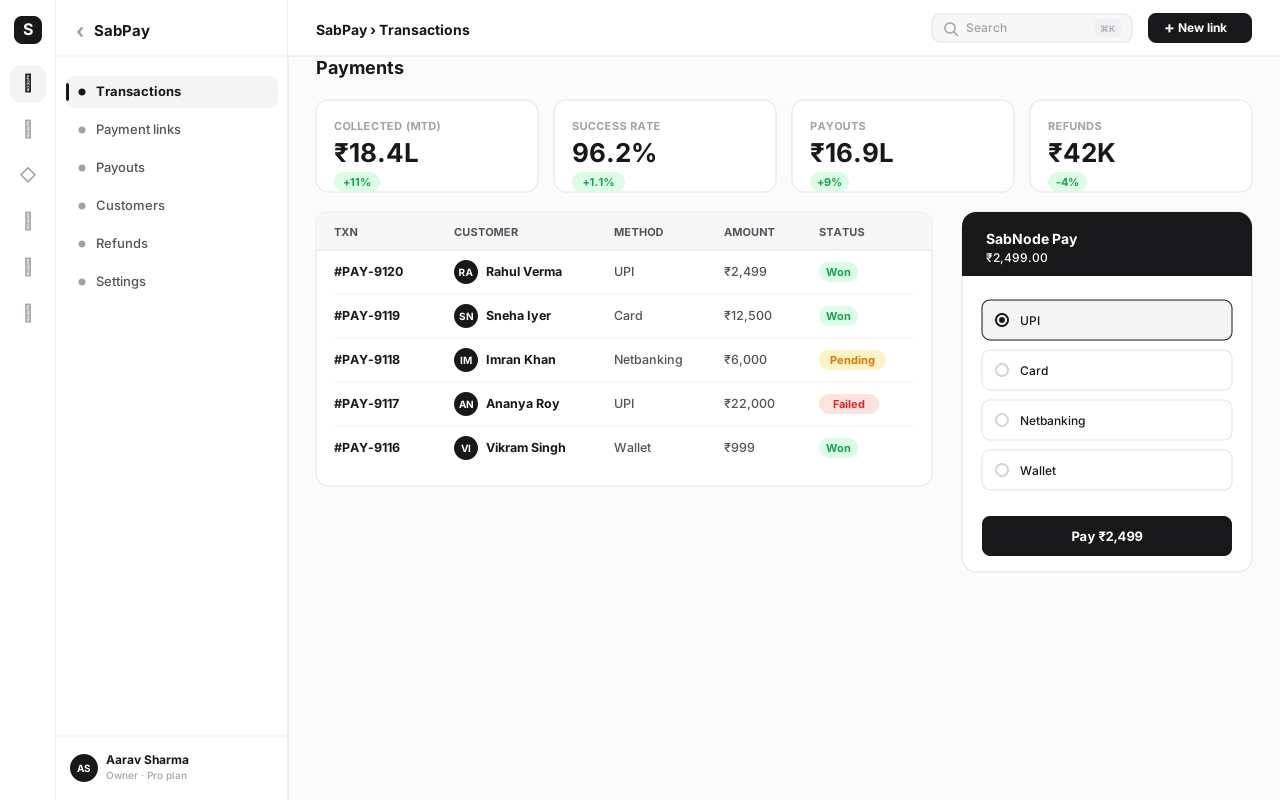
Followed in order, this takes under a minute once you've done it a few times — and it's exactly the sequence that gets replaced by automation once the volume of conversations makes doing it by hand impractical.
Plain message vs a Utility template#
There are two ways the link itself can arrive, and the difference matters mainly for who starts the conversation. If the customer messaged you first and you're replying inside an open session, a plain-text message with the link pasted in works fine — it's a normal reply in an ongoing chat. If your business needs to reach out proactively — a reminder for an overdue invoice, a nudge on an abandoned cart, a recurring bill — that falls under WhatsApp's rules for business-initiated messages, which generally means sending a pre-approved Utility template with the amount and a "Pay Now" style button rather than free text.
The mechanics of writing, approving and sending those templates — including exactly when a plain reply is allowed versus when a template is required — are covered in the WhatsApp message templates guide. For payment nudges specifically, a Utility template with a clear amount and a single button tends to read as more official than a bare link pasted into a message, which also nudges trust in the right direction.
Automating it: catalog orders and CRM deal stages#
The manual flow above works, but it doesn't scale past a person's available hours. The automated version keeps the same five moments — quote agreed, link generated, link sent, payment made, confirmation logged — but removes the human from the middle three.
There are two common triggers that make this work well together with WaChat and SabPay.
The first is a catalog order. When a customer browses a WhatsApp product catalog inside WaChat and builds a cart, the total is already known the instant they confirm it — there's no ambiguity to resolve, no back-and-forth on price. That confirmed total can trigger SabPay to generate a payment link automatically, with the order number and item list already filled into the description, and send it back into the same conversation without anyone typing an amount by hand.
The second is a CRM deal stage. In SabCRM, a deal moving into a stage like "Quote sent" or "Invoice due" can be the signal that a payment link should go out — for the exact figure recorded against that deal. As soon as the stage changes, the link is created and delivered over WhatsApp, and when it's paid, the payment writes itself back onto that same deal record, often advancing the pipeline stage automatically and notifying whoever owns the account.
| Aspect | Manual (one at a time) | Automated (catalog or CRM-triggered) |
|---|---|---|
| Who creates the link | A person, per customer, per order | The system, the instant the trigger condition is met |
| Amount accuracy | Depends on whoever types it in correctly | Pulled directly from the confirmed cart or deal value |
| Speed to send | Minutes to hours, depending on staff availability | Seconds, regardless of time of day |
| Payment status tracking | Checked manually against a list of sent links | Flows back automatically to the order or CRM deal record |
| Best fit | Low volume, bespoke quotes, high-touch sales | Repeat orders, standard pricing, growing order volume |
Automating link generation matters most once volume climbs, because the failure mode of doing it manually isn't just slower service — it's silent errors. A wrong amount typed once, a link sent to the wrong contact, a payment that lands but never gets matched back to the order it was for. Tying the link to the catalog checkout or the deal stage removes all three: the amount can't drift from what was agreed, the send happens in the same thread the order came from, and the paid status updates the record that actually needs to know about it.
A quick worked example makes this concrete. A small apparel seller runs their storefront entirely through a WhatsApp catalog. A customer adds two items, confirms the cart at ₹1,850, and taps checkout. Instead of a staff member picking up that chat, generating a link by hand and typing the total, the confirmed cart total fires straight into SabPay, which creates a link for exactly ₹1,850 with the order number in the description and sends it back into the same conversation within seconds. The customer pays by UPI, the link flips to paid, and the order — already sitting in the seller's dashboard — updates to "Paid, ready to pack" without anyone re-typing a single figure. The same pattern works just as well for a service business, where a CRM deal reaching "Quote accepted" is the trigger instead of a cart.
Getting paid is only half the job — knowing which order or deal that payment belongs to is the other half. An automated link ties itself to a specific order or CRM record from the moment it's created, so a member of the team can look at any conversation later and immediately see whether it was paid, for what, and when — without cross-checking a separate payments dashboard by hand.
Why UPI makes this frictionless in India#
For an Indian customer, the biggest barrier to paying anything online is usually the card form — number, expiry, CVV, an OTP that may or may not arrive quickly. UPI removes almost all of that. Most smartphone users already have a UPI app installed, and a UPI-enabled payment link lets them approve a payment with a PIN in a couple of taps, with no card details typed anywhere.
That matters specifically because of where the link is being sent. A customer reading a message on WhatsApp is typically on their phone already, mid-conversation, with their UPI app one swipe away — the payment step barely interrupts what they were already doing. Compare that to being emailed an invoice on a desktop, where paying might mean digging out a card, or switching devices entirely to find a UPI app.
None of this replaces the other methods — cards, netbanking and wallets should stay enabled on every link, since not every customer defaults to UPI, and B2B buyers in particular may prefer a card or netbanking trail for their own accounting. But defaulting to UPI as the fastest path, on a channel where the customer is already present and engaged, is what turns "I'll pay later" into "paid, right now."
There's also a familiarity effect worth naming. Indian customers have spent years scanning UPI QR codes at the local shop and approving small payments through their bank's own app, so a UPI checkout screen doesn't feel like a new piece of technology to learn — it feels like the same motion they already do several times a day, just triggered from a link instead of a QR sticker on a counter. That familiarity is part of why UPI links convert so much better than asking a customer to dig out a card and type sixteen digits on a phone keyboard.
Security and trust: confirm before you send, and never fake it with a bank transfer#
A payment link only works as a trust shortcut if it actually behaves like one — which means getting a couple of basics right every time, and never substituting a manual money request for the real thing.
The first rule is simple: always confirm the amount out loud (or in writing, in the chat) before generating the link. Don't rely on a figure from three messages ago that might have changed after a discount or an added item. A customer who sees a link for the wrong amount doesn't just decline to pay — they start wondering whether the whole conversation is legitimate.
The second rule matters even more for trust: use a real payment gateway link, never a manual bank-transfer request dressed up as one. A genuine payment link points to a hosted checkout on a payment gateway's own secure domain — the kind that shows your business name, encrypts the transaction, and gives both sides an automatic confirmation. A message that instead asks a customer to transfer money to an account number, or to scan a personal UPI QR code with no order details attached, is exactly the pattern that payment scams imitate. Customers have learned, rightly, to be cautious of unsolicited "just send money here" messages — a proper payment link, tied to an identifiable order and a recognisable business checkout, reads as legitimate in a way a bare bank transfer never will.
| Practice | Why it protects the customer (and you) |
|---|---|
| Confirm the amount before generating the link | Prevents disputes and stops a customer second-guessing whether the request is genuine |
| Use a licensed gateway's hosted checkout | Card and UPI details are entered on the gateway's encrypted page, never inside the chat |
| Attach an order description, not a bare amount | Gives the customer something to recognise, and gives you a clean reconciliation trail |
| Set an expiry on time-sensitive links | Stops an old, stale link being paid (or reused) long after the context has changed |
| Never ask for a manual bank transfer as a "faster" alternative | Manual transfers have no automatic verification and are the pattern most payment scams copy |
A legitimate business collecting payment on WhatsApp sends a link to a hosted checkout page — it does not ask a customer to transfer funds directly to a personal account, share a UPI PIN, or "confirm" a payment by sending a screenshot. If a message pushes for any of those instead of a proper gateway link, that's the moment to stop and verify the sender, not proceed.
Common mistakes#
Even once the mechanics are understood, a handful of avoidable errors show up again and again once a business starts sending payment links regularly.
- Manually creating links one by one at volume. Once orders climb past a handful a day, generating each link by hand turns into a real time sink and a source of typos in the amount. Tie link generation to the catalog checkout or the CRM deal stage instead.
- No automatic payment-status logging. Sending a link and then checking days later whether it was paid means missed follow-ups and orders that sit unfulfilled. Make sure the paid status writes back to the order or deal the moment it happens.
- Sending a generic link with no context or amount confirmation first. A bare URL with no description invites the customer to wonder what it's for and whether it's genuine. Restate the amount and the order in the message that carries the link.
- Treating a bank-transfer request as a substitute for a real link. Asking a customer to transfer funds directly removes every safeguard a proper gateway link provides, and looks identical to a scam pattern customers have learned to distrust.
- Skipping the expiry on time-sensitive offers. A quote or booking link with no expiry can be paid weeks later, after the price or availability has changed, creating a dispute that didn't need to happen.
- Blasting the same link to a list instead of a per-customer one. A link meant for a single order shouldn't be broadcast; use a reusable link with a quantity cap for genuinely shared offers, and a fresh per-order link for individual sales.
- Forgetting to send a human confirmation in the thread. Even with an automatic receipt from the gateway, a short "got it, thank you" message in the same WhatsApp conversation reassures the customer the payment was actually seen on your end.
Turn your WhatsApp conversations into checkouts
Send SabPay payment links straight from a WaChat conversation, or let a catalog order or CRM deal stage trigger the link automatically. Start free and get paid without ever leaving the chat.
Conclusion#
A payment link sent inside a WhatsApp conversation works because it doesn't ask the customer to go anywhere — the chat that convinced them to buy is the same chat where they pay, and UPI gets most of them through checkout in a couple of taps. Manually, that's five simple steps: agree the amount, generate the link, send it in the thread, let the customer pay, and confirm. Automatically, a catalog checkout or a CRM deal stage does the same five steps without anyone lifting a finger, and the paid status flows straight back to the record that needs it.
The part worth protecting, at any volume, is trust — always confirm the amount before the link goes out, and always send a real payment-gateway link rather than a manual transfer request that looks, to a wary customer, exactly like a scam. Get that right, and a payment link stops being an extra step tacked onto the sale and becomes the natural last line of the conversation.
To see the full mechanics of link creation, tracking and refunds, read the payment links guide, or explore how catalog orders fit into the same WhatsApp conversation in the WhatsApp catalog commerce guide. When you're ready to connect WaChat and SabPay for your own business, sign up free or compare plans on pricing.
Frequently asked questions
Can I send a payment link directly in a WhatsApp message?
Yes. A payment link is just a URL, so you can paste it into any WhatsApp message the same way you'd share any other link — the customer taps it, lands on a hosted checkout page, and pays by UPI, card, netbanking or wallet. For a more polished experience, businesses on the WhatsApp Business API usually send it inside a Utility template with a dedicated "Pay Now" button rather than a plain-text URL, but the underlying mechanic is identical either way.
Do I need a separate payment gateway to send links on WhatsApp?
You need a payment gateway to generate the link itself — WhatsApp doesn't process payments on its own, it's only the channel the link travels through. In SabPay, that link creation and the WhatsApp send happen from the same screen, since SabPay and WaChat sit on one platform, so there's no copy-pasting between two separate tools.
Is it safe to pay through a link sent on WhatsApp?
It's safe as long as the link points to a real, PCI-DSS-compliant payment gateway's hosted checkout page — the kind where you enter card or UPI details on the gateway's own secure domain, not inside the chat. It becomes risky only when someone asks for a manual bank transfer, a screenshot of your UPI PIN, or sends a link from an unfamiliar shortened domain. Always confirm the business, the amount and the destination before you pay any link, on WhatsApp or elsewhere.
Can payment links in WhatsApp be generated automatically?
Yes, and at any real volume this is how it should work. Instead of a person creating a link by hand for every order, a catalog checkout or a CRM deal reaching a "Quote sent" or "Invoice due" stage can trigger link generation automatically with the correct amount already filled in, and the resulting payment status can flow straight back to that order or deal record without manual reconciliation.
Why do UPI links work so well for WhatsApp payments in India?
Because most Indian smartphone users already have a UPI app installed, a UPI-enabled payment link lets them authorise a payment in two taps with no card number, no CVV and no OTP typed on a keyboard. Combined with WhatsApp's very high open and read rates compared with email, a UPI link sent in-chat tends to get paid within minutes rather than sitting unopened in an inbox.
What's the difference between a payment link and asking for a bank transfer on WhatsApp?
A payment link routes the customer through a licensed payment gateway that verifies the amount, encrypts the transaction and gives both sides an automatic, timestamped confirmation. A manual bank-transfer request relies on the customer typing an account number correctly, trusting that the details in the chat are genuine, and both of you cross-checking bank statements afterward — a pattern scammers also exploit, which is exactly why a real payment link is the safer, more professional choice.
Can a WhatsApp payment link be part of an automated chatbot flow?
Yes. A flow or chatbot can confirm an order, calculate the total, generate a payment link with that exact amount, and send it as the next message — all without a human in the loop — then update the customer and your CRM the moment the webhook reports the link as paid. This is typically wired using WhatsApp Flows or a chatbot builder alongside the payment gateway's API, rather than by a person creating each link by hand.