One Platform vs Juggling Ten Tools: The Real Cost
A WhatsApp tool, a dialer, a CRM, an SMS gateway, an email app, an automation builder, a payments link, an e-sign tool — eight bills and eight data silos. Here's the real cost of juggling them, and when consolidating actually pays.
Juggling ten point tools almost always costs more than one good platform — but not for the reason most people think. The subscriptions are the smallest line item. The real bill is paid in lost context, data that drifts out of sync, per-seat sprawl and the hours your team spends moving information between screens that should never have been separate.
This article puts numbers and judgement to that claim. We'll compare running a fragmented stack — a WhatsApp tool, a calling app, a CRM, an SMS gateway, an email tool, an automation builder, a payments link and an e-sign product — against a single platform like SabNode that does all of it. We'll be fair: there are real situations where best-of-breed still wins, and we'll name them. Then we'll cover when consolidation is the right call, the common mistakes teams make doing it, and how to migrate without a risky big-bang switch.
The stack nobody designed#
No business sets out to run ten disconnected tools. It happens one reasonable decision at a time. You start with a WhatsApp tool because that's where customers message you. Sales asks for a CRM. The calling team needs a dialer. Marketing signs up for an SMS gateway and a separate email tool. Someone automates a hand-off with a workflow builder. Finance adds a payments link. Legal adds an e-sign product. Each purchase made sense on its own day.
The problem is that none of these tools were designed to know about each other. The WhatsApp conversation lives in one app, the call recording in another, the deal in a third, the payment in a fourth. The customer is one person with one story, but their story is now scattered across eight databases that don't talk — and the work of stitching it back together lands on your team, every single day.
That stitching is the hidden tax of a fragmented stack. It rarely shows up on an invoice, which is exactly why it's so expensive: nobody is tracking it.
Where the money actually goes#
Let's split the cost of a fragmented stack into what you can see on a bank statement and what you can't. Both are real; the invisible half is usually larger.
The visible costs#
Multiple subscriptions. Eight products means eight monthly bills, often on eight different renewal dates and eight different cards. Even when each looks cheap in isolation, the total creeps upward, and nobody owns the whole number.
Per-seat sprawl. This is the one finance teams underestimate most. The same salesperson needs a seat in the CRM, the dialer, the WhatsApp tool and the email platform. You're paying for that one human four times. Multiply across a team of ten and the seat math gets ugly fast — you're buying forty licences to employ ten people.
Integration and connector cost. To make the tools pretend they're connected, you pay for connectors — a third-party automation service, premium API tiers, or an "integrations" add-on on each product. Those fees are pure overhead: money spent to partially undo the fragmentation you paid for elsewhere.
The invisible costs#
Data going out of sync. A phone number gets updated in the CRM but not the dialer. A customer unsubscribes in the email tool but still gets an SMS. Every silo holds a slightly different version of the truth, and the gaps surface at the worst moments — usually in front of a customer.
Context lost between tools. An agent picks up a call with no idea the customer messaged on WhatsApp an hour ago, or that a payment just failed. Without the full history on one screen, every interaction starts cold. Customers feel it, and they read it as "this company doesn't know me."
More vendors, more security surface. Eight vendors means eight contracts, eight data-processing agreements, eight sets of credentials, eight places your customer data lives and eight potential breach points. Every tool you add widens the surface a security team has to defend and an admin has to govern.
Slower onboarding. A new hire must learn ten interfaces, ten logins and ten sets of quirks before they're productive. With one platform, they learn one. Across a year of hiring, that difference compounds into real weeks of lost ramp time.
An illustrative cost comparison#
Numbers make this concrete. The table below is illustrative, not a quote — it uses representative figures for the kind of point tools an Indian SMB typically runs, to show the shape of the cost, not exact prices. For SabNode's actual pricing, see our pricing page. The point isn't the precise rupee total; it's that the fragmented column carries costs the platform column simply doesn't have.
| Cost line | Fragmented stack (8 separate tools) | One platform (SabNode) |
|---|---|---|
| WhatsApp Business tool | Separate subscription + per-seat | Included module |
| Calling app / dialer | Separate subscription + per-seat | Included module |
| CRM | Separate subscription + per-seat | Included module |
| SMS gateway | Separate subscription + usage | Included module + usage |
| Email tool | Separate subscription + per-seat | Included module |
| Automation builder | Separate subscription | Included module |
| Payments link | Separate subscription + fees | Included module + fees |
| E-sign tool | Separate subscription + per-seat | Included module |
| Connectors to sync the above | Extra automation / API fees | None — modules share data natively |
| Per-seat duplication | Same person paid for across 4–8 tools | One seat covers every module |
| Bills to manage | 8+ invoices, multiple renewal dates | 1 invoice, one renewal |
| Vendors to govern | 8 contracts and security reviews | 1 vendor, one posture |
Notice that the most expensive rows in the fragmented column — connectors, per-seat duplication, vendor governance — are the ones that vanish entirely on a platform. That's the structural advantage. It isn't that each tool is overpriced; it's that the seams between them cost money the platform model never incurs.
The cost of fragmentation that never appears in any budget is the deal you didn't close because the lead who messaged on WhatsApp, called, and then got an SMS was treated like three strangers. One platform makes that customer one record. That's where consolidation pays for itself first.
How a fragmented stack leaks value, day to day#
It helps to trace a single customer through both worlds, because the abstract "lost context" becomes obvious the moment you follow one person.
A lead messages your WhatsApp on Monday asking about a product. In a fragmented stack, that conversation lives in the WhatsApp tool. On Tuesday they call; the agent who picks up has no record of Monday's chat, asks them to repeat everything, and logs the call in the dialer. On Wednesday marketing blasts them an SMS promoting the same product they already asked about — because the SMS gateway has no idea a conversation is underway. On Thursday they're ready to buy, but the payment link is generated in yet another tool and emailed manually, and the e-sign for the contract comes from a fifth. By the time the deal closes, the customer has been treated like five different people by five different systems, and your team has hand-typed the same name and number into each.
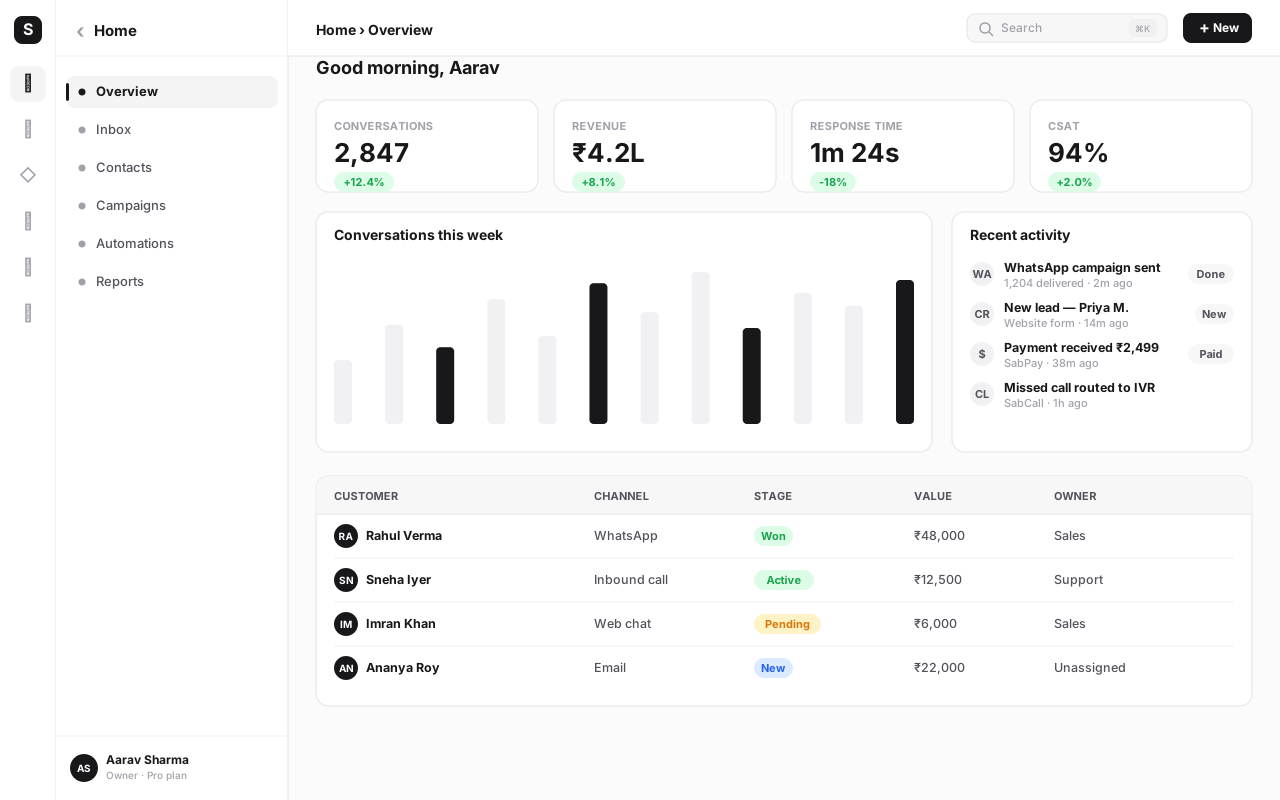
On one platform, that same journey is a single timeline. The WhatsApp message, the call and its recording, the SMS (suppressed automatically because a live conversation is open), the payment and the signed contract all attach to one contact record. The agent who takes Tuesday's call sees Monday's chat. Marketing's automation knows not to interrupt. The whole thing flows because the modules share one database instead of eight.
The table below maps the same business job to both models, so the structural difference is easy to see.
| Business job | Fragmented stack | One platform |
|---|---|---|
| See a customer's full history | Open 4–5 tools, reconcile manually | One contact timeline, every channel |
| Follow up after a call | Copy notes from dialer into CRM | Call and outcome logged automatically |
| Stop messaging an unsubscribed contact | Update each channel tool separately | One suppression list across channels |
| Trigger action after a payment | Build and maintain a connector | Native cross-module automation |
| Onboard a new team member | Train on ten interfaces and logins | Train on one system |
| Answer "did we already contact them?" | Search every tool, hope it's current | Glance at the unified timeline |
This is the real argument for consolidation. It's not "one bill is tidier." It's that a shared customer timeline removes a whole category of work and error that a fragmented stack creates by design. For a deeper look at unifying channels around the customer, see our omnichannel customer engagement guide, and for the automation that ties modules together, the workflow automation guide.
Where best-of-breed still wins (and we mean it)#
Consolidation is not a universal answer, and pretending otherwise would be dishonest. There are clear cases where a specialist tool earns its place.
The strongest case is depth in a single, central niche. If your business lives or dies by one function, a tool built obsessively for that function can be a genuine competitive advantage. A performance-marketing agency may need an ad-buying platform with capabilities no all-in-one will match. A data team may need a dedicated warehouse and BI stack. A high-volume support operation may have a ticketing workflow so specific that a general module can't replicate it. In those cases, the specialist tool isn't sprawl — it's the core of the business.
The second case is regulatory or technical edges where a niche vendor has gone deeper than a platform reasonably can — a tool built around one industry's compliance regime, for example.
The honest framing is this: best-of-breed wins for the one or two functions that are your actual edge, and consolidation wins for everything around them. The mistake isn't keeping a great specialist tool. The mistake is letting every function become its own specialist tool, until the seams between them cost more than any single tool saves. Most teams should consolidate the core — channels, CRM, automation, payments — and connect the rare genuine specialist by API.
When consolidation is right — and when it isn't yet#
The decision is about timing as much as fit. Here's how to read your own situation honestly.
Consolidate when context is getting lost — not when you simply have a lot of apps. App count alone isn't the signal; plenty of teams run several tools happily because the seams don't hurt. The real trigger is when people start asking "where's that conversation?", "did we already call them?", or visibly pasting data between screens. That friction is the cost of fragmentation arriving in person. When you feel it weekly, a platform will pay for itself.
It isn't yet the right call if you're a one-person shop on a single channel, where the overhead of switching outweighs a pain you don't really feel; if your tools genuinely don't overlap and rarely need to share data; or if your one critical function is so deep that no platform module would match it and the rest of your stack is already small.
A second test is depth. A real platform has modules you'd be happy to use standalone — a CRM with proper pipelines and custom objects, a calling system with IVR and queues, automation that rivals a dedicated builder. A thin bundle of shallow features is a downgrade dressed as consolidation. When you evaluate, push on each module as hard as if you were buying it on its own.
Don't be seduced by a long feature list. A platform that does eight things badly is worse than two tools that each do one thing brilliantly. Ask to actually run the modules you'll lean on most — the CRM, the inbox, the dialer — before you trust them with your business. Depth first, breadth second.
Common mistakes when consolidating#
Teams that consolidate well share a method. Teams that struggle usually make one of these avoidable errors.
Big-bang cutover. Switching every tool off on the same Friday and expecting Monday to run is the fastest way to create chaos and lose trust in the new platform. Migrate one channel at a time. Run the old and new systems in parallel for the first channel until you're confident, then move the next.
Choosing breadth over depth. Picking the platform with the longest feature list rather than the strongest core modules. You don't need a platform that does forty things; you need one that does your eight things genuinely well. Score it on the jobs you do most.
Ignoring the migration of history. Bringing over new conversations but abandoning years of past interactions, deals and notes. The value of a unified timeline depends on it being complete. Import your history — contacts, deals, message logs — so the new record is the full record, not a fresh start that throws away context.
Forgetting compliance from day one. In India especially, channels carry rules — DLT registration for SMS, WhatsApp Business API onboarding, consent and opt-out handling. Wiring these in after the fact is painful. Plan them into the migration so the new platform is compliant on the first message it sends.
Not retiring the old tools. Leaving the old subscriptions running "just in case" for months. You keep paying both bills, and worse, data keeps trickling into the old silos because nobody fully switched. Set a firm sunset date for each tool once its channel is live on the platform, and stick to it.
Skipping the team. Treating consolidation as an IT project instead of a workflow change. The people who live in these tools all day need to be brought along, trained and heard. A platform nobody adopts is just another silo with a nicer login.
A phased migration that doesn't break anything#
The safe way to consolidate is gradual, channel by channel, with the old system as a safety net until each step is proven.
- Map your real workflows first. Before touching anything, list how a customer actually moves through your tools today — every hand-off, every copy-paste. This becomes your migration checklist and reveals which seams hurt most.
- Stand up the platform and import contacts. Create the workspace, bring in your contacts and deals from spreadsheets and existing tools, and invite your team. This is usually an afternoon's work and changes nothing customer-facing yet.
- Migrate your most painful channel first. Pick the channel where context loss hurts most — often WhatsApp or calling — and move it. Run it alongside the old tool, comparing outcomes, until you trust it.
- Run provider approvals in parallel. WhatsApp Business API onboarding and DLT-registered SMS sender IDs take a few business days for verification. Start them early so they're ready when you reach those channels, not blocking you.
- Add channels one at a time. With the first channel proven, bring the rest across in sequence — SMS, email, payments, e-sign — each running in parallel briefly before the old tool is retired.
- Turn on cross-module automation. Once data lives in one place, wire the automations that were impossible before: a payment that triggers a WhatsApp confirmation, a new lead that starts a call sequence. This is where consolidation stops saving money and starts making it.
- Sunset the old tools deliberately. As each channel goes live, set and honour a cancellation date for the tool it replaced. The savings only land when the old bills actually stop.
Done this way, there's no risky weekend, no lost data and no period where the business can't operate. Each step is reversible until you've proven the next. For the bigger-picture view of how the pieces fit, our all-in-one business platform guide is the place to start, and the CRM software complete guide goes deep on the record that anchors the whole timeline.
The honest bottom line#
Juggling ten tools isn't a moral failing — it's the natural result of solving problems one at a time. But left unmanaged, the fragmented stack quietly bills you twice: once in subscriptions, connectors and duplicate seats, and again, larger, in lost context, out-of-sync data and the human hours spent papering over the gaps. The deals you never see slip away are the most expensive part, and they never appear on any invoice.
The fair answer isn't "consolidate everything, always." Keep the one or two specialist tools that are your genuine edge. But consolidate the core — channels, CRM, automation, payments — onto one platform with a shared customer timeline, and do it the moment you notice context getting lost rather than the moment you count your apps. Migrate in phases, import your history, plan compliance in, and retire the old tools on purpose. Do that, and you trade a tangle of disconnected screens for one system that finally treats each customer as one person.
If your team already feels the seams between tools every day, that's your signal. A platform like SabNode exists precisely to turn ten logins into one — fairly, without pretending the migration is free.
Bring your whole stack onto one timeline
Replace a tangle of WhatsApp, calling, CRM, SMS, email, automation, payments and e-sign tools with one platform and one bill. Start free, migrate one channel at a time, and add modules as you grow — no credit card required.
Frequently asked questions
Is an all-in-one platform cheaper than buying separate tools?
Usually, but the subscription saving is the smallest part. Replacing eight tools with one lowers the monthly software bill, especially once you count per-seat licences multiplied across every product. The bigger saving is operational: when data flows automatically between channels and your CRM, you stop paying people to copy-paste it, and you stop losing deals to slow, context-free follow-ups. Migration effort is the cost on the other side of the ledger.
When does best-of-breed beat an all-in-one platform?
When one job is so central and so deep that a specialist tool is a genuine competitive advantage — a performance-marketing team living in an ad platform, a data team in a dedicated warehouse, a support team that needs a very specific ticketing workflow. Even then, most teams consolidate the core (channels, CRM, automation) and keep only one or two best-of-breed tools at the edges, connected by API.
How do I know it's time to consolidate my tools?
Consolidate when context is getting lost, not when you simply have a lot of apps. The signal is people asking 'where's that conversation?', 'did we already call them?', or pasting data between screens. If your team feels the seams between tools every day, fragmentation is already costing you more than a platform would.
Will I lose data if I move from many tools to one platform?
No, if you migrate in phases. Good platforms import contacts, deals and message history from spreadsheets and most popular tools, and offer an API and webhooks for anything custom. The goal of consolidation is to bring your data together onto one timeline, not to leave it behind. Run the old and new systems in parallel for the first channel before switching the rest.
What hidden costs come with juggling multiple SaaS tools?
The invisible costs add up fast: per-seat sprawl (paying for the same person across eight products), integration and connector fees to keep tools in sync, engineering time maintaining those integrations, data drifting out of sync between silos, context lost when an agent can't see the full customer history, a larger security and vendor-management surface, and slower onboarding because new staff must learn ten interfaces instead of one.
Does consolidating mean settling for weaker features?
It can, if you buy a thin bundle. A real all-in-one platform has genuinely capable modules — a CRM you'd happily use standalone, a calling system with IVR and queues, automation that rivals a dedicated builder. The mistake is choosing a long feature list over depth. Push on each module as if you were buying it on its own, and you'll avoid trading ten good tools for one shallow one.
How long does migrating from multiple tools to one platform take?
Core setup — creating the workspace, importing contacts, inviting your team and connecting your first channel — typically takes an afternoon. A phased migration of all channels, with provider approvals like WhatsApp Business API or DLT-registered SMS sender IDs running in parallel, usually completes within a few weeks for a small or mid-size business, without a risky big-bang cutover.