WhatsApp Drip Campaigns: How to Build a Message Sequence That Nurtures Leads
One broadcast is a blast. A drip campaign is a conversation that unfolds over days, branching on what the contact does. Here's how to build one that actually converts.
A WhatsApp drip campaign is a pre-built sequence of messages sent to a contact over time — triggered by an event like a signup or an abandoned cart, and released on a schedule such as immediately, then +1 day, then +3 days, then +7 days — rather than a single broadcast blast sent to everyone at once. Because messages sent outside the 24-hour reply window require approved templates, a drip sequence is really a chain of pre-approved templates fired by an automation platform at scheduled delays, ideally branching the contact out of the sequence the moment they reply, click, or convert.
Drip campaign vs broadcast: what's actually different#
Every WhatsApp sending strategy eventually needs both a broadcast and a drip campaign, but they solve different problems, and conflating them is where most automation plans go wrong.
A broadcast is a single message sent once to a defined audience at a chosen moment — a Diwali sale, a policy update, a "we're open again" announcement. Everyone in the segment gets the same message on the same day, and that's the end of it. If you want the full playbook for that side of WhatsApp marketing, see the guide on WhatsApp broadcast campaigns.
A drip campaign is different in kind, not just in size. It's a sequence of multiple messages, spaced out over days or weeks, sent to one contact because of something that contact did — not because of a date on your marketing calendar. The trigger is behavioral (signed up, abandoned a cart, attended a webinar, went quiet for 30 days), and the schedule that follows is relative to that trigger, not to the calendar. Contact A who signs up on Monday and Contact B who signs up on Thursday both get "day 1," "day 3," and "day 7" messages — just on different actual dates.
| Dimension | Broadcast | Drip campaign |
|---|---|---|
| Trigger | A calendar date or business decision | A contact's own action or inaction |
| Message count | One | Multiple, spaced over time |
| Timing basis | Same day for everyone in the segment | Relative to each contact's own trigger date |
| Personalization depth | Segment-level (same message, swapped variables) | Journey-level (different message depending on stage and behavior) |
| Exit logic | Not applicable — it's a one-shot send | Essential — must stop or reroute on reply/click/purchase |
| Best for | Announcements, sales, time-bound offers | Onboarding, recovery, nurture, review requests, re-engagement |
A launch announcement is a broadcast. What happens to the person who clicks "learn more" but doesn't buy — that's a drip. Think of broadcasts as the moments you choose to speak, and drips as the conversations that unfold automatically once someone raises a hand.
Why drips need approved templates, chained#
WhatsApp's Business API rule is simple and unforgiving: once more than 24 hours have passed since a customer's last message to you, you cannot send them free-form text. You can only send a message template that Meta has reviewed and approved in advance. A drip sequence, almost by definition, sends most of its messages outside that 24-hour window — the whole point is that the contact isn't actively chatting with you right now, and you're following up later.
That's why a drip campaign is architecturally a chain of templates, not a script of free text. You pre-approve a small library — a welcome template, a "still there?" nudge template, a day-7 value template, a final "last call" template — and your automation platform fires each one at its scheduled delay: immediately on trigger, then +1 day, then +3 days, then +7 days, or whatever cadence fits the use case. Each template can carry variables (name, product, amount, date) so the sequence still feels personal even though the wording is fixed and pre-reviewed.
The moment a contact replies to any step, you're inside the 24-hour customer service window again, and you can switch to free-form text — which is exactly when a human agent or a chatbot flow should pick up the conversation instead of the next scheduled template firing over the top of it.
The behavior-branch: exiting the sequence at the right moment#
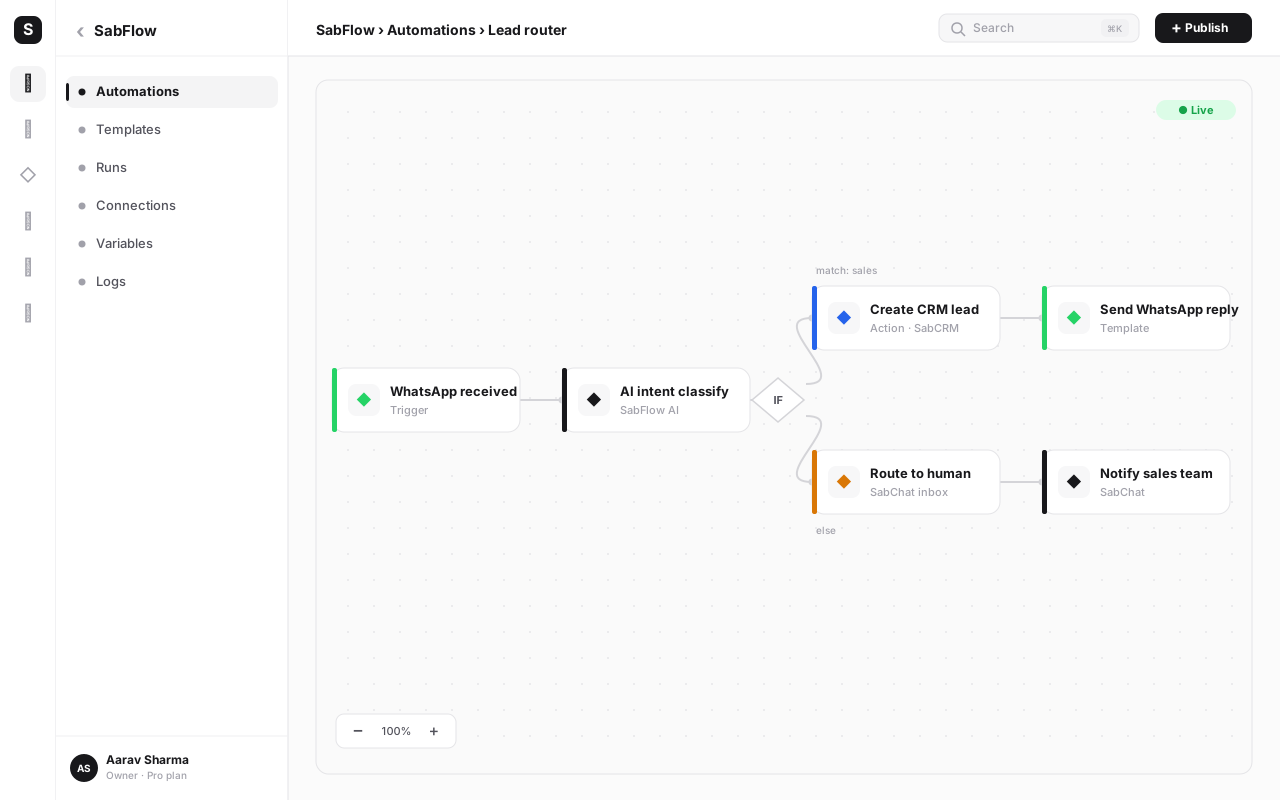
The difference between a drip campaign that nurtures and one that annoys is almost always the exit condition. A generic sequence that keeps firing at a contact who already replied, already clicked through, or already bought the thing you're still pitching them isn't automation — it's noise with a delay timer.
A well-built sequence checks, before firing each scheduled step, whether anything has changed:
- Did the contact reply? Pull them out of the generic sequence and route to a human or a relevant chatbot flow rather than continuing to blast the next scripted message over an active conversation.
- Did they click the link or button? That's a stronger signal than a reply in some cases — route them to a more specific sequence (e.g., a checkout-focused flow instead of a general nurture flow).
- Did they complete the goal action? A cart-abandonment sequence should stop the instant the cart is paid for. A review-request sequence should stop the instant the review is submitted.
- Did they opt out? "STOP" or an explicit unsubscribe must end every sequence they're in immediately, not just the one they replied to.
It's not enough to check "has this contact converted?" once, when they enter the sequence. Check again immediately before every scheduled send. A contact can enroll in a cart-abandonment sequence on Monday, pay on Tuesday, and still be sitting in a queue for a Thursday "still thinking it over?" message if your automation only evaluated the condition at the start. Re-evaluate the branch at each step.
Five sequence types worth building first#
Most businesses don't need twenty different drip campaigns. They need four or five well-built ones, covering the moments where an automated nudge clearly beats silence — or a manual follow-up nobody has time to send consistently.
1. Welcome / onboarding sequence#
Triggered the moment someone becomes a new customer or subscriber. The goal is to get them to their first meaningful action fast — first login, first order, first feature used — before their initial interest cools. A typical shape: an immediate welcome and confirmation, a day-2 "here's how to get started" message with a short how-to, and a day-5 check-in offering help if they haven't taken the first step yet.
2. Cart-abandonment recovery sequence#
Triggered when a shopper adds to cart or starts checkout but doesn't complete the purchase. This one runs on hours, not days, because purchase intent decays fast — a reminder an hour later performs very differently from one sent three days later. A typical shape: a reminder 1-2 hours after abandonment ("still have this in your cart?"), a stronger nudge at 24 hours (sometimes with a small incentive), and a final message at 48-72 hours before the sequence closes out.
3. Lead-nurture sequence#
Triggered when someone shows interest but isn't ready to buy yet — downloaded a resource, asked a question, attended a webinar without converting. This sequence runs longer and slower than cart-recovery, because the decision cycle is longer: a day-1 thank-you plus a relevant resource, a day-4 message addressing a common objection or use case, and a day-10 message offering a demo or consultation. Any reply pulls them into a sales conversation instead of the next scripted touch.
4. Post-purchase review-request sequence#
Triggered after a completed order or service delivery. The goal is a review or referral while the experience is fresh, without hassling someone who's had a problem. A typical shape: a day-2 "how's it going?" check-in (which also surfaces support issues early), then a day-7 review request if there's been no complaint, with a direct link to leave feedback.
5. Re-engagement sequence#
Triggered by inactivity — no purchase, no reply, no open in 60-90 days. The goal is to win back attention before someone quietly churns. A typical shape: a "we miss you" message with something new or relevant, a follow-up with an incentive a week later, and a final message asking directly if they'd like to keep hearing from you — with opting out made explicit and easy, since a contact who's genuinely moved on shouldn't stay in future sequences either.
| Day | Message purpose | Template category | Exit condition |
|---|---|---|---|
| Day 0 (immediate) | Cart reminder — "you left this behind" | Utility | Exit if order is completed |
| Day 0 (+4 hours) | Stronger nudge with product image, reassurance on stock | Utility | Exit if order completed or contact replies |
| Day 1 | Small incentive — limited-time discount code | Marketing | Exit if order completed, replies, or clicks checkout link |
| Day 3 | Final call — "your discount expires tonight" | Marketing | Exit if order completed, or contact opts out |
| Day 3 (end) | Sequence closes — contact returns to general segment | — | No further sends unless newly triggered |
Cart-abandonment sequences move in hours because intent decays in hours. Lead-nurture and re-engagement sequences can stretch to weeks because the decision cycle is genuinely slower. Copying a cart-recovery cadence onto a nurture sequence makes you look pushy; copying a nurture cadence onto cart recovery means you show up after the shopper already bought elsewhere.
Template-category discipline: get this wrong and everything breaks#
Every step in a drip sequence needs a template, and every template needs a category — Marketing, Utility, or Authentication — assigned honestly. This matters more in a drip sequence than in a single broadcast, because a sequence mixes message types by nature: a shipping confirmation is transactional, but the "leave us a review" follow-up two steps later is promotional in spirit even if it feels like a courtesy.
| Category | Use it for | Drip examples |
|---|---|---|
| Utility | Follow-ups tied to an action the contact already took | Order confirmation, shipping update, appointment reminder, "how's it going?" check-in |
| Marketing | Promotions, incentives, re-engagement, upsells | Discount nudge in cart recovery, "we miss you" re-engagement, upsell after purchase |
| Authentication | One-time passcodes and login verification only | Rarely part of a drip sequence — used for OTP flows specifically |
The practical rule: categorize the message, not the sequence. A cart-abandonment sequence can (and often should) mix categories — the first reminder is arguably Utility (you're just reminding them of their own cart), while the discount-code nudge two steps later is Marketing (you're offering an incentive). Submitting a promotional step as Utility to dodge marketing restrictions is a common shortcut that backfires: Meta's review can re-categorize or reject it, and even when it slips through, it erodes the discipline that keeps your quality rating healthy.
Pacing, consent and opt-out: the guardrails that keep a sequence healthy#
A drip campaign is still WhatsApp messaging, and every rule that applies to a single broadcast applies here too — just stretched across multiple touches, which means more chances to get it wrong if you're not deliberate.
Consent comes first. Every contact entering a drip sequence should have opted in to hear from you on WhatsApp, through the same valid channels as any broadcast — a checkout checkbox, a keyword opt-in, a Click-to-WhatsApp conversation they started, or a clearly disclosed existing relationship. A sequence built on scraped or purchased numbers doesn't just risk one blocked message, it risks a blocked number across every sequence running through it.
Pacing prevents fatigue. Because a drip sequence sends multiple messages, the risk of "too many touches too close together" is built into the format in a way a single broadcast doesn't have. If a contact is simultaneously enrolled in a welcome sequence and a promotional broadcast and a re-engagement nudge, they can receive three unrelated WhatsApp messages in two days — which reads as spam even though each individual sequence is well-designed. Cap how many active sequences a single contact can be in at once, and give later, less-urgent sequences (like re-engagement) a lower priority when they'd overlap with an active, more relevant one.
Opt-out has to work, every time, at every step. A "Reply STOP to unsubscribe" line or an explicit opt-out button isn't just step-one boilerplate — it needs to actually remove the contact from every active sequence, not just silence the one message they replied to. A contact who says stop and keeps getting the next scheduled template hasn't been given an opt-out at all; they've been given a false promise, and the next thing they'll do is tap "Block" and "Report," which hurts your account for every other contact too.
Get pacing and exit logic right, and a drip sequence out-performs a single broadcast because each message lands at a more relevant moment. Get it wrong, and you're not sending one bad message — you're sending three or four, each one compounding the annoyance and the risk to your number's quality rating. Build the exit and opt-out logic before you build the content.
How SabFlow chains templates without custom code#
Building the sequences described above by hand — tracking who's on day 3 of which sequence, checking who's replied, firing the right template at the right delay — isn't realistic to run manually past a handful of contacts. This is exactly the job a no-code automation builder is for.
SabFlow is SabNode's visual workflow builder, and it's the engine behind WaChat's drip campaigns because it already speaks the language a sequence needs: triggers, scheduled waits, conditional branches, and per-item iteration, with an n8n-style expression engine for anything dynamic (pulling a name, an order number, or a due date from the CRM record into the template variables).
A drip sequence in SabFlow is built as a visual canvas rather than a script:
- Trigger node — the event that enrolls a contact: new lead created, cart abandoned, order marked delivered, tag added, or a scheduled inactivity check.
- Wait node — the scheduled delay before the next action: "wait 1 day," "wait until 6pm," "wait 3 days."
- Send-template node — fires the approved WhatsApp template for that step, with variables mapped from the CRM record.
- Branch/condition node — checks reply, click, purchase, or opt-out status, and routes the contact either to the next step, out of the sequence entirely, or into a different sequence (e.g., handing off to a human agent).
- Multi-output IF branches — because a real sequence often needs more than "yes/no": replied-and-interested goes one way, replied-with-a-complaint goes to support, no-reply continues the sequence, opted-out exits everywhere.
Because WaChat, SabCRM and SabFlow sit on the same platform and the same login, the trigger data, the contact record, and the template send are never a disconnected export-and-import — the CRM field that says "cart value ₹2,499" is the same field the template variable pulls from, and the reply that lands in the shared team inbox is the same event SabFlow checks to decide whether to keep sending.
Once a drip sequence is built in SabFlow, you don't re-trigger it manually for each new contact. Every new lead, every new abandoned cart, every new completed order enrolls automatically and runs its own timeline independently — Contact A on day 2 of the sequence and Contact B just enrolling today are both being handled correctly, at the same time, without anyone checking a spreadsheet.
How to build your first WhatsApp drip campaign#
Here's the practical build order. Follow it in sequence — the biggest cause of a broken drip campaign is skipping straight to "build the automation" before the templates and exit logic are ready.
- Pick one trigger. Don't start with five sequences at once. Choose the single highest-value trigger for your business right now — cart abandonment for an e-commerce store, a new-lead form fill for a services business, a completed order for anyone chasing reviews.
- Map the message timeline on paper first. Before touching the builder, write out each step: what day, what it says, what category it is, and what should stop it. This is the table you'll turn into templates and automation nodes.
- Write and submit your templates. Draft each step as its own approved template with the right category and the variables you'll need (name, order number, amount, date). Submit for Meta's review before building the automation around them.
- Confirm your opt-in source for this trigger. Make sure everyone who'll enter this sequence has genuinely opted in through this specific trigger — a checkout checkbox for cart recovery, a form consent for lead nurture, and so on.
- Build the trigger and wait chain in SabFlow. Add the trigger node, then a wait node and send-template node for each step in your mapped timeline, connecting them in order.
- Add the exit branch at every step. Before each send-template node, add a condition that checks reply, click, purchase or opt-out status, and routes accordingly — don't let any step fire blind.
- Map variables to CRM fields. Connect each template's placeholders to the actual contact and order fields so the sequence personalizes correctly, and set sensible fallbacks for missing data.
- Test with a handful of real contacts. Enroll a few test contacts (including yourself), fast-forward through the delays if your platform allows a test mode, and confirm every step renders correctly and every exit condition actually exits.
- Set the enrollment cap and priority. Decide whether a contact already in another active sequence should be held back, and set this sequence's priority relative to others so contacts don't get double-messaged.
- Launch to a small slice first. Turn it on for a limited audience or a short time window, watch reply rates and opt-outs closely, then open it up fully once you're confident the timing and content are landing well.
Common mistakes that turn a nurture sequence into spam#
- No exit condition when the contact replies. The single most damaging mistake — a contact who's already talking to you (or already bought) keeps getting the next scripted message, which reads as robotic and ignored.
- Too-frequent messaging across overlapping sequences. A contact enrolled in three sequences at once gets hit with unrelated messages in quick succession, even if each sequence individually is well-paced.
- Using Marketing-category templates for what should be Utility (or vice versa). Mislabeling a promotional nudge as a transactional follow-up gets templates rejected or re-categorized and damages trust with both Meta and the contact.
- No opt-out, or an opt-out that doesn't actually stop every sequence. "STOP" has to end everything the contact is enrolled in, not just the one message they replied to.
- Copying one sequence's pace onto a different trigger. A cart-recovery cadence (hours) applied to a lead-nurture sequence (weeks) feels pushy; the reverse feels absent when urgency actually matters.
- Enrolling contacts who never opted in. Building a "welcome sequence" off a scraped list or an old export with no consent trail risks the whole number, not just the sequence.
- Checking conditions only at enrollment, not at every send. A contact who converts on day 2 shouldn't still get a day-5 message pitching the thing they already bought.
- Treating the sequence as "done" once it's built. No one reviews reply rates, drop-off points, or opt-outs after launch, so a sequence that's quietly under-performing keeps running unchanged for months.
Build your first WhatsApp drip sequence on SabNode
Chain approved WhatsApp templates into a scheduled, branching sequence with SabFlow — no custom code, and it's wired straight into your CRM and shared inbox. Start free, no card required.
Conclusion#
A WhatsApp drip campaign works because it does something a human team can't reliably do at scale: follow up with exactly the right message, at exactly the right delay, for every single contact, every single time — and then get out of the way the moment that contact replies, clicks, or converts. The mechanics are template categories, scheduled delays and a small library of pre-approved messages, but the thing that actually makes a sequence feel like a relationship instead of a robot is the exit logic — checked before every send, not just once at enrollment.
Start with one trigger and one sequence — cart recovery or a welcome flow are usually the fastest wins — map the timeline on paper, get the templates approved with honest categories, and build the branch conditions before you build the content polish. Once that first sequence is running cleanly in SabFlow, the same pattern extends to lead nurture, review requests and re-engagement, all sitting on the same CRM data and the same shared inbox. If you haven't set up broadcasts yet, pair this with the guide to WhatsApp broadcast campaigns — most businesses end up running both, side by side, once they see how much a well-paced sequence recovers that a single message never would. See pricing or sign up free to start building your first sequence today.
Frequently asked questions
What is a WhatsApp drip campaign?
A WhatsApp drip campaign is a pre-built sequence of messages sent to a contact over time, triggered by an event — signing up, abandoning a cart, attending a webinar — and released on a schedule such as immediately, then +1 day, then +3 days, then +7 days. It's different from a single broadcast blast because it unfolds automatically as a mini-conversation, and a well-built sequence branches out of itself the moment the contact replies, clicks or converts.
How is a drip campaign different from a broadcast?
A broadcast is one message sent once to a segment. A drip campaign is several messages, spaced out over days or weeks, sent to one contact based on a trigger rather than a calendar date. A broadcast answers 'what do I want to say today?'; a drip campaign answers 'what does this contact need to hear next, based on where they are in their journey?' Most mature WhatsApp programs run both — broadcasts for moments in time, drips for individual journeys.
Can I send a full WhatsApp drip sequence for free, or do I need approved templates?
You need approved message templates for the parts of the sequence sent outside the 24-hour customer service window, which in practice is nearly every automated follow-up. Each step in the drip is usually its own pre-approved template — a welcome template, a day-3 nudge template, a day-7 template — chained together by your automation platform and fired at the scheduled delay. Once the contact replies, you're inside the 24-hour window and can use free-form text until it closes again.
What's the right delay between drip messages?
There's no universal number, but the shape that works across most sequences is: immediate or near-immediate for the first message (confirmation, welcome, or cart reminder), a short gap of 1-3 days for the second nudge, and a longer gap of 5-7+ days for later touches, tapering off after 2-4 messages if there's still no response. Cart-abandonment sequences run faster (hours, not days) because purchase intent decays quickly; lead-nurture and re-engagement sequences can stretch to weeks because the decision cycle is longer.
How do I stop a WhatsApp drip campaign when a contact replies?
This is called an exit condition, and it's the single most important piece of drip logic. Your automation should check, before firing each scheduled step, whether the contact has already replied, clicked a button, made a purchase, or explicitly opted out — and if so, remove them from the sequence instead of sending the next message. In a no-code builder like SabFlow, this is usually a branch condition on the trigger node, checked at send-time, not just at enrollment-time.
What template category should I use for drip messages?
It depends on what the message is actually for, not what you wish it were. A shipping update or payment confirmation is Utility. A 'here's 10% off if you complete your order' nudge is Marketing. Mixing these up — labeling a promotional nudge as Utility to dodge marketing restrictions — gets templates rejected or re-categorized and damages your account's quality rating. Categorize every step in the sequence honestly before you submit templates for approval.
Will a drip campaign get my WhatsApp number blocked?
Only if you run it badly. The risks are the same as any WhatsApp sending: messaging people who never opted in, sending too many touches too close together, ignoring exit conditions so contacts get an irrelevant message after they've already converted, and giving no way to stop. A drip sequence that respects opt-in, paces itself sensibly, exits the moment behavior changes, and always allows STOP is generally safer than a single broadcast, because each message is more targeted and more expected.
Do I need custom code to build a WhatsApp drip campaign?
No. A no-code automation builder like SabFlow chains approved templates together with scheduled delays, branch conditions and exit logic through a visual canvas — trigger, wait, send, check, branch — without writing a line of code. You define the trigger (e.g. new lead, cart abandoned), the timeline, and the exit rules, and the platform handles firing each template at the right time for each contact.