WhatsApp Webhooks: A Developer's Guide to Real-Time Events
A webhook is Meta calling you, not the other way around. Here's exactly how WhatsApp webhooks work, what events they carry, and how to build a reliable handler.
A WhatsApp webhook is an HTTP callback Meta sends to a URL on your server the instant a subscribed event happens — a customer message arrives, a message's delivery status changes, or a template gets approved or rejected. It's the opposite direction of a normal API call: instead of your app asking Meta "anything new?", Meta calls you. That's what makes real-time chatbots, CRM logging and automation platforms like SabFlow possible.
Key takeaways#
What a webhook actually is: push vs. pull#
Most developers meet APIs first as something you call: you send a request, the server answers, done. That's a pull model — information only moves when you ask for it. If you want to know whether a WhatsApp message you sent has been delivered yet, the pull approach would mean asking Meta's servers again and again — "delivered yet? delivered yet? delivered yet?" — until the answer changes. That works, technically, but it's wasteful, slow to notice changes, and it doesn't scale once you're tracking thousands of messages at once.
A webhook flips the direction. Instead of you asking, you register a URL once, and the other system calls you — automatically, the moment something happens. You're no longer polling; you're listening. Meta pushes an HTTP POST request to your endpoint carrying the details of exactly one event, and your server reacts to it. This is why people describe webhooks as "reverse APIs" or summarize them as Meta calling you, not the other way around.
The trade-off is real, though: a webhook only works if your server is reachable, fast enough to accept the notification, and trustworthy enough that you can be sure the request genuinely came from Meta. Those three conditions — reachability, speed, trust — are the entire engineering challenge of building a webhook handler, and most of this guide is about satisfying them.
| Aspect | Pull (polling an API) | Push (webhook) |
|---|---|---|
| Who initiates the request | Your application | Meta (the platform) |
| How you learn about a new event | Ask repeatedly and compare | Get told automatically, once |
| Latency to notice a change | Depends on poll interval | Near-instant |
| Load on the sending system | Grows with polling frequency × clients | One request per real event |
| What your server needs | Nothing public — it only calls out | A public, always-on HTTPS endpoint |
| Typical WhatsApp use | Fetching a business profile or template list on demand | Receiving messages, statuses and template updates |
Webhooks don't replace the WhatsApp Business API entirely — you still call the API to send messages, upload media or manage templates. Webhooks only cover the incoming direction: what customers send you, and what Meta tells you about messages you sent. A complete integration always uses both halves.
How WhatsApp webhooks work: registration and verification#
Setting up a WhatsApp webhook is a one-time configuration step, but it has a specific shape that trips up a lot of first attempts. There are three pieces you need before a single event will arrive.
First, a publicly reachable HTTPS endpoint. Plain HTTP won't be accepted, and localhost obviously won't either — Meta's servers need to reach yours over the open internet, with a valid TLS certificate. If you're developing locally, a tunnel tool that exposes your machine over HTTPS is the usual workaround until you deploy somewhere with a real domain.
Second, registration plus a verify-token handshake in the Meta App dashboard, under your WhatsApp product's webhook configuration. You supply your callback URL and a "verify token" — a string you make up yourself, essentially a shared secret for this one step. The instant you save that configuration, Meta sends a single GET request to your URL containing a hub.mode, hub.verify_token and hub.challenge in the query string. Your endpoint must check that the token matches what you configured, and if it does, respond with the raw hub.challenge value as plain text. Get this handshake wrong — wrong token, wrong response format, endpoint not live yet — and the webhook registration simply fails; nothing downstream will ever fire.
Third, subscribing to specific fields. Verifying the endpoint doesn't automatically mean every event type flows to it. In the dashboard (or via the API) you choose which webhook fields you actually want — messages, message template status updates, account alerts, and so on. Only subscribed fields generate POST requests to your endpoint. This is deliberate: it keeps your handler from being flooded with events you have no code path for.
Because the verification GET request happens the moment you save the webhook config, your endpoint has to already be live, deployed and returning the correct challenge before you touch the dashboard. Teams that configure the webhook URL before deploying the corresponding code get a confusing "verification failed" with no other clue. Deploy first, verify second, subscribe third.
Once verification and subscription are both done, every subsequent qualifying event arrives as an HTTP POST to your callback URL, with no further action needed on your side — that's the entire ongoing relationship. If you ever rotate your app secret, move your endpoint, or the app goes through Meta's review again, re-check that your subscriptions survived the change; re-verification can silently reset them.
The three WhatsApp webhook event categories#
Nearly everything you'll ever build against WhatsApp's incoming events falls into three buckets. Getting comfortable with this split early makes the rest of your integration's architecture obvious — each category tends to map to its own handler function, its own downstream side effects, and often its own team.
| Event category | When it fires | Typical use |
|---|---|---|
| Incoming messages | A customer sends you text, media, a location, taps a button/quick-reply, or submits a WhatsApp Flow | Feed a chatbot, log to a CRM contact timeline, route to a live agent's shared inbox |
| Message status updates | A message you sent progresses through sent → delivered → read, or fails with an error code | Show delivery ticks in your own UI, trigger a retry or fallback channel on failure, measure campaign read rates |
| Template status changes | A submitted message template is approved, rejected, paused, or disabled by Meta | Unblock a queued campaign the moment a template goes live, alert marketing when a template is rejected or paused |
Incoming messages are the richest category because a "message" isn't just text. Customers can send images, videos, documents, voice notes, a shared location, a tap on a button you offered in an earlier template, an interactive list reply, or the structured output of a WhatsApp Flow (a multi-step in-chat form). Each message type carries a different set of fields, so a robust handler branches on message type before doing anything else — a text handler, a media handler, a button-reply handler and a Flow-response handler are genuinely different code paths, even though they all arrive on the same webhook field.
Message status updates track the life of messages you sent, not messages you received. A single outbound message typically generates multiple status callbacks over its life: first sent (accepted by Meta), then delivered (reached the device), then either read (opened) or, on the failure branch, a failed status carrying an error code and a human-readable reason — an expired session window, a blocked number, a template that hasn't been approved yet. Anyone building broadcast analytics, like a delivered/read/replied funnel, is really just aggregating this event stream over time.
Template status changes matter because you cannot send a marketing or utility template to someone outside their 24-hour session window until Meta approves it — and approvals, rejections, and later pauses or disables happen asynchronously, sometimes minutes and sometimes hours after submission. Subscribing to this event means your system can react the second a template clears review — releasing a queued campaign automatically — rather than a human refreshing the dashboard every ten minutes.
It's tempting to subscribe to every available field "just in case." Resist it. Every extra field is more traffic your endpoint must validate, deduplicate and either process or safely ignore. Subscribe to exactly what your product needs today, and revisit the list when you build the next feature.
Anatomy of a webhook notification#
Rather than reproduce a raw JSON payload here — which is easy to get subtly wrong as Meta's schema evolves, and awkward to keep accurate in a written guide — it's more useful to describe the shape every notification shares, since that shape is stable even as field-level details change.
Every WhatsApp webhook POST arrives as an envelope with a handful of predictable layers: an outer object identifying the product (WhatsApp Business Account), a list of entries (normally one, identifying which business account triggered it), a list of changes within that entry (normally one, naming the field — messages, for example — that changed), and a value block holding the actual payload for that field. Inside the value block you'll typically find messaging-product metadata (which phone number this concerns), contact information for the person involved, and then either a messages array (for incoming messages), a statuses array (for delivery/read/failure updates), or template-specific fields (for template status changes).
| Layer / field | What it holds |
|---|---|
| Outer object | Identifies this as a WhatsApp Business Account notification |
| Entry | Which WhatsApp Business Account triggered this notification |
| Changes | Which subscribed field changed (messages, message template status update, etc.) |
| Value → metadata | Your business phone number ID and display number the event concerns |
| Value → contacts | The customer's WhatsApp profile name and wa_id (their number) |
| Value → messages | Present on incoming-message events: message id, type, timestamp, and type-specific content (text body, media id, location, button payload, Flow response) |
| Value → statuses | Present on status events: message id, status (sent/delivered/read/failed), timestamp, and an error object if failed |
Field names and nesting are accurate as of this writing, but Meta does evolve the Graph API and webhook payload shape over time, and versions can differ subtly. Before wiring production parsing logic, cross-check the current payload formats in Meta's official WhatsApp Business Platform webhook documentation rather than relying solely on any single guide, including this one.
Two design habits pay off here regardless of exact field names. Parse defensively — treat every nested field as possibly absent rather than assuming a fixed shape, since different message and status types populate different subsets of fields. And log the raw payload (redacting anything sensitive) before you transform it, so that when Meta's format shifts or a new message type appears, you have the original evidence instead of a stack trace and a guess.
Building a reliable, secure webhook handler: a production checklist#
A webhook handler that only works in the demo isn't done. Because Meta is calling your server on its schedule, a handful of non-negotiable properties separate a toy endpoint from a production one.
Respond fast, process async. Meta expects your endpoint to acknowledge receipt quickly. If your handler does heavy work — database writes, calling an LLM, sending a Slack message — before it responds, you risk timeouts, which Meta can interpret as delivery failure and retry. The fix is standard queueing architecture: validate the request, push the payload onto a queue or background job, return 200 OK immediately, and do the actual work asynchronously.
Verify the signature on every request. Meta signs each POST body with an HMAC, delivered in a header (commonly X-Hub-Signature-256), computed using your app secret. Recompute that HMAC yourself over the raw request body and compare it before trusting anything in the payload. Without this check, your endpoint's URL is effectively a public API that accepts fake events from anyone who finds it — fabricated incoming messages, forged delivery statuses.
Be idempotent. Networks retry. Meta may occasionally redeliver an event you already processed, and your handler should treat that as a safe no-op rather than double-charging a wallet, double-logging a message, or double-triggering a customer notification. Track processed message and event IDs (even a short-lived cache is often enough) and skip anything you've already handled.
Handle every declared field type, and fail closed on the rest. A handler that only expects text messages will choke — or worse, silently drop — media messages, button replies and Flow responses. Explicitly branch on the fields you support, and log-and-skip anything unrecognized rather than crashing the whole request.
Monitor and alert on your endpoint's health. A webhook handler that's down doesn't announce itself with an error message anyone sees — it just stops receiving events, silently, until someone notices customer replies aren't showing up anywhere. Put uptime and latency monitoring on the endpoint itself, and alert on a sudden drop in event volume, not just on outright downtime.
Skipping signature verification is the single most common webhook security mistake, and it's the one with the worst blast radius: it means anyone who discovers your callback URL can inject fabricated events directly into your business logic — fake orders confirmed, fake OTP validations, fake support conversations. Treat signature verification as a launch blocker, not a nice-to-have.
Building your own vs. using a no-code platform like SabFlow#
Once you look at that checklist honestly, a webhook handler is a small piece of always-on infrastructure: it needs hosting, uptime, security review, monitoring, and someone on call when it breaks — usually at the worst possible time, mid-campaign, when replies suddenly stop logging. That's a reasonable investment for a team with deep custom logic to build. For a lot of businesses, it's more infrastructure than the actual use case (log a message to a CRM, ping an agent, kick off a follow-up) really needs.
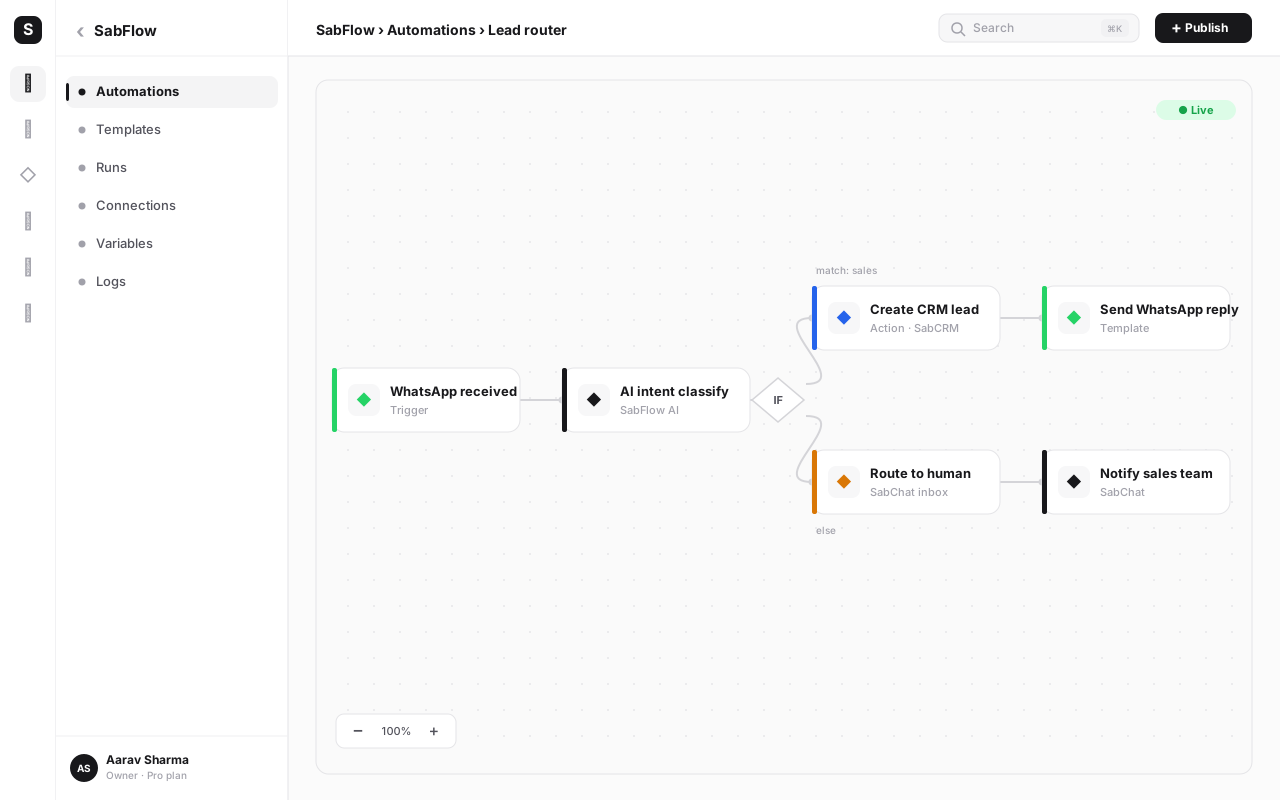
A no-code automation platform inverts that trade. With SabFlow, SabNode's workflow builder, the WhatsApp trigger — new message, status update, template approved — is a node you drag onto a canvas, not a server you host. SabFlow owns the endpoint, the verification handshake, signature checking and retry handling; you just build the logic that runs once the event lands: log the contact to SabCRM, notify an agent in the shared team inbox, or kick off a chatbot flow — all from the same trigger, wired together visually.
Neither approach is universally "right." A platform with genuinely novel, high-volume, highly custom event processing may still be better served hand-rolling its handler on infrastructure it already runs. But for the very common case — react to a message, update a record, notify someone, maybe branch on content — a no-code trigger removes an entire category of infrastructure risk for a fraction of the build time.
How to set up your first WhatsApp webhook#
Here's the concrete path from zero to receiving real events, whether you're building the handler yourself or wiring it into an automation platform.
- Stand up a public HTTPS endpoint. Deploy a route that can accept both GET (for verification) and POST (for events) requests, reachable over HTTPS from the open internet. For local development, use an HTTPS tunnel so Meta can reach your machine while you build.
- Write the verification handler first. On GET, check that
hub.modeequalssubscribeandhub.verify_tokenmatches the token you're about to configure, then respond with the rawhub.challengevalue as plain text. Deploy this before touching the dashboard — the handshake fires the moment you save the config. - Register the webhook in the Meta App dashboard. Under your app's WhatsApp product, enter your callback URL and the same verify token you coded into step 2. Save, and confirm the dashboard reports successful verification.
- Subscribe to the fields you actually need. Turn on
messagesfor incoming customer messages and status callbacks, andmessage_template_status_updateif your product manages templates. Leave everything else off until you have a concrete use for it. - Implement signature verification before anything else touches the payload. Recompute the HMAC over the raw body using your app secret and compare it to the
X-Hub-Signature-256header on every request. Reject anything that doesn't match. - Parse defensively and branch by type. Check whether the payload is a message or a status before assuming which fields exist, and within messages, branch on message type (text, image, button reply, Flow response) so each gets handled correctly instead of silently dropped.
- Acknowledge fast, process async. Return
200 OKas soon as you've validated and queued the event — don't make Meta wait on your database writes, downstream API calls or LLM requests. - Add idempotency using the message or event ID. Store IDs you've already processed (even a short-lived cache works) and skip duplicates instead of reprocessing them.
- Test with real events before going live. Send yourself a message, watch a template through approval, and deliberately trigger a failed send, confirming your handler produces the right side effect for each — a logged contact, an agent notification, a paused campaign.
- Monitor event volume, not just uptime. Alert on a sudden drop in incoming events, not only on the endpoint returning errors — a silently unsubscribed field looks identical to "nothing happened today" until you check.
If you'd rather not own steps 1, 2, 3, 7, 8 and 10 yourself, a platform like SabFlow handles the endpoint, verification and reliability plumbing for you — you configure the trigger and build the workflow that runs when it fires, which is effectively starting at "subscribe to the fields you need" and going straight to your business logic.
Common mistakes when implementing WhatsApp webhooks#
Most webhook incidents trace back to a small, repeatable set of mistakes. Watch for these specifically.
- Slow endpoint response. Doing heavy synchronous work — database writes, third-party API calls, AI processing — before responding risks timeouts that look like delivery failure. Acknowledge fast, queue the real work.
- No signature verification. Trusting the payload without checking
X-Hub-Signature-256means anyone who finds your URL can inject fabricated events. This is the most damaging item on this list and the easiest to fix. - Not handling duplicate deliveries. Networks retry, and Meta can redeliver an event you've already processed. Without an idempotency check on message or event ID, you'll double-log messages or double-fire downstream actions.
- Forgetting to resubscribe after re-verifying the app. Field subscriptions can reset when your app goes through review again or credentials rotate. A webhook that worked last month can go silent with zero errors — it's just not subscribed anymore.
- Assuming every payload has the same shape. Text messages, media messages, button replies and Flow responses populate different fields. A handler written only against text messages will mishandle or silently drop everything else.
- Ignoring template status events. Without subscribing to template updates, campaigns sit blocked on "pending" long after Meta actually approved them, because nobody's watching for the callback that says so.
- Testing only the happy path. Verifying that a text message logs correctly isn't the same as verifying a failed-send status, a rejected template, or a duplicate delivery are all handled — and those are exactly the cases that show up in production, not in demos.
- No monitoring on event volume. An endpoint returning 200 OK to health checks can still have silently lost its subscription. Alert on a drop in incoming events, not only on outright downtime.
Consume WhatsApp events without hosting a webhook server
SabFlow gives you a ready-made WhatsApp trigger — new message, status update, template approved — with verification, signature checks and retries handled for you. Build the automation, skip the infrastructure.
Automating on WhatsApp events with SabFlow#
Everything described above — the endpoint, the handshake, the signature check, the retry logic — exists to answer one question reliably: something happened on WhatsApp; now what? A no-code automation platform answers that question without asking you to build the plumbing first.
Inside SabNode, WaChat already owns the WhatsApp Business API connection — the number, the templates, the inbox — and SabFlow exposes the events that connection generates as triggers on a visual canvas. A new incoming message can simultaneously create or update a contact in SabCRM, notify the right agent in the shared team inbox, and, if it matches a keyword, kick off a chatbot flow — three side effects from one event, built by connecting nodes rather than writing three integrations. Status events work the same way: a failed delivery can trigger a fallback SMS instead of leaving a customer silently un-messaged, and a template moving to "approved" can automatically release a broadcast that's been queued and waiting.
This matters most for teams without a dedicated backend engineer watching webhook infrastructure. On SabNode's Growth plan, every module — including WaChat's webhooks and SabFlow's automations, up to 100,000 workflow runs a month — is included on one login and one bill, so the same event that would otherwise need a hosted endpoint, a signature-verification library and an on-call rotation instead becomes a workflow you build once and never think about again unless you're changing what it does.
Conclusion#
A webhook is a small idea with a big payoff: instead of your application repeatedly asking whether anything changed, the platform tells you the instant it does. For WhatsApp specifically, that means real-time visibility into every incoming message, every delivery status, and every template approval — the raw material for a chatbot that replies instantly, a CRM that never misses a conversation, or a campaign that releases itself the moment it's cleared for send.
Building that handler well is a checklist, not a mystery: a public HTTPS endpoint, a correct verification handshake, deliberate field subscriptions, fast acknowledgement with async processing, signature verification on every request, and idempotent handling of duplicates. Get those right and you have a production-grade integration; skip any one of them and you have an incident waiting for a busy Tuesday.
If that list sounds like more infrastructure than your team wants to own, that's exactly the gap a platform like SabFlow is built to close — the same events, the same real-time reactions, without hosting or maintaining a webhook server yourself. Read the WhatsApp Business API guide for the bigger picture of how messaging, templates and webhooks fit together, or see how the broadcast campaigns guide uses these exact status events to measure what's working. Explore SabNode's products or pricing to see how far a single connected event can go once it's flowing.
Frequently asked questions
What is a webhook?
A webhook is a way for one system to notify another the instant something happens, instead of the second system repeatedly asking 'did anything change yet?' You register a URL on your server, and the sending system makes an HTTP POST request to that URL every time a relevant event occurs. It flips the usual direction of an API call — the sender initiates the request, not the receiver — which is why webhooks are often described as 'don't call us, we'll call you.'
What's the difference between a webhook and an API?
A regular API call is pull-based: your application asks a question, such as 'any new messages?', and gets an answer back immediately, so staying current means asking again and again — polling — even when nothing changed. A webhook is push-based: the other system calls your server automatically the moment an event happens, with no polling required. Most real integrations use both — you call WhatsApp's API to send messages, and WhatsApp calls your webhook to deliver incoming messages and status updates.
How do I set up a WhatsApp webhook for my number?
You need a publicly reachable HTTPS endpoint on your server. In your Meta App dashboard's WhatsApp product settings, you register that URL along with a verify token you choose yourself. Meta immediately sends a one-time GET request containing a challenge value to confirm you control the endpoint; your server must recognize the verify token and echo the challenge back. Once verification succeeds, you subscribe to the webhook fields you want — messages, message template status updates, and so on — and events start arriving as HTTP POST requests.
What events can I subscribe to on WhatsApp webhooks?
The three categories that matter for almost every integration are: incoming messages (text, media, location, button replies, and WhatsApp Flow responses from customers), message status updates (a sent message moving through sent, delivered and read, or failing with an error code), and template status changes (a submitted template being approved, rejected, paused or disabled by Meta). Which fields actually arrive depends on what you subscribe to in the app dashboard, so check Meta's current webhook field list before going live.
Why isn't my WhatsApp webhook receiving events?
The most common causes are: you're not subscribed to the right webhook fields in the app dashboard, your verify token doesn't match on both sides, your endpoint was reachable during verification but has since gone down or changed its response time, or you're testing against a number that isn't the one actually wired to the subscribed app. Also check that you haven't silently unsubscribed after a re-verification or app review — Meta can reset field subscriptions when app permissions change.
Do I need to verify the signature on every webhook request?
Yes. Meta signs every webhook POST with a header (commonly X-Hub-Signature-256) computed as an HMAC of the raw request body using your app secret. Recompute that HMAC on your side and compare it before trusting the payload. Skipping this check means anyone who discovers or guesses your endpoint URL can post fake events — fake incoming messages, fake delivery receipts — straight into your system.
Can I use WhatsApp webhooks without building my own server?
Yes. No-code automation platforms give you a hosted webhook trigger you can point Meta at directly, handling verification, signature checks and retries for you, so you configure a workflow instead of writing and hosting a server. SabFlow works this way inside SabNode — a new WhatsApp message or status update can trigger a workflow with zero backend code, and the same event can simultaneously log to your CRM, notify an agent and update a dashboard.